An official website of the Commonwealth of Massachusetts Here's how you knowHere's how you know

ABAWD Work Rules Participation
Overview
SNAP clients who are not exempt from the ABAWD Work Rules must:
- work an average of 20 hours per week,
- participate in a qualified employment and training program (E&T or SNAP Path to Work) 20 hours per week,
- do a combination of work and E&T totaling 20 hours per week, or
- do community service for a certain number of hours each month.
Working an Average of 20 Hours Weekly
What Does “Working” Mean for the ABAWD Work Rules?
A non-exempt client can meet the ABAWD Work Rules by working 20 hours per week, averaged monthly (or 80 hours per month).
For the ABAWD Work Rules, “working” means:
- work in exchange for money;
- work in exchange for goods and services (“in kind” work);
- unpaid work; or
- a combination of paid and unpaid work.
The table below gives an example of each way a client may meet the rules by working:
| Type of Work | Example |
|---|---|
| Work in Exchange for Money | Marianne (she/her) is self-employed. She recently started a small catering business out of her home. Each week she spends 10 hours prepping food, 5 hours delivering meals, and 5 hours managing relationships with clients and doing administrative work. After her business expenses, she is only earning $150-$200 per week. She is not exempt from the General Work Rules because her income is below $217.50 a week, but she is meeting the ABAWD Work Rules. |
| Work in Exchange for Goods and Services | Bryanne (they/their) does 20 hours a week in maintenance work on their landlord’s property and car. In exchange, the landlord does not charge them rent. Bryanne is meeting the ABAWD Work Rules. |
| Unpaid Work for a family member or other third party |
Gianna (she/her, 25 years old) volunteers as an unpaid apprentice in a local auto shop for an average of 20 hours a week. Vanessa (she/her, 59 years old) cares for her 12-year-old grandchild (who is not disabled), for 4 hours each school day. Penny (she/her, 45 years old) works at a hospital for 10 hours a week (earning minimum wage) and cares for her friend’s 7-year-old for 10 hours a week (unpaid). Mary (she/her) is a church organist. She gets paid $50/week for playing at the Sunday service. Mary also volunteers at the church (without pay) for 5 hours each week. Mary receives the maximum SNAP benefit as a household of 1 because her earnings are low. With her 5 hours a week (20 hours/month) volunteer work, Mary meets the SNAP community service rules. If she did 20 hours of volunteer work all in one week in the month, Mary would also meet the community service rules. Other examples: helping neighbors, working unpaid for local organizations. |
| Combination of Paid and Unpaid Work | Jordan (they/them) is a part-time cashier at a neighborhood grocery store. They work 12 hours each week for pay and volunteer 8 hours each week at the city library’s literacy program. Jordan provides recent paystubs from the grocery store and a signed statement from the library coordinator confirming their volunteer schedule. Jordan is meeting the Work Rules through a combination of paid and unpaid work totaling 20 hours per week. |
Clients can also meet the work rules if they get rental income. However, rental income can be used to meet the rules only if the client actively manages the property for 20 hours per week on average.
How Can Clients Verify Participation by Working?
Clients can verify work hours by sending pay stubs or a letter from the employer or through the Work Number. If the client is self-employed (including rental income), they can submit tax records and a written self-declaration of their work hours.
For in-kind and other unpaid work, the client can send a letter from the person they are working for.
The client must provide the best evidence they have of their hours. If they cannot get proof of their hours, you must assist the client by performing collateral contact.
How Do I Enter Work Hours in BEACON?
You must accurately enter the hours using the procedures detailed in Entering, Changing, and Ending Earned Income in BEACON. This will ensure that BEACON correctly captures that the client is participating by working.
You must enter rental income on the Other Income page. When entering it, you must select Yes for Earned if the client manages the property for 20 hours or more per week View/HideView/Hide
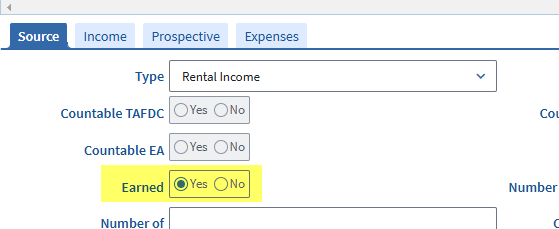
Reminder: If the client manages the rental property for less than an average of 20 hours per week, you must select No for Earned. See Rental, Roomer, and Boarder Income. In this scenario, rental income cannot be used to meet the work rules.
To enter hours for in-kind or unpaid work:
- Open the Earned Income page.
- Open the Employed tab.
- Select the income type: Self-Employment.
- Select the job title: ABAWD In-Kind or ABAWD Unpaid Work.
- Open the Earnings tab.
- Enter $0 in the Gross Income field for each applicable pay period.
- Enter the number of hours worked during the applicable pay periods in the Hours field.
- Open the Prospective tab.
- Run a prospective calculation of the total hours (with $0 entered for each pay period) using the normal procedures detailed in Entering Changing & Ending Earned Income.
Reporting Requirements for Clients Who Meet by Working
During case maintenance, non-exempt clients who meet the ABAWD Work Rules by working must report if their hours drop below 20 per week. Simplified Reporting rules require this.
Clients who are exempt from the General Work Rules do not have to report if their hours drop below 20 per week. This rule only applies to clients who are not exempt from the ABAWD Work Rules.
Example: Norman (he/him) works 30 hours per week. This exempts him from the General Work Rules. Because Norman is exempt from the General Work Rules, he is also exempt from the ABAWD Work Rules. During case maintenance, Norman does not have to report if his work hours fall below 20 per week because this reporting rule only applies to clients who are subject to the ABAWD Work Rules (which Norman is not subject to).
Participating in a Qualified Employment and Training Activity
A non-exempt client can meet the ABAWD Work Rules by participating in an employment and training (E&T) activity. E&T activities are programs for improving a client’s job readiness.
Clients can meet the ABAWD Work Rules through E&T if:
- they are participating for at least 20 hours per week, and
- the activity is a qualifying E&T activity.
What is a Qualified Employment and Training Activity?
Qualifying E&T activities include:
- basic education
- vocational or technical training
- on-the-job training
- the Work Participant Program (WPP)
- job search and job readiness activities (under the Workforce Innovation and Opportunity Act or section 236 of the 1974 Trade Act)
- a program for veterans operated by the Department of Labor or the Department of Veterans Affairs. (Any E/T program of the Department of Labor or Veterans Affairs that serves veterans shall be an approved program)
Note: If a job search or job readiness activity is not under WIOA or section 236 of the 1974 Trade Act or an E&T program serving veterans that is offered by the Department of Labor or Veterans Affairs, DTA will only allow the client to claim less than half of the required participation hours towards the ABAWD Work Rules.
Clients are often enrolled in an E&T activity through DTA’s SNAP Path to Work Program. Clients can get involved in Path to Work by visiting the website: http://snappathtowork.org. However, a client does not have to enroll through Path to Work to meet the ABAWD Work Rules.
Using the SNAP Path to Work Website
You must assist clients who call for help navigating the SNAP Path to Work website. To search for volunteer sites, the user must:
- Go to http://snappathtowork.org. The user will be brought to this landing page: View/HideView/Hide
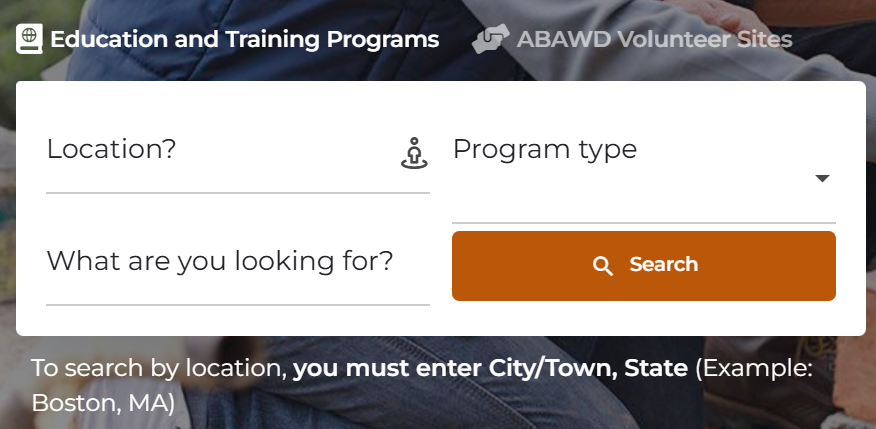
- Click Education and Training Programs
- Type their home address or city/town, MA in the Location? field
- Type in the kind of activity preferred in What are you looking for? field, or leave blank if there is no preference
- Select a Program type, or leave blank if there is no preference
- Click Search
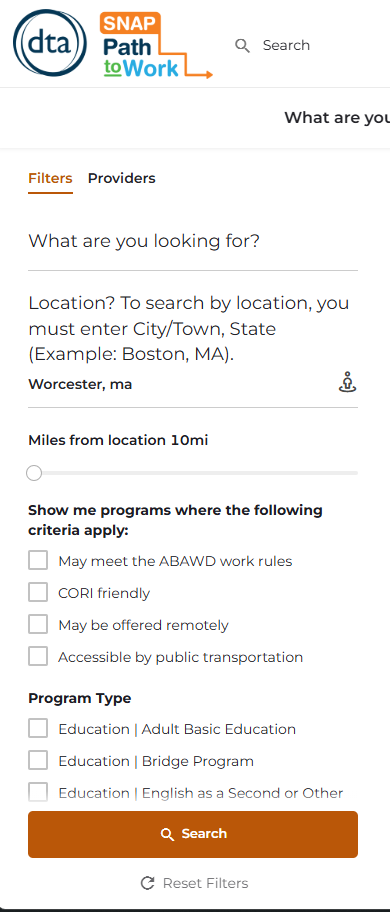
- If there are any available sites within 10 miles of the entered address, the website will display results like this: View/HideView/Hide

- The website allows you to apply additional search filters. You can adjust the distance of available sites beyond 10 miles. You can also set the search filters so that the results only include sites that:
- are CORI-friendly,
- can be used to meet the ABAWD Work Rules,
- are offered remotely, and/or
- are accessible by public transportation. View/HideView/Hide
- Clicking on any result will give the user the contact information they need to participate in E&T. See the example below: View/HideView/Hide
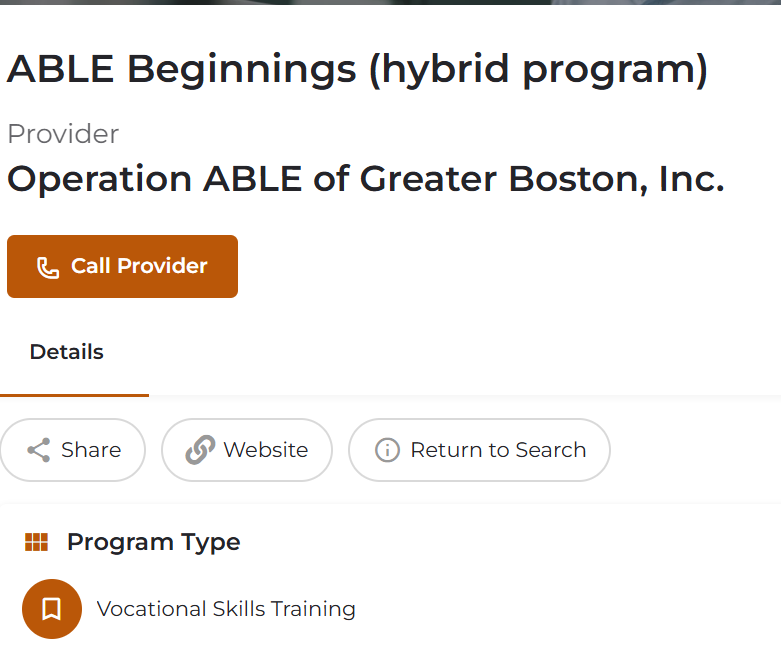
When contacting an organization, the client should use the contact information provided in the result. This may not always be the organization’s main number. This may be a separate phone number, e-mail, or form that the client must complete online. See example below: View/HideView/Hide
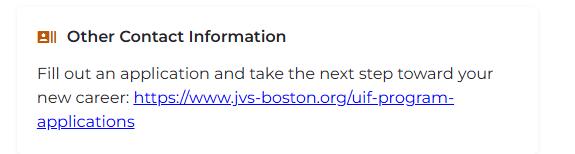
How Can Clients Verify E&T Participation?
Clients can verify E&T participation by having a representative of the E&T site fill out the ABAWD Training Program Information Request (TPIR) form. The TPIR form generates with the VC-1 for SNAP ABAWD Work Rules Participation with the Value: Enrollment in Education or Training Program. Clients can also download this form on Mass.gov.
The client can also send any other official document from the E&T site verifying:
- the type of program (for example, job search or on-the-job training);
- start date;
- expected completion date;
- weekly participation hours; and
- weekly hours devoted to job search/job readiness activities.
How Do I Record E&T Participation in BEACON?
When the client first enrolls in E&T, you do not have to enter this information in BEACON. This is handled by E/T specialists.
If the client is newly required to meet the ABAWD Work Rules and returns the TPIR form, the specialists will retrieve it using the ABAWD Document Search page.
The specialists will document the client’s E&T enrollment and participation by filling out the:
- ESP Referral Disposition page,
- ESP Activity Disposition page, and
- component start and end dates.
If the client has been meeting the ABAWD Work Rules via E&T and is verifying continued participation at recertification, you must follow the procedures detailed in Verifying Participation at Recertification.
Community Service
What is Community Service?
Community service is volunteer work for an organization that is:
- public
- quasi-public, or
- nonprofit.
A non-exempt client can meet the ABAWD Work Rules by doing community service.
Clients meeting through community service must volunteer for a certain number of hours per month. The number of hours is based on the household’s SNAP amount and the number of non-exempt household members. The client’s required number of hours is indicated on the notice explaining the ABAWD Work Rules.
How Do I Calculate the Required Number of Volunteer Hours?
DTA calculates the hours for one client by dividing their SNAP amount by the Massachusetts state minimum wage:
|
Required Volunteer Hours for Household =1 |
= |
Monthly SNAP Amount |
If the household size is more than 1, DTA further divides this number by the total household size. This will determine the client’s individual volunteer hours:
|
Required Volunteer Hours for Household >1 |
= |
|
BEACON will calculate the client’s required volunteer hours. This is an automatic process. The client will be notified of these hours on the notice that DTA sends to SNAP clients whenever their household includes a non-exempt member.
Note: If the client’s SNAP amount divided by the state minimum wage is less than 1, the client will not have to take further action to meet the rules. DTA will consider the client to be already meeting the work rules.
How Can a Client Start Volunteering?
A non-exempt client can start volunteering by:
- self-arranging an allowable volunteer placement at a public or nonprofit organization, or
- search for sites by visiting http://snappathtowork.org and using the Find a Provider features, or
- calling the SNAP Path to Work Line for a referral. The number is (888) 483-0255.
Using the SNAP Path to Work Website
You must assist clients who call and ask for help navigating the SNAP Path to Work website. To search for volunteer sites, the user must:
Go to http://snappathtowork.org. The user will be brought to this landing page: View/HideView/Hide
- Click ABAWD Volunteer Sites
- Type their home address in the Where to look? field
- Type in the kind of work preferred in What are you looking for? field, or leave blank if there is no preference
- Click Search
- If there are any available sites within 10 miles of the entered address, the website will display results like this: View/HideView/Hide
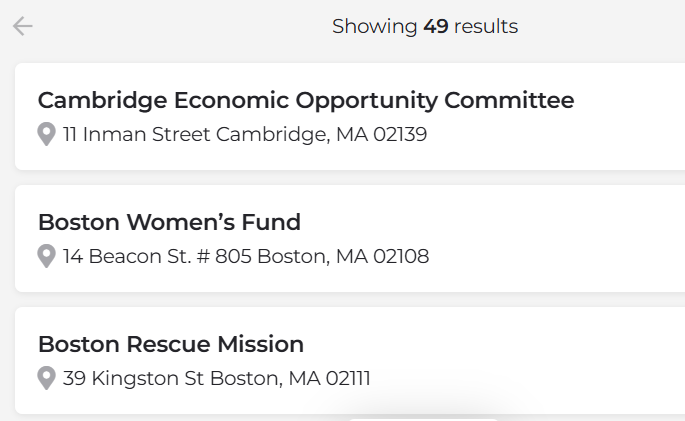
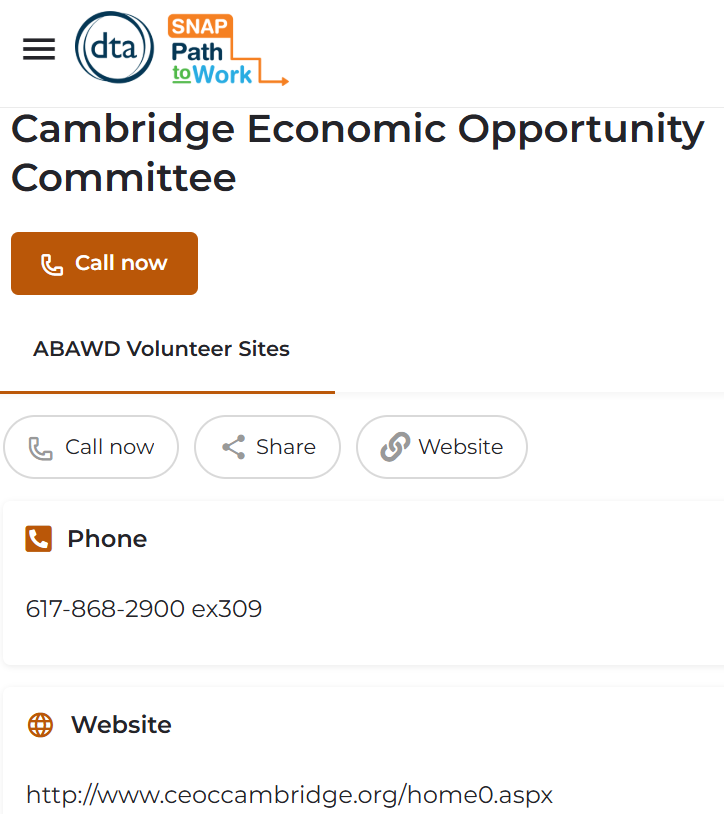
- Clicking on any result will give the user the contact information they need to volunteer. See the example below: View/HideView/Hide
How Can Clients Verify Community Service Participation?
Clients can verify community service participation by having a representative of the site fill out the ABAWD Work Program Participation Report (WPPR). The client can also submit any other official document from the site verifying:
- The client’s total volunteer hours for the last month, or
- if the client has yet to volunteer for a month, the client’s expected volunteer hours per month.
The WPPR generates with the consolidated notice if the notice displays a required number of volunteer hours.
If you send a VC-1 for SNAP ABAWD Work Rules Participation with the Value: Community Service, BEACON will also send the WPPR with the VC-1.
Note: Even if the consolidated notice includes the WPPR, the client can still choose to meet the rules by working or E&T. The inclusion of the WPPR with the notice does not mean that volunteering is the client’s only option for meeting the rules.
How Do I Enter Community Service Participation in BEACON?
Once the client returns the verification, you must follow these steps:
- Open the ABAWD Clock page.
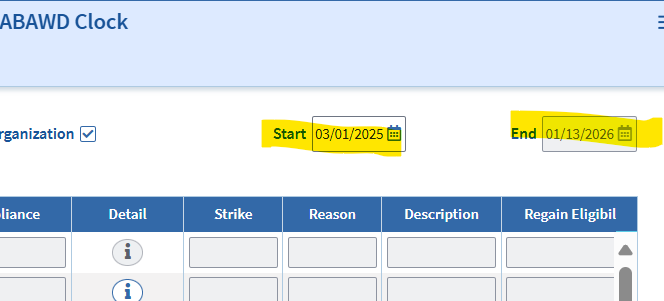
- Mark the checkbox: Volunteering at public or Non-profit organization. View/HideView/Hide
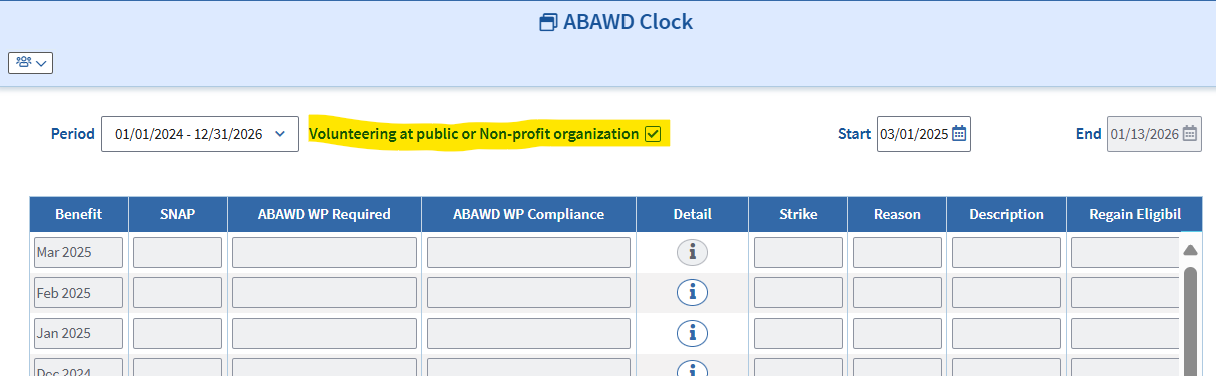
- BEACON will enter the first of the current month as the Start Date and reevaluation end date for End Date. If the client started volunteering earlier or later than the default date, you can change the start date. You cannot change the end date. View/HideView/Hide
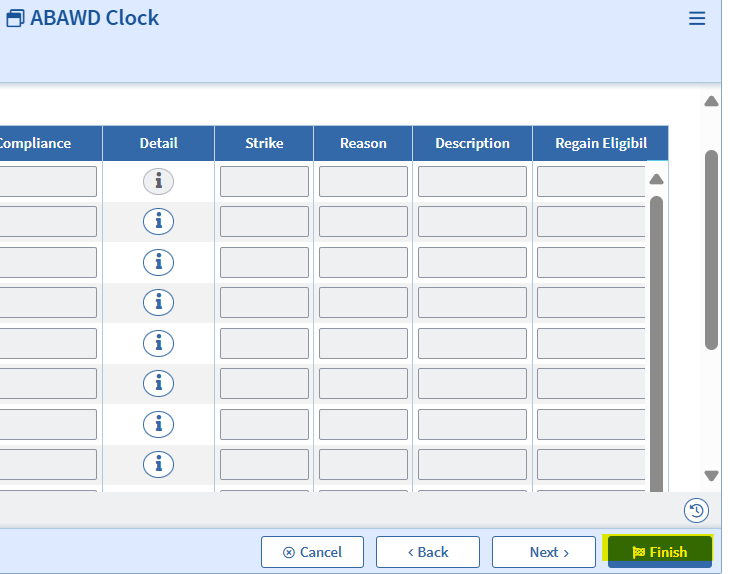
- Click Finish. View/HideView/Hide
- Wrap the case.
If a client verifies that they are volunteering, it is crucial that you follow these steps. If you do not, BEACON will incorrectly issue strikes for non-compliance with the ABAWD Work Rules.
Important: If the client reports that they are no longer volunteering, you must remember to visit the ABAWD Clock page and uncheck the Volunteer checkbox. When the volunteer checkbox is unchecked, BEACON will issue strikes unless the client is meeting by working or E&T.
When Must Clients Verify ABAWD Work Rules Participation?
If the client is newly subject to these work rules, they will have three months to submit verification. The three months will begin from their ABAWD Work Rules start date. The start date is displayed on the SNAP Work Rules Screening page.
If the verification remains missing after three countable months, the client must be disqualified from SNAP. The client will stay disqualified unless they start meeting the rules or become exempt. See ABAWD Work Rules Disqualification Process and ABAWD Work Rules Regaining Process for more details.
Once the client verifies participation, they do not have to verify it again until they:
- recertify;
- resume participation during case maintenance; or
- Example: If the client reports during case maintenance that they stopped meeting by working but started meeting by volunteering, they must verify participation.
- reapply after their case closes.
Do I Have to Send a VC-1 for Participation?
You do not always have to send a VC-1 for participation. The reason is that the consolidated notice advises clients of how they can verify participation. The consolidated notice goes out when you certify a case with a non-exempt client. Clients will also get these instructions in the Work Rules explanation, which is part of the screening process.
You must send a VC-1 for SNAP ABAWD Work Rules Participation only if the client:
- is newly subject to the ABAWD Work Rules and tells you how they plan on meeting (by working, E&T, or volunteering); or
- was subject to the rules at the last certification and verified participation, and is now recertifying.
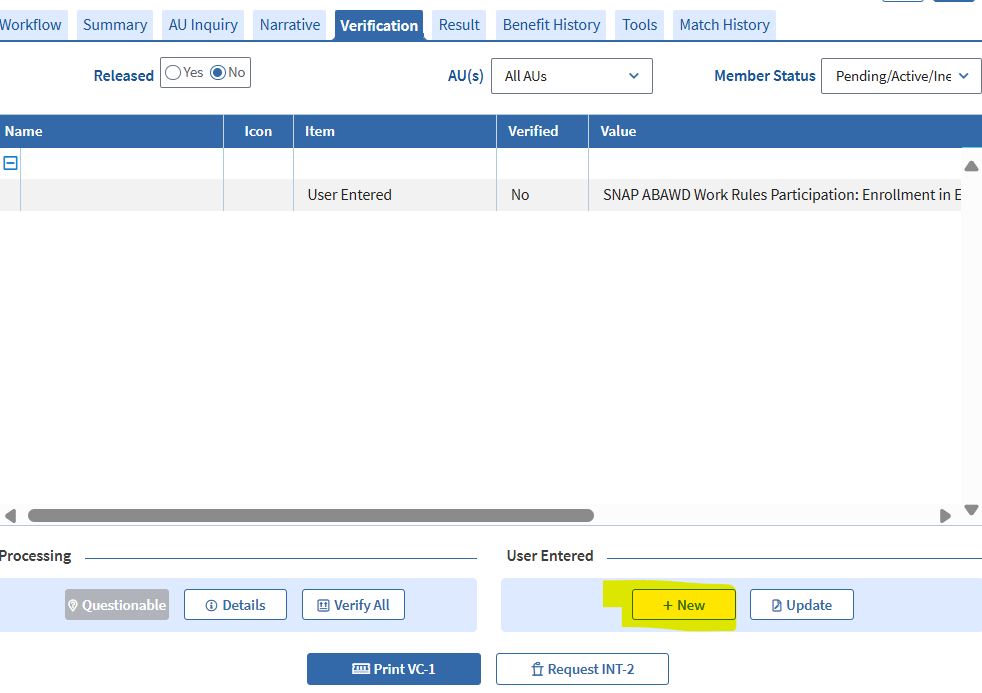
This VC-1 item does not automatically appear in the Verification tab when a client is non-exempt. You must add this item as a User-Entered item by clicking “New”: View/HideView/Hide
When a client meets the criteria above and verification has not already been received, you must send this VC-1, selecting one of three Values based on how the client indicates they will meet: View/HideView/Hide
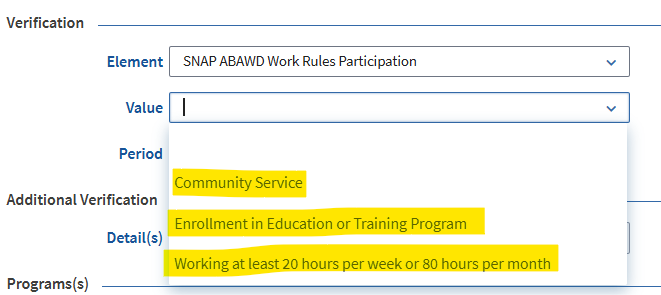
- If a client says they will meet by working, the Value must be Working at least 20 hours per week or 80 hours per month.
- If a client says they will meet through E&T, the Value must be Enrollment in Education or Training Program.
- If a client says they will meet through volunteering, the Value must be Community Service.
Example 1
Claude (he/him) is applying for SNAP for the first time. He has no exemptions from the ABAWD Work Rules. Claude indicates that he is working 21 hours a week. In addition to the VC-1 for earnings, staff must send Claude a VC-1 for SNAP ABAWD Work Rules Participation with the Value: Working at least 20 hours per week or 80 hours per month.
Example 2
Teagan (she/her) is applying for SNAP for the first time. She has no exemptions from the ABAWD Work Rules. Teagan knows that she will have to meet the rules, but has not decided how she will do so. She has provided all other verification items. Staff must process the case without sending a VC-1 for SNAP ABAWD Work Rules Participation.
Example 3
Adolfo (he/him) is recertifying his SNAP case. He has no exemptions from the ABAWD Work Rules. For the past year, he has been meeting by volunteering. Adolfo says during the interview that he will continue volunteering. Staff must send Adolfo a VC-1 for SNAP ABAWD Work Rules Participation with the Value: Community Service.
Example 4
Jane (she/her) is recertifying her SNAP case. For the past year, she was exempt from the ABAWD Work Rules due to being homeless. However, Jane reports on her recertification form that she has a new address and indicates she is no longer homeless. Staff determine that Jane has no other exemptions. Staff inform Jane that she must meet the rules, but Jane says she is undecided on how she will meet them. She has provided all other verification items. Staff must process the case without sending Jane a VC-1 for SNAP ABAWD Work Rules Participation.
Approving a Case Without Verification of Participation
You must not deny an application, recertification, or Interim Report for missing verification if ABAWD Work Rules participation if that is the only item that is missing, and the client still has countable months that they have not used. At these reporting periods, you must follow the rules for Processing Cases with Only Optional Verifications Outstanding.
If you process a case without recording participation, BEACON will run a batch each month to check for it. If BEACON detects that participation is still unrecorded, BEACON will issue a strike. BEACON will disqualify the client after three strikes. See ABAWD Work Rules Disqualification Process for more details.
What if Not Proving Participation Will Result in Denial of Application or Recertification?
Sometimes, a case will be denied if the client does not verify participation. This primarily applies to clients who already received three strikes during the ABAWD clock and are still non-exempt when they are applying or recertifying.
For cases that will be denied if the client does not verify participation, you must follow these procedures:
- If the case is at application, do not process until Day 30.
- If the case is at recertification, do not process until the Release Date before the reevaluation end date. Refer to When to Process a Recertification with Optional Verifications Outstanding. If a VC-1 was issued with a Due Date that extends beyond the Release Date or reevaluation end date, the case will automatically close and BEACON will display Initiated but Failed to Recertify.
Reminder: This guidance only applies to clients who were previously subject to the work rules during the same 36-month period (aka “ABAWD Clock”). If a new clock started after they incurred the strikes, those prior strikes get erased. The ABAWD Clock is the same for all SNAP clients. It is displayed at the top of the ABAWD Clock page.
This scenario cannot occur at Interim Report (IR). You will only address the work rules at IR if the client’s exemption is unclear information. If you determine the client is non-exempt, they will not have to verify participation until later. BEACON will push the ABAWD Work Rules start date to Day 1 of the first calendar month after the client’s certification midpoint. See Screening for Exemptions at IR for more information.
Verifying Participation at Recertification for Clients Who Were Previously Coded as Meeting
Non-exempt clients who previously verified participation must verify it again at recertification. The verification procedures you must follow depend on how the client met over the previous year.
Reminder: You must always screen clients for exemptions at recertification, even if the client was previously non-exempt. If they have an exemption, they do not have to verify participation.
Verifying Community Service
If the non-exempt client was meeting by volunteering, follow these steps:
- Ask the client if they have been meeting their required volunteer hours.
- If the client says yes:
- Explain that they must verify their total volunteer hours for the past month.
- Send a VC-1 for SNAP ABAWD Work Rules Participation with the Value: Community Service.
- If there is missing mandatory verification, the VC-1 must include the mandatory item(s) in addition to the request for participation. If verification remains missing, BEACON will create a Verification Due Action when the item(s) is due.
- If the client does not verify participation, the FAW who gets the Verification Due Action must open the ABAWD Clock Page and uncheck the Volunteer checkbox, and save the changes.
- If there is no missing mandatory verification, process the recertification without the proof of participation. Leave the Volunteer checkbox marked. You must create an Action to review the case on the VC-1 Due Date. If the client does not respond, follow Step 2c above.
- If the client says no:
- Explain to the client that to keep SNAP benefits, they must volunteer. The client must reach out to the previous volunteer site (or a new volunteer site) to schedule participation hours.
- Send a VC-1 for SNAP ABAWD Work Rules Participation with the Value: Community Service.
- Add a User-Entered Additional Verification Element to the VC-1 with the following language:
- “Please submit verification that you have volunteered for {HOURS}. The verification must state you have met for these hours. If the Program Contact Person completes the Work Program Participation Report, they must hand write that you met for these hours.”
- You can determine what to enter for {HOURS} by applying the calculation detailed above. These required hours are also displayed on the consolidated notice of work rules, which you can review in the Client Communication tab.
- If there is missing mandatory verification, the VC-1 must include this item(s) in addition to the request for participation. If verification remains missing, BEACON will create a Verification Due Action when the item(s) is due.
- If the client does not verify participation, the FAW who gets the Action must open the ABAWD Clock Page and uncheck the Volunteer checkbox, and save the changes.
- If there is no missing mandatory verification, process the recertification without the proof of participation. In this scenario, you must not create an Action to follow up. Open the ABAWD Clock Page, uncheck the Volunteer checkbox, save your change, and wrap the case.
Verifying Employment and Training
If the non-exempt client was meeting by E&T, follow these steps:
- Ask the client if they have been meeting their employment and training requirements.
- If the client says yes:
- Send a VC-1 for SNAP ABAWD Work Rules Participation with the Value: Enrollment in Education or Training Program.
- If there is missing mandatory verification, the VC-1 must include this item(s) in addition to the request for participation. If verification remains missing, BEACON will create a Verification Due Action when the item(s) is due.
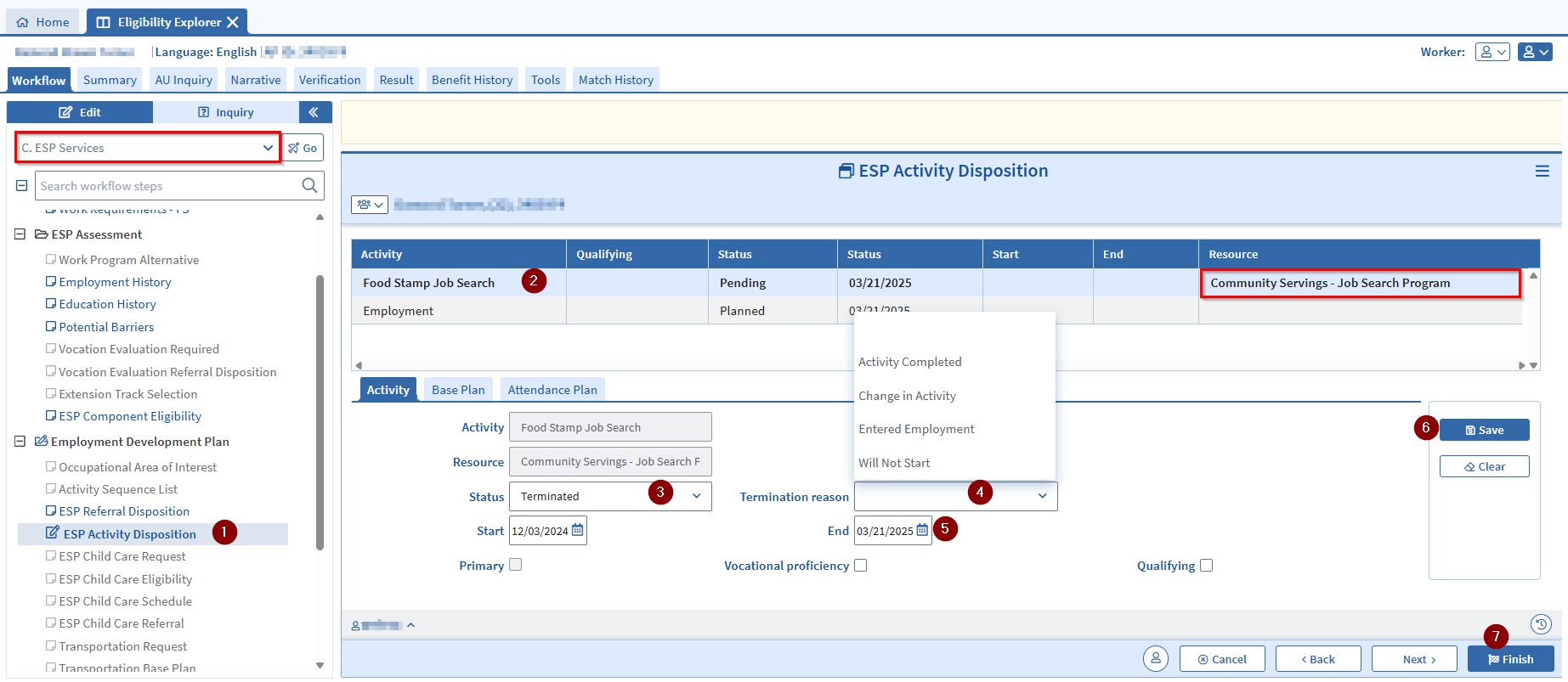
- If the client does not verify participation, the FAW who gets the Action must:
- Navigate to the ESP Activity Disposition page
- Select the applicable Food Stamp Job Search from the Activity list
- On the Activity Tab, change the Status from Active to Terminated
- Select the applicable Termination reason from the dropdown selection
- Change the program End date as need
- Click Save
- Click Finish View/HideView/Hide
- If there is no missing mandatory verification, process the recertification without the proof of participation. You must create an Action to review the case on the Release Date that occurs right before the reevaluation end date. If the client does not follow up, you must follow Step 2b above.
- Send a VC-1 for SNAP ABAWD Work Rules Participation with the Value: Enrollment in Education or Training Program.
- If the client says no:
- Explain to the client that to keep benefits, they must participate.
- Send a VC-1 for SNAP ABAWD Work Rules Participation with the Value: Enrollment in Education or Training Program.
- Add a User-Entered Additional Verification Element to the VC-1 with the following language:
- “You must verify that you have participated for 20 hours per week during the month of {LAST CERTIFICATION MONTH}. The verification must clearly state that you participated for these hours. If the Program Contact Person completes the Training Program Information Request, they must hand write that you met for these hours.”
- If there is missing mandatory verification, the VC-1 must include this item(s) in addition to the request for participation. If verification remains missing, BEACON will create a Verification Due Action when the item(s) is due.
- If the client does not verify participation, you must follow Step 2b above.
- If there is no missing mandatory verification, process the recertification without the proof of participation and follow Step 2b above.
Verifying Work Hours
If the client was meeting by working, you must send a VC-1 for SNAP ABAWD Work Rules Participation with the Value: Working at least 20 hours per week or 80 hours per month.
You must also send a VC-1 for earnings. This is mandatory at recertification.
If the client:
- reports that they are no longer working, and
- meets no other exemption,
you must tell them that their SNAP will eventually stop unless they meet the rules or become exempt. Once you approve the case, BEACON will resume the strike issuance process at the beginning of the new certification. The client will get another consolidated notice and Work Rules explanation.
Last Update: September 24, 2026
|
|
|
||
| Digital Accessibility Statement | Privacy Policy | Site Policies | Public Records Requests |
|
© 2026 Commonwealth of Massachusetts. Mass.gov is a registered service mark of the Commonwealth of Massachusetts. |
|||

