An official website of the Commonwealth of Massachusetts Here's how you knowHere's how you know

The SNAP Work Rules Screening Page
Overview
The SNAP Work Rules Screening page is a page in BEACON that:
- indicates whether the client is exempt from the General and/or ABAWD Work Rules;
- keeps a record of every exemption that applies to the client, if any;
- for non-exempt clients, indicates their start date for the General and/or ABAWD Work Rules;
- contains checkboxes and a script to ensure that staff properly explain work rules to the client; and
- provides a workflow that ensures staff follow the proper screening steps.
To screen for exemptions from the General and/or ABAWD Work Rules, you must use the SNAP Work Rules Screening page. See The General Work Rules and ABAWD Work Rules Exemptions pages for details on when a screening is required under SNAP rules.
The Screening Page is located in the Work Requirements section of the BEACON workflow: View/HideView/Hide
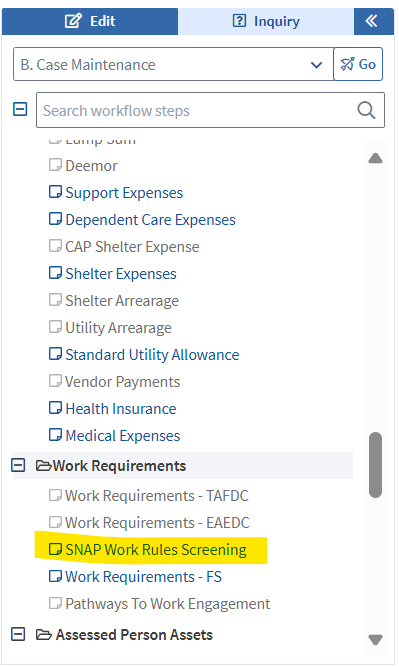
BEACON will direct you to this page in the following workflows for SNAP:
- applications,
- recertifications, or
- Interim Reports (if the client’s Reason in BEACON is Unclear Information).
Screening Page Layout
The screenshot below shows the layout of the SNAP Work Rules Screening page: View/HideView/Hide
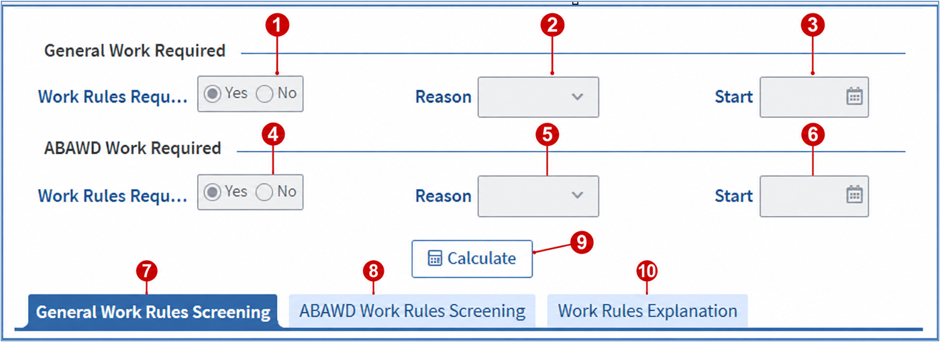
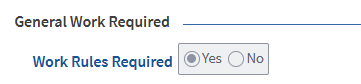
1. General Work Rules Required
This indicates whether the client is required to follow the General Work Rules.
2. General Work Rules Reason
If General Work Rules Required = No, then this will display the reason the client is exempt or does not have to follow the General Work Rules. If the client has more than one exemption from the General Work Rules, BEACON will choose the displayed reason based on the following hierarchy:
- Under 16 or over age 59
- Age 16 or 17 and not the Grantee
- Unable to Work – Certified Disability
- Unable to Work – Illness or Temporary Disability
- Pregnant 2nd/3rd Trimester
- Caretaker
- UC Applicant/Recipient
- Student
- Meets TAFDC/EAEDC Requirement
- Working 30hrs/wk or Equivalent
- Substance Use Treatment
- Good Cause
- Zero Benefit
- GWR Exempt Until Recert
- New Member at CM/IR
3. General Work Rules Start Date
If General Work Rules Required = Yes, then this will display the date the client must start following the General Work Rules. This date will not be displayed until you wrap the case.
The start date for the General Work Rules takes effect on the application date or the first day of the household’s new certification period.
Application
If you determine the client is non-exempt at application, BEACON will set the start date to the application date.
Recertification
If you determine the client is non-exempt at recertification, BEACON will set the start date to the start of the household’s new certification period.
Interim Report and Case Maintenance
Clients are not required to be screened at these times and therefore not required to be registered for work during Interim Report and Case Maintenance periods. The client must carry over the exemption or existing start date from their previous application or recertification. However, if the client submits verification, you must enter the exemption reason in the screening page so that the client can be exempt from the General and ABAWD Work Rules. If a client loses an GWR exemption, BEACON will automatically set the “GWR Exempt Until Recert” exemption to Yes and the client will remain exempt from the General Work Rules until their next recertification period.
4. ABAWD Work Rules Required
This indicates whether the client is required to meet the ABAWD Work Rules.
5. ABAWD Work Rules Reason
If ABAWD Work Rules Required = No, then this will display the reason the client is exempt or not required to meet the work rules. This will not be displayed until you wrap the case.
If the client is exempt from the General Work Rules for any reason other than under age 16 or over age 59, then this will display: General Work Rules.
If General Work Rules Required = Yes and the client has more than one exemption from the ABAWD Work Rules, BEACON will choose the displayed reason based on the following hierarchy:
- Under Age 18 or age 65 or over
- Residing with person < 14
- Pregnant
- Unable to Work – DTA Determination
- Indian per IHCIA
- Unable to Work - ABAWD Screening
- Resident of a Waived Area
- Discretionary
- Unclear Information
If the client is coded as exempt from the ABAWD Work Rules, BEACON will add Exemption from SNAP ABAWD Work Rules to the Verification tab if the client is coded as exempt for any of the following reasons:
- Pregnant
- Indian Per IHCIA
- Unable to Work – DTA Determination
Note: If ABAWD Work Rules Required = Yes but the client’s required volunteer hours are less than $1, this will display “Zero Community Service Hrs”. If the client meets this condition, BEACON will set this as the Reason during wrap-up. You will get the following pop-up when you wrap the case:
The AU Exemption reason and/or the member work program requirement reason(s) have been changed automatically by EBC and the new values are shown below: Required – Zero Benefit.
For more information on volunteering to meet the ABAWD Work Rules, see ABAWD Work Rules Participation.
6. ABAWD Work Rules Start Date
If ABAWD Work Rules Required = Yes, then this will display the date the client must start meeting the ABAWD Work Rules. The start date for the ABAWD Work Rules is based on when you determine the client is not exempt. This date will not be displayed until you wrap the case.
Application
If you determine the client is non-exempt at application, BEACON will set the start date to Day 1 of the first full calendar month after their application period.
Recertification
If you determine the client is non-exempt at recertification, BEACON will set the start date to Day 1 of the first full calendar month in their new certification period.
Interim Report
If you determine the client is non-exempt at Interim Report, BEACON will set the start date to Day 1 of the first full calendar month after their certification midpoint.
Case Maintenance
If you determine the client is non-exempt at case maintenance, the client must start following the rules on Day 1 of the first full calendar month after the current cyclical month.
Reminder:
You can only start the ABAWD Work Rules at Interim Report (IR) if:
- the client’s ABAWD exemption is unclear information, or
- the client discloses that an ABAWD-specific exemption has ended, you have the opportunity to screen the client because they are on the phone or in person, and determine after screening that they have no other exemptions.
You can only start the ABAWD Work Rules during case maintenance:
- if an existing exemption ends, and
- you have the opportunity to screen the client because they are on the phone or in person, and
- you determine after screening that they have no other exemptions.
See ABAWD Work Rules Overview and ABAWD Work Rules Exemptions for more information on these rules.
See ABAWD Work Rules Overview for examples of setting the ABAWD Work Rules start date.
7. General Work Rules Screening Tab
This displays all the screening questions for the General Work Rules. View/HideView/Hide

The screening questions are answered with Yes/No radio buttons.
You must click the Calculate button after all the questions are answered. This includes both the General and ABAWD Work Rules. ABAWD Work Rules Screening tab is covered in more detail below. View/HideView/Hide
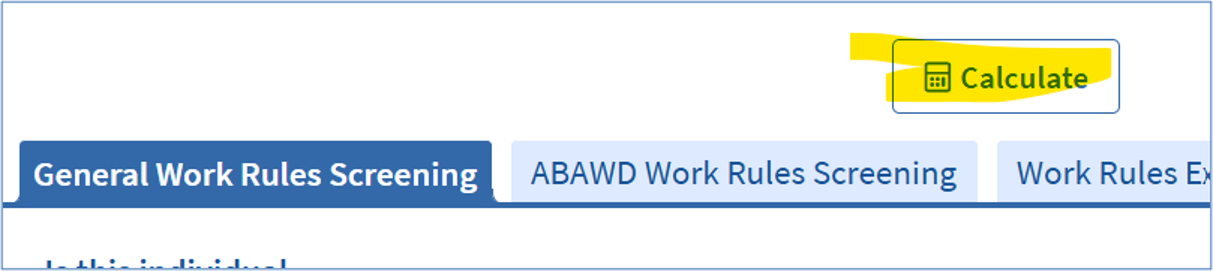
After you click the Calculate button: If at least one answer is Yes, the General Work Rules Required field will display No. The ABAWD Work Rules Required field will be determined by the responses on the ABAWD Work Rules Screening tab.
The Yes or No radio button response will auto populate for each question for which the answer can be found on another BEACON page. The table below lists each question and specifies the BEACON page, if any, that will determine the answer to the screening question. Some questions are user-entered and not driven by data from existing pages.
|
General Work Rules Screening Questions |
Exemption Reason that will Appear in the “Reason” Field |
Exemption Description |
Is the Screening Question Automated/Greyed Out or Entered by Staff? *NoteNote |
How to Verify Exemption |
What Will Be the VC-1 Item? |
|---|---|---|---|---|---|
|
Under age 16 or over age 59? |
Under age 16 or over age 59 |
Client is under age 16 or over age 59 |
Automated/Greyed Out BEACON page: Assessed Person Driven by DOB. |
No additional verification needed. This information is obtained by the client’s date of birth on the Assessed Person page. |
None. |
|
16 or 17 years old, and not head of household? |
Age 16 or 17 and not the Grantee |
Client is 16 or 17 years old, and not the head of household |
Automated/Greyed Out BEACON Page: Assessed Person Driven by DOB and if they are not the Grantee. |
No additional verification needed. This information is obtained by the client’s date of birth on the Assessed Person page and the AU Composition page. |
None. |
|
Federally certified as disabled? For example, by the Social Security Administration (SSA), MassHealth, Mass Commission for the Blind, Veterans Affairs 100% disabled, or Disability Evaluation Services (DES)? |
Unable to Work - Certified Disability |
Client is considered Federally certified as disabled by SNAP standards. For example, by the Social Security Administration (SSA), MassHealth, Veterans Affairs 100% disabled, or Disability Evaluation Services (DES) |
Automated/Greyed Out BEACON Page: Disability Driven by certified as Disabled. |
Verification must be obtained as described in SNAP Disability Requirements and Verifications. |
Existing Optional Disability verification |
|
Receiving services or have you ever received services in the past from Mass Commission for the Blind, Mass Commission for the Deaf and Hard of Hearing or the Department of Developmental Services? |
Unable to Work - Illness or Temporary Disability |
Clients can indicate yes to any of the three screening questions to receive the Unable to Work – Illness or Temporary Disability exemption. *If a client receives any temporary disability benefits such as Workman’s Comp, Veteran’s Disability Benefits (less than 100%), Paid Family Medical Leave (PFML) for themself, Short-Term Disability benefits, they are also eligible for this exemption. Household members who are applying for SSI are also exempt under this exemption. |
Entered by staff. |
Telephonic or written self-declaration from the client* or A letter from a medical authority or agency. If a client receives any temporary disability benefits such as Workman’s Comp, Veteran’s Disability Benefits (less than 100%), or Short-Term Disability benefits, they must provide proof of income as required for SNAP eligibility. |
Optional SNAP General Work Rules Exemption: Unable to Work – Temporary Illness or Disability verification If the client receives this exemption due to having temporary disability benefits, the client will also have the Mandatory Other Income Status verification generated for this exemption. |
|
Actively participating in services from Mass Department of Mental Health or MassAbility? If yes, is their illness/disability expected to last 90 days or more? |
|||||
|
Experiencing a health problem that substantially reduces or prevents them from working, and is expected to last 90 days/3 months or more? This could be mental, physical, sensory, learning, intellectual, cognitive, or developmental* |
|||||
|
Pregnant and is within 120 days of the due date? |
Pregnant 2nd/3rd Trimester |
Pregnant in their second or third trimester. |
Automated/Greyed Out BEACON Page: Pregnancy Driven by due date that is within 120 days. |
A letter from a medical authority. |
Existing Pregnancy verification |
|
Caring for a child under 6 years old or caring for a person (adult or child) with a disability even if the person being cared for is not living in the same household? |
Caretaker |
Caring for a child under 6 years old or a person with a disability, even if the person they are caring for does not live in the same household as them. |
Entered by staff. |
If caring for a person with a disability (either for someone in the same household or someone outside of the household): Or A letter from the medical provider that includes all information asked on the SNAP General Work Rules Exemption – Caretaker form If caring for a child under 6 outside of the household: If the client provides verification of foster care payments to care for an individual, no additional verification is needed. The client can claim the Caretaker exemption, even if the client does not wish to have the foster person on their SNAP case. |
Optional SNAP General Work Rules Exemption: Caretaker verification |
|
Receiving Unemployment benefits or have they applied for Unemployment benefits? |
UC Applicant/Recipient |
Receiving Unemployment benefits or applied for unemployment benefits. Note: A client that has an active claim that has exhausted its funds is not considered receiving Unemployment benefits. |
Automated/Greyed Out BEACON Page: Other Income Status Driven by Unemployment Compensation income item being entered. |
Verification of unemployment compensation, as required for SNAP eligibility, is sufficient to establish this exemption. Most unemployment compensation records can be verified using the EMT system. |
Existing Mandatory Other Income Status: Unemployment verification |
|
Enrolled at least half-time in a school, training program, or college? This includes refugee training programs, business or technical schools, trade or vocational schools, etc. |
Student |
Is a student at a recognized school or participating in a training program at least halftime. A recognized school includes colleges, universities, business or technical schools, trade and vocational schools. Training programs also include refugee training programs. |
Automated/Greyed Out BEACON Page: Education Driven by the client’s age (between the age of 18-49), their school enrollment status (i.e. half-time or full-time status), and type of degree (i.e. Associates, Bachelors, Masters) |
Verification of student status must be obtained as described in Students. If a client is participating in a training program that is not subject to Student eligibility rules, a letter from the training program is acceptable. |
Existing Mandatory Student Eligibility verification If a Training Program, existing Optional School/Training Enrollment verification will generate for this exemption. |
|
Receiving TAFDC or EAEDC? |
Meets TAFDC/EAEDC Requirement |
Receiving TAFDC or EAEDC. |
Automated/Greyed Out BEACON Page: Work Requirements – TAFDC/EAEDC Driven by receipt of TAFDC/EAEDC. |
No additional verification needed. |
None. |
|
Earning at least $217.50 per week or working 30 hours or more per week? |
Working 30hrs/wk or Equivalent |
Earning at least $217.50 per week or working 30 hours or more per week. |
Automated/Greyed Out BEACON Page: Earned Income Driven by combined earned income and monthly prospective totaling more than $942.43 or combined weekly hours entered are 30+/week. |
Verification of earned income, as required for SNAP eligibility, is sufficient to establish this exemption. |
Existing Mandatory Earned Income verification |
|
Participating in a substance use treatment program? |
Substance Use Treatment |
Participating in a substance use disorder treatment program. |
Entered by staff. |
A letter from the substance use treatment program indicating the client is actively participating in the program. |
Optional SNAP General Work Rules Exemption: Substance Use Treatment verification |
The below conditions make the client not subject to the General Work Rules based on certain case circumstances that are also reflected on the Work Rules Screening page.
|
General Work Rules Screening Questions |
Reason |
Description |
Automated/Greyed Out Description |
How to Verify |
What Will Be the VC-1 Item? |
|---|---|---|---|---|---|
|
A noncitizen who is not authorized to work in the US? |
Good Cause |
If a noncitizen who is eligible to receive SNAP benefits is not authorized to work in the United States and does not meet any General Work Rules exemptions must have this exemption applied in order to not be subject to the General and ABAWD Work rules. |
This screening question will be grayed out and set to No for individuals who are coded as United States Citizens. If a client is coded as a noncitizen, this screening question will be entered by staff using the procedures outlined below. |
None. |
None. |
|
Active with a Zero SNAP benefit? |
Zero Benefit |
If a household’s case has a monthly SNAP benefit amount of $0 (Active at $0), clients are not required to comply with General or ABAWD Work Rules regardless of whether any exemptions apply as they are not receiving a monthly SNAP benefit. |
Automated/Greyed Out BEACON will automatically apply if the SNAP case is Active at 0. Clients do not have to follow the GWR if the SNAP case is active at 0, even if they are subject to the GWR. |
None. |
None. |
|
Not currently subject to General Work Rules due to loss of GWR exemption during case maintenance? |
GWR Exempt Until Recert |
If a client loses an exemption during case maintenance or Interim Report, they will be prevented from becoming subject to the General Work Rules until their next recertification, at which time a screening will take place. |
Automated/Greyed Out BEACON will automatically apply this during case maintenance or Interim Report if a client loses an exemption and no other exemption applies. |
None. |
None. |
|
A household member that was added during case maintenance/Interim Report? |
New Member at CM/IR |
If a household member is added to the SNAP case during case maintenance or Interim Report, this reason will be automatically applied. Screening for GWR’s is not required at Case Maintenance/Interim Report |
Automated/Greyed Out BEACON will automatically apply this exemption if a new member is being added to the household during case maintenance or Interim Report. |
None. |
None. |
All user-driven screening questions will be reset to blank at every reapplication and recertification.
8. ABAWD Work Rules Screening Tab
This displays all the screening questions for the ABAWD Work Rules. View/HideView/Hide
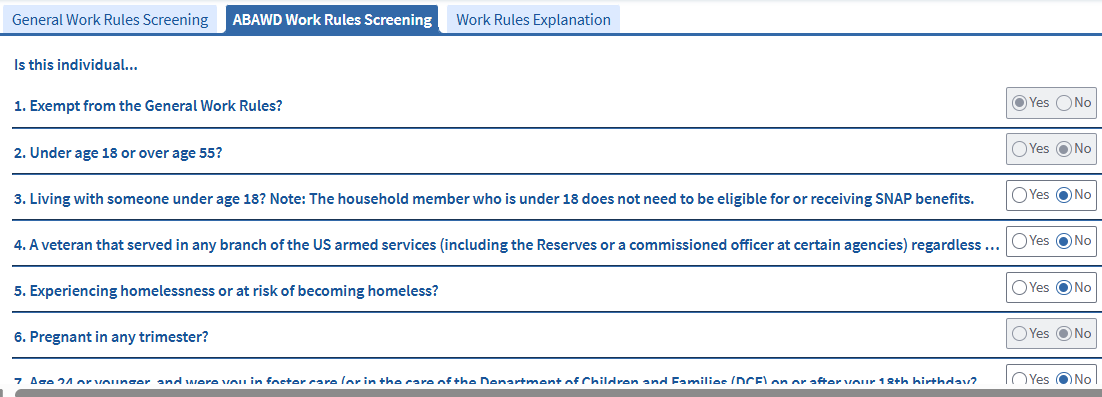
The screening questions are answered with Yes/No radio buttons.
- If all the answers are No, the ABAWD Work Rules Required field will display Yes.
- If at least one answer is Yes, the ABAWD Work Rules Required field will display No.
You must click the Calculate button after all the questions are answered. View/HideView/Hide
Like the General Work Rules Screening questions, the Yes or No radio button response will auto populate for each ABAWD Work Rules screening question for which the answer can be found on another BEACON page. The data-driven questions and the user-entered questions are detailed in the table below:
|
ABAWD Work Rules Screening Questions |
Exemption Reason that will Appear in the “Reason” Field |
Exemption Description |
Is the Screening Question Automated/Greyed Out or Entered by Staff? *Note |
How to Verify Exemption |
What Will Be the VC-1 Item? |
|---|---|---|---|---|---|
|
Exempt from the General Work Rules for reasons other than age? |
General Work Rules |
Client is exempt from the General Work Rules. |
Automated/ Greyed Out BEACON Page: SNAP Work Rules Screening Driven by General Work Required being set to No. |
No additional verification needed. This is driven by verification of the General Work Rules exemption. |
N/A |
|
Under age 18 or age 65 or older? |
Under Age 18 or age 65 or over |
Client is under age 18 or age 65 or older. |
Automated/ Greyed Out BEACON Page: Assessed Person Driven by DOB |
No additional verification needed. This information is obtained by the client’s date of birth in the Assessed Person page. |
N/A |
|
Receiving SNAP with someone under 14? |
Residing with person < 14 |
Client has a child under 14 in the SNAP household. |
Automated/ Greyed Out BEACON Page: Assessed Person Driven by DOB |
No additional verification needed. Based on household composition information gathered during the certification process. DOB verified by external database |
N/A |
|
Living with someone under age 14 who is not receiving SNAP benefits but is a member of the household? This could be an ineligible child or a foster child. |
Residing with person < 14 |
Client lives with a child under 14 who is not in the SNAP household. |
Entered by staff |
No additional verification needed. Based on information about the ineligible child or foster child gathered during the certification process. |
N/A |
|
Pregnant in any trimester? |
Pregnant |
Client is pregnant. |
Automated/ Greyed Out BEACON Page: Pregnancy Driven by due date. |
|
Optional Exemption from SNAP ABAWD Work Rules verification. |
|
Experiencing a health problem that limits them from working/training 30 or more hours per week? This could be mental, physical, sensory, learning, intellectual, cognitive, developmental, substance dependency or as a victim of domestic violence, sexual harassment, sexual assault or stalking. |
Unable to Work - DTA Determination |
Client has a disability that has not been recognized by SSA or any public agency. |
Entered by staff. |
If the letter is not written by one of these listed medical providers and you are unsure if it is acceptable, you may seek clarification from the Procedural Mailbox using the Procedural Mailbox Engagement procedures.
|
Optional Exemption from SNAP ABAWD Work Rules verification. |
|
An American Indian or Alaska Native as described in the Indian Health Care Improvement Act? |
Indian per IHCIA |
Client meets the criteria detailed in Clarification of the Exemption: An American Indian or Alaska Native as described in the Indian Health Care Improvement Act. |
Entered by staff. |
|
Optional Exemption from SNAP ABAWD Work Rules verification. |
|
Unable to work based on responses from ABAWD Unable for Work Screening page? |
Unable to Work – ABAWD Screening |
This information is mapped into the screening page based on answers in the ABAWD Unable to Work Screening page. |
Automated/Greyed Out. |
Driven by answers provided in the ABAWD Unable to Work Screening page. No additional verification needed. This information is mapped into the screening page based on answers in the ABAWD Unable to Work Screening page |
N/A |
The below conditions make the client not subject to the ABAWD Work Rules based on certain case circumstances that are also reflected on the Work Rules Screening page.
|
ABAWD Work Rules Screening Questions |
Reason |
Description |
Automated/ Greyed Out Description |
How to Verify |
What Will Be the VC-1 Item? |
|---|---|---|---|---|---|
|
A Resident of a Waived Area? |
Resident of a Waived Area |
Client resides in an area with high unemployment |
Automated/ Greyed Out BEACON will automatically update based on the client’s residential zip code. |
No additional verification needed. This information is obtained by the client’s zip code in the Address page. |
N/A |
|
Approved for Discretionary Exemptions? |
Discretionary Exemptions |
Applied by designated staff. Prevents household member from being subject to time-limits. One discretionary exemption is for one month. |
Greyed Out - except for designated staff. Only designated staff will be able to apply discretionary exemptions. |
No additional verification needed. This is entered by designated staff. |
N/A |
|
Not subject to time-limited benefits because it is unclear if they meet another exemption? |
Unclear Information |
If a client loses an ABAWD exemption during case maintenance, no other exemption applies and DTA was not able to screen the client, unclear information rules apply. If a client loses an ABAWD exemption during Interim Report, no other exemption applies, and the Reason was not already Unclear Information, unclear information rules apply |
Automated/ Greyed Out - except during case maintenance and Interim Report, staff can select the option. BEACON will automatically batch over this exemption during Case Maintenance if a client loses an ABAWD exemption and no other exemption applies. BEACON will automatically batch over this exemption during Interim Report if a client loses an ABAWD exemption, no other exemption applies, and they did not previously have Unclear Information as a Reason. |
No additional verification needed. This is applied based on simplified reporting rules. |
N/A |
All user-driven screening questions will be reset to blank at every recertification. For the ABAWD Work Rules, the user-driven questions will be reset to blank at Interim Report if the client’s exemption status is Unclear Information. Per Simplified Reporting rules, unclear information must be addressed at the next reporting period. For more information, see ABAWD Work Rules Exemptions.
9. Calculate
After you complete both screening tabs, clicking Calculate will populate the Work Rules Required and Exemption Reason fields. View/HideView/Hide

10. Work Rules Explanation Tab
This tab ensures that you follow the required steps for explaining the work rules to the client. BEACON will make you complete this tab only if:
- General and/or ABAWD Work Rules Required = Yes, and
- the case is at application or recertification. View/HideView/Hide
Once you enter the tab, you will see a script followed by two checkboxes. You must read the script to the client. See below: View/HideView/Hide
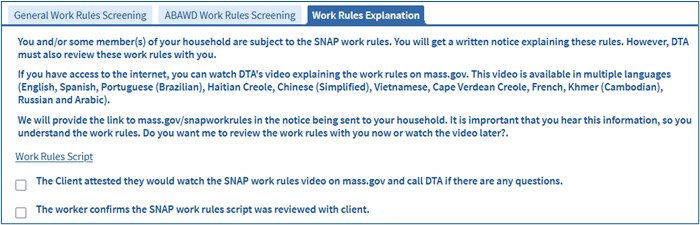
If the client says they would rather watch a video later, you must click the checkbox that says: The client attested that they would watch the SNAP work rules video on mass.gov and call DTA if there are any questions.
If the client wants you to explain the rules now, you must click the link to one of the scripts listed below:
- Work Rules Script - English (The Work Rules script embedded in BEACON is the English version)
- Work Rules Script - Spanish
- Work Rules Script - Portuguese
- Work Rules Script - Haitian Creole
- Work Rules Script - Simplified Chinese
- Work Rules Script - Vietnamese
This will open a PDF of the script you must read to the client. The script details the rules that the client must follow. If you are using an interpreter, speak slowly and pause at reasonable intervals; this makes it easier for the interpreter to translate.
After you read the work rules explanation, you must click the checkbox that says: The worker confirms the SNAP work rules script was reviewed with the client. You will need to click a checkbox for each household member subject to the work rules; however, you only need to read the work rules explanation once.
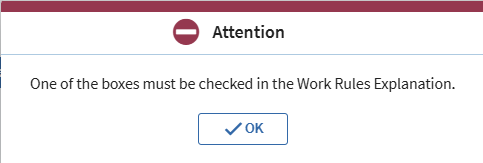
If you do not click either one of the checkboxes, you will get this pop-up: View/HideView/Hide
Important: The Work Rules Explanation tab will be mandatory to edit for every household member subject to the work rules at every application and recertification. Once the work rules explanation has been reviewed, you must check off the appropriate checkbox for each applicable household member. However, you only need to read the script on the Work Rules Explanation tab (and if applicable, the work rules explanation itself) with the client you are interviewing. You do not have to repeat this step with the other non-exempt household members.
Completing the Work Rules Explanation Tab at Interim Report
BEACON will not require you to complete the Work Rules Explanation tab at IR. However, you will still have access to it. You must address the Work Rules at IR only if the client’s ABAWD exemption status is unclear information or if the client reports a change that causes them to become non-exempt from the ABAWD Work Rules and they are in-person or on the phone, which means you must screen the client.
Important: Although screening for General Work Rules is not required at Interim Report, if a client becomes non-exempt from the ABAWD Work Rules during IR, you must screen the client for any General and ABAWD exemptions to assist the client with becoming ABAWD exempt.
If you are addressing the Work Rules at IR, you must give the work rules explanation only if:
- the client’s existing exemption status is Unclear Information and you successfully cold call the client to screen for exemptions, or
- the client reports the loss of an existing ABAWD-specific exemption, and you have the opportunity to screen the client because they happen to be on the phone or in person;
AND
- you determine after screening that the client is non-exempt.
Once you give the work rules explanation, you must complete the Work Rules Explanation Tab. You must mark one of the checkboxes so that BEACON will have a record that you followed the explanation process.
Do not mark either checkbox in the Work Rules Explanation tab if you determine the client is non-exempt but are unable to give the work rules explanation. The client will still get a letter explaining the work rules.
You must not schedule an interview at IR to screen and/or give the Work Rules explanation. Interviews are not required at IR.
See The General Work Rules, ABAWD Work Rules Exemptions, and Simplified Reporting Interim Report for more information on addressing Work Rules at IR.
Work Requirements-FS Page
BEACON still includes the Work Requirements-FS page. This page was used to record exemption information before the SNAP Work Rules Screening page was created.
BEACON will not make you visit the Work Requirements-FS page. This page only exists to maintain certain batches and processes that are based on the page. However, you can still access the page if you need it for informational purposes.
Some of what you enter in the SNAP Work Rules Screening page will automatically feed into the Work Requirements-FS page. This includes the following fields: View/HideView/Hide
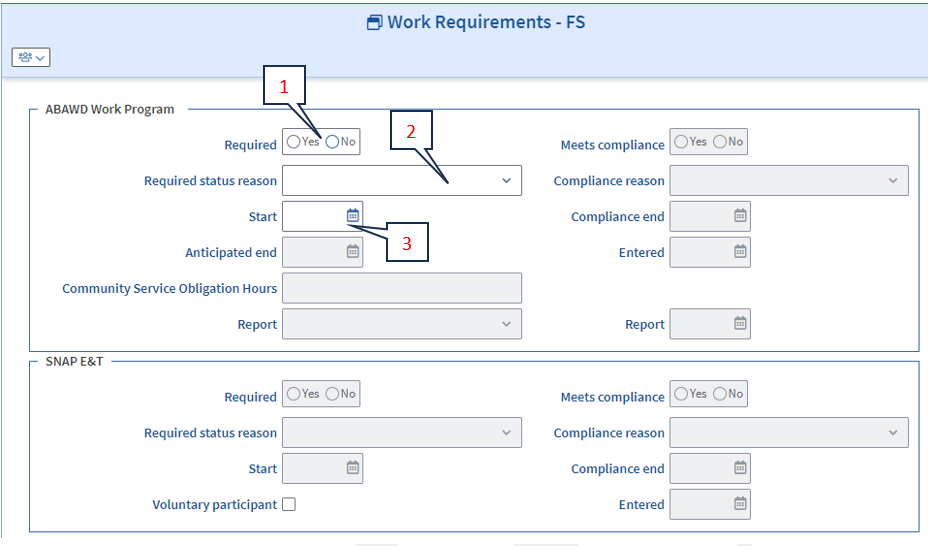
- Required
- Required Status Reason
- Start
You will be unable to change these fields because BEACON will gray them out. You can only change them from the SNAP Work Rules Screening page.
Unable to Work Screening Page
Clients between the ages of 18 through and including age 64 that have the Homeless indicator marked on the Address page in BEACON will have the ABAWD Unable to Work Screening page enabled in the Work Requirements section of the BEACON Workflow. This page will be required to be completed before the SNAP Work Rules Screening page during application, Interim Report (only if the client has Unclear Information listed as their ABAWD exemption), Recertification, or when a new household member is being added during case maintenance or at Interim Report.
The ABAWD exemption reason, Unable to Work – ABAWD Screening, will be calculated by BEACON based on the Yes/No responses to the below 5 screening questions:
- Do you have a stable night time residence?
- Do you have a high school diploma or GED?
- During the last year, have you been steadily employed for at least 6 months or a full-time student for at least 6 months?
- Do you regularly access to health care that you need, such as dental care, psychiatric care, and treatment for an ongoing illness?
- Have you been hospitalized during the last 6 months?
Once the screening questions are completed, click the Calculate button. BEACON will calculate the responses to determine if the client meets the Unable to Work – ABAWD Screening exemption. The answer will then carry over to the SNAP Work Rules Screening page and will code the “Unable to work based on responses from ABAWD Unable for Work Screening page?” based on what was captured in the ABAWD Unable to Work Screening page.
During case maintenance, BEACON will require you to complete this page if:
- You check the Homeless indicator in the address page, or
- You add a household member to a household that is already coded as homeless.
When this happens, you must perform the screening only if you happen to be speaking with the client while completing the workflow.
If you are not speaking with the client when you check the Homeless indicator or add the household member, you must select Unanswered for each question: View/HideView/Hide
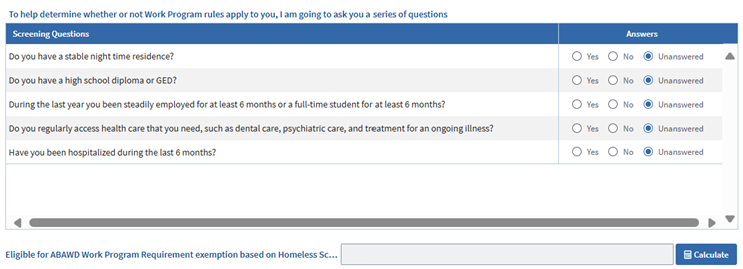
After you click Calculate and save the page, BEACON will direct you to the SNAP Work Rules Screening page. If you selected Unanswered for each question, then:
- For new household members, BEACON will automatically apply the following exemption if no other exemption is applicable: New Member at CM/IR.
- If you did not add a new household member but checked off Homeless, you must retain the exemption status that was already on record. Fill out the screening page using the same responses.
Exemption Examples
The table below provides examples of each exemption from the General and ABAWD Work Rules. Please note, some exemptions such as Waived Area, Under age 16 or over age 59 are not included on this examples list as these exemptions are based on BEACON data that cannot be changed by the client or worker.
General Work Rules Exemption Examples
|
Exemption Reason |
Examples |
|---|---|
|
Unable to Work – Temporary Illness or Disability |
John (he/him, 34) provides a telephonic self-declaration during his application interview that he received services last year from the Department of Developmental Services. John is exempt from the General and ABAWD Work Rules. |
|
Unable to Work – Temporary Illness or Disability |
Sarah (she/her, 28) provides a telephonic self-declaration during her application interview that it is hard for her to leave her house due to an existing health problem. Sarah is exempt from the General and ABAWD Work Rules. |
|
Unable to Work – Temporary Illness or Disability |
Julian (they/them, 40) telephonically self-declares during their recertification interview that they are actively participating in services from MassAbility, and their disability is expected to last over 90 days. Julian is exempt from the General and ABAWD Work Rules. |
|
Pregnant 2nd/3rd Trimester |
Susan (she/her, 30) has been subject to the SNAP Work Rules since January. She self-declares to you that she is 24 weeks pregnant and provides her due date, which is in 112 days. Susan is exempt from the General and ABAWD Work Rules. |
|
Caretaker |
Henry (he/him, 26) provides a completed SNAP General Work Rules Exemption – Caretaker form from his grandmother’s doctor indicating that he is responsible for the care of his 90-year-old disabled grandmother who does not live in the household. Henry is exempt from the General and ABAWD Work Rules. |
|
Student |
Jules (they/them, 22) provides verification that they are a full-time college student at Bristol Community College. Jules is considered an eligible student, and the verification is sufficient to exempt Jules from the General and ABAWD Work Rules. |
|
Substance Use Treatment |
Charlie (he/him, 40) verifies at application that he is actively participating in an outpatient substance use treatment center program. Charlie is exempt from the General and ABAWD Work Rules. |
|
Good Cause |
Layla (they/them) is applying for SNAP as a Household of 1. They are an eligible Cuban/Haitian Entrant as they provided their I-862 Notice to Appear. Layla’s SAVE response indicates they are not work authorized. A Non-Work SSN Letter has been sent to SSA. They do not meet any exemptions for the General or ABAWD Work Rules. You must select Yes for the, “Is this individual a noncitizen who is not authorized to work in the US?” so that the client can receive good cause for not being able to meet the General and ABAWD Work Rules. |
|
GWR Exempt Until Recert |
Veronica (she/her) indicates in her Interim Report that she is no longer enrolled at Bristol Community College. Since Veronica was previously exempt from the General Work Rules as a student at least half time, she will continue to be exempt from the General Work Rules until her next recertification where she can work register. You must update the Education page to update the student exemption on the screening page and BEACON will automatically select “Yes” for the GWR Exempt Until Recert screening question so that Veronica is not incorrectly subject to the General Work Rules and ABAWD Work Rules. |
|
New Member at CM/IR |
Kathleen (she/her) calls the DTA Assistance Line during case maintenance to report that her 20-year-old son, Jeremy, has moved back into her household. Since Jeremy is being added into the SNAP household during case maintenance, Jeremy will not be required to be screened for the General Work Rules, and the “New Member at CM/IR” will automatically be applied by BEACON. However, you must inform Jeremy that at the next Recertification period, he will have to be screened for any exemptions, and if no exemptions apply, he will need to follow the General and ABAWD Work Rules. |
ABAWD Work Rules
|
Exemption Reason |
Examples |
|---|---|
|
Residing with person < 14 |
Mica (she/her) receives SNAP for herself. She is a foster parent to Emma (she/her) who is 10 years old. Mica decided to exclude Emma from her SNAP case. Even though Emma is not in the SNAP case, Mica is living with someone under age 18. Mica is exempt. |
|
Unable to Work – DTA Determination |
Mark (he/him) says he hasn’t been able to work consistently because he has been struggling with addiction. Mark is not in treatment right now but says he has been unable to work. Mark is exempt. Linda (she/her) reports that she has been unable to work because she feels unsafe and is working with a domestic violence counselor and attending court hearings to address the open Restraining Order and charges against her ex-boyfriend. Linda is exempt. |
|
Pregnant |
Susan (she/her) has been subject to the SNAP Work Rules since January. She reports to you in early March that she is pregnant and provides verification with an estimated due date, as she is not sure of her actual due date. Susan is exempt. |
|
Indian per IHCIA |
Taylor (she/her) indicates during her application interview that she is a California Indian per the IHCIA, and provides verification of this. Taylor is exempt. |
|
Unable to Work – ABAWD Screening |
Jeremiah (they/them) states during their interview that they are homeless. Once you get to the Unable to Work – ABAWD Screening page, Jeremiah indicates that they do not have a stable nighttime residence and has been hospitalized in the last six months. BEACON calculates the answers to the screening questions and confirms that Jeremiah is eligible for the Unable to Work – ABAWD Screening exemption. Jeremiah is exempt. |
When a New Household Member is Added
If a new household member is added during the application or recertification period, you must screen them for the Work Rules.
If a new household member is added during case maintenance or at Interim Report, BEACON will review the new household member information listed in BEACON to determine if there are any exemptions known to BEACON (i.e. the new household member is coded as federally disabled, has wages in the Earned Income Status page, etc.). If there are no exemptions known to BEACON, BEACON will set the “A household member that was added during case maintenance or Interim Report?” question to Yes per simplified reporting rules. A new household member cannot be subject to the General Work Rules until they can work register. By extension, the client will also not be subject to the ABAWD Work Rules during this time.
Best Practices Before Screening
When BEACON directs you to the SNAP Work Rules Screening page, follow these best practices before you begin screening:
- Explain why you are asking the screening questions. A lot of these questions are personal, and people may not want to answer without knowing why you are asking.
- Emphasize that many people do not have to meet the Work Rules. Tell them that to make sure no one is incorrectly told to meet the rules, you want to be thorough about asking for all exemptions.
Last Update: September 15, 2026
|
|
|
||
| Digital Accessibility Statement | Privacy Policy | Site Policies | Public Records Requests |
|
© 2026 Commonwealth of Massachusetts. Mass.gov is a registered service mark of the Commonwealth of Massachusetts. |
|||

