An official website of the Commonwealth of Massachusetts Here's how you knowHere's how you know

ABAWD Work Rules Exemptions
Overview
Clients are exempt or are not required to meet the ABAWD Work Rules if they are:
- Exempt from the General Work Rules for reasons other than age
- Under age 18, or age 65 or older
- Experiencing a health problem that limits them from working/training 30 or more hours per week. This could be mental, physical, sensory, learning, intellectual, cognitive, developmental, substance dependency or as a survivor of domestic violence, sexual harassment, sexual assault, or stalking
- Receiving SNAP with someone under 14
- Living with someone under age 14 who is not receiving SNAP benefits but is a member of the household. This could be an ineligible child such as a foster child
- Pregnant in any trimester
- An American Indian or Alaska Native as described in the Indian Health Care Improvement Act.
- Unable to work based on responses from ABAWD Unable for Work Screening page
- A resident of a waived area (see Waived Areas for more details)
- Designated as having Unclear Information during the certification period
Clarification of the Exemption: Living with Non-Household Member Under 14
A client is exempt from the ABAWD Work Rules if:
- they live with a child under 14, and
- the child is not part of the SNAP household due to being ineligible. See Nonhousehold Members.
An ineligible child grants the exemption only if the child would otherwise receive SNAP with the client, if not for the disqualification.
Below are examples of when the exemption would apply:
- Josephina (she/her) applies for SNAP with her niece Juliana (she/her). Juliana is aged 8. Juliana was born in Mexico. Juliana’s immigration status is undetermined. Although Josephina will not receive SNAP for Juliana, Josephina is still exempt. The reason is that Juliana would be part of Josephina’s SNAP household if she (Juliana) was an eligible noncitizen. Juliana would have mandatory inclusion under the parental control rule.
- Genevieve (she/her) applies for SNAP. She has a 9-year-old foster child, Charlie (he/him). Under the foster care rules, Genevieve chooses not to add Charlie to her SNAP case. Although Charlie is not part of the SNAP household, Genevieve is exempt from the ABAWD Work Rules.
Below is an example of when the exemption would not apply:
- Laverne (she/her) lives with her roommate Shirley (she/her). They purchase and prepare separate meals. The household also includes Shirley’s daughter Janet (she/her). Janet is aged 4. Laverne receives SNAP for herself. Laverne cannot get the exemption for living with a child under 14. The reason is that Janet is under the parental control of Shirley and has no mandatory inclusion in Laverne’s SNAP case.
Clarification of the Exemption: An American Indian or Alaska Native as described in the Indian Health Care Improvement Act
An American Indian or Alaska Native as described in the Indian Health Care Improvement Act is as follows:
- an Eskimo, Aleut, or other Alaska Natives;
- an individual considered to be Indian by the Secretary of the Interior for any purpose; or
- an individual determined to be Indian under regulations promulgated by the Secretary.
- a descendant of Indians residing in California on June 1, 1852, who are part of and considered Indian by the local Indian community;
- an Indian holding trust interests in public domain, national forest, or reservation allotments in California; or
- a person (or descendant of one who is) listed on California Rancheria/Reservation distribution plans.
For list of examples of acceptable verification, see How Do Clients Verify ABAWD Work Rules Exemption?
Important: You must never:
- Request additional verification based on appearance, surname, accent, where the person lives, or a “hunch.”
- Ask intrusive questions like “How much Native American?” or “what percentage?”.
- Treat all first-time claims as automatically questionable and request more verification than is necessary.
Clarification of the Exemption: Unable to Work Based on Responses from ABAWD Unable to Work Screening Page
If a client is between age 18 through and including age 64 and coded as Homeless, you must visit the ABAWD Unable to Work Screening page in BEACON. This page will require you to answer the following questions:
- Do you have a stable night-time residence?
- Do you have a high school diploma or GED?
- During the last year, have you been steadily employed for at least 6 months or a full-time student for at least 6 months?
- Do you have regular access to health care that you need, such as dental care, psychiatric care, and treatment for an ongoing illness?
- Have you been hospitalized during the last 6 months?
Once you answer these questions, BEACON will determine if the client qualifies for the exemption: Unable to work based on responses from ABAWD Unable for Work Screening page. BEACON will automatically map this information to the SNAP Work Rules Screening page.
For more information, see SNAP Work Rules Screening Page.
How Do I Determine and Record ABAWD Work Rules Exemptions?
You must screen every client who is aged 18 through and including age 64 for exemptions from the ABAWD Work Rules.
The screening process includes:
- reviewing ALL the screening questions for each household member,
- calculating the screening question responses to determine each household member’s exemption(s) or if they are subject to the Work Rules, and
- providing a Work Rule Explanation to any non-exempt client(s).
To screen for exemptions, you must use the SNAP Work Rules Screening page. BEACON will automatically direct you to this page when the client is required to be screened.
The SNAP Work Rules Screening page keeps a record of each exemption that applies to the client. The interface of the page has multiple tabs for recording different data elements. BEACON will prefill some of these elements based on information already known. Other exemptions will require staff to check a radio button because there is no associated data from other BEACON pages.
The SNAP Work Rules Screening page also uses a workflow that ensures you follow the proper screening steps. The workflow includes the following sections:
- General Work Rules Screening tab with screening questions and Yes/No radio buttons
- ABAWD Work Rules Screening tab with screening questions and Yes/No radio buttons
- Work Rules Explanation tab for indicating that you followed the procedures for explaining the rules to the client
See The SNAP Work Rules Screening Page for detailed guidance on using this page.
Before you begin screening, staff are to:
- Explain why you are asking the screening questions. A lot of these questions are personal and people may not want to answer without knowing why you are asking.
- Emphasize that many people do not have to meet the Work Rules. Tell them that to make sure no one is incorrectly told to meet the rules, you want to be thorough about asking for exemptions.
Example explanation: “Some people who get SNAP must meet Work Rules to keep SNAP for more than 3 months. I am going to ask you a series of questions to see if you are exempt from these rules. I know a lot of these questions may feel personal, but I am asking to help you keep SNAP. If you have no exemptions after I review them with you, I will provide more information on how you can meet the work rules. Do you have any questions before I start?”
How Do Clients Verify ABAWD Work Rules Exemption?
To verify ABAWD Work Rules exemption, the primary verification method is documentary evidence. However, some of the exemptions are verified through what is known to DTA (i.e. under age 18, or age 65 or older and Receiving SNAP with someone under 14) or a separate process and do not require additional verification (i.e. Unable to work based on responses from ABAWD Unable to Work Screening page). The table below details each ABAWD exemption with examples of acceptable verification (if required):
| Exemption | Verification Examples |
|---|---|
|
Exempt from the General Work Rules for reasons other than age |
No additional verification needed. This is driven by verification of the General Work Rules exemption. See The General Work Rules for information on verifying General Work Rules exemption. |
|
Under age 18, or age 65 or older |
No additional verification needed. This information is obtained by the client’s date of birth in the Assessed Person page. |
|
Experiencing a health problem that limits them from working/training 30 or more hours per week |
A letter stating that the client is unable to work 30 or more hours per week due to experiencing a health problem. The letter must be written by:
If the letter is not written by one of these listed medical providers and you are unsure if it is acceptable, you may seek clarification from the Procedural Mailbox using the Procedural Mailbox Engagement procedures.
|
|
Receiving SNAP with someone under 14 |
No additional verification needed. Based on household composition information gathered during the certification process. DOB verified by external database. |
|
Living with someone under 14 who is not receiving SNAP but is a member of the household |
No additional verification needed. Based on information about the ineligible child or foster child gathered during the certification process. |
|
Pregnant in any trimester |
|
|
An American Indian or Alaska Native as described in the IHCIA |
|
|
Unable to work based on responses from ABAWD Unable to Work Screening page |
No additional verification needed. This information is mapped into the screening page based on answers in the ABAWD Unable to Work Screening page |
|
A resident of a waived area |
No additional verification needed. This information is obtained by the client’s zip code in the Address page. Residency is verified as part of the certification process. |
|
Unclear Information |
No additional verification needed. This is applied based on simplified reporting rules. |
When Do I Screen Clients for Exemptions?
You must always screen at application and recertification.
You must screen at Interim Report (IR) only if:
- the client’s ABAWD exemption is Unclear Information,
OR
- the client reports a loss of an ABAWD-specific exemption (i.e., an exemption that is not also an exemption from the General Work Rules), and
- you have the opportunity to screen the client because they are on the phone or in person, and
- you determine after screening that they have no other exemptions.
You must screen during case maintenance only if you:
- are talking to the client on the phone, by virtual meeting or in-person when you find that their exemption ended; and
- are able to screen and confirm they have no other exemptions on record. For More details see Screening for Exemptions During Case Maintenance
Screening for Exemptions at IR
In situations where you must screen for exemptions at IR, you must follow special procedures because there is no interview at IR. BEACON will direct you to the SNAP Work Rules Screening Page at IR only if the page lists a household member’s exemption as “Unclear Information.” View/HideView/Hide

If the Client’s Exemption at IR is Unclear Information
If the client’s exemption at IR is Unclear Information, you must:
- Attempt to call the client two times.
- If the client answers, use the SNAP Work Rules Screening Page to screen for all exemptions and if now work rules required update the Work Rules Explanation tab. Follow the steps detailed in What Steps Must Workers Take to Apply the ABAWD Work Rules.
- If you cannot reach the client, send a VC-1 for Exemption from SNAP ABAWD Work Rules. Also add Additional Verification (coded as Optional) and copy the following language into Document(s) of evidence:
- “We received your Interim Report. We would like to talk to you to determine if you need to follow our work rules. If we do not hear from you, you will have to follow the work rules to stay on SNAP. You will get a separate notice explaining these rules.”
- If no other verification is missing, follow the rules for processing IRs with missing optional verification. Do not wait until you get the verification. Process the case with the applicable household member coded as non-exempt: View/HideView/Hide
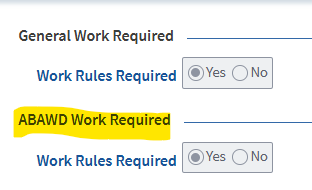
Reminder: See Completing the Work Rules Explanation tab at Interim Report for instructions on completing this part of the SNAP Work Rules Screening Page if you cannot reach the client at IR.
If the Client Reports a Change at IR that Removes an Existing ABAWD Exemption
There may be times at IR when a client who already has an ABAWD-specific exemption reports information that removes the exemption. For example, a client who is exempt from the ABAWD Work Rules for being homeless might report on the IR that they found a place to live.
If this happens, you must use what information is available to determine if another exemption applies. If no other exemption applies update the screening questions accordingly however leave Yes to the question: Did this client lose an exemption during case maintenance and it is unclear if they meet another exemption? Recalculate the client’s exemption status and then wrap the case.
Sometimes at IR, you may be speaking to the client when you find out that their exemption ended. Example: You cold call the client to ask them to clarify a section of the IR that is incomplete and, during the call, they happen to report that an exemption ended. In this scenario, you can screen them for other exemptions. If there are none, then you must code them as required to meet the ABAWD Work Rules. However, you must not cold call them solely to screen for exemptions.
Important: These procedures do not apply if the ABAWD exemption on file is “General Work Rules”, as the client will not actually lose their ABAWD exemption in that case. The General Work Rules exemption applies for the duration of the certification period.
If the client loses an exemption from the General Work Rules during Interim Report, you must follow the procedures detailed in The General Work Rules: What Happens if the Client Loses an Exemption During Case Maintenance or Interim Report?
Screening for Exemptions During Case Maintenance
During case maintenance, you may discover that a client’s exemption from the ABAWD Work Rules has ended. For example, a client who was exempt due to being homeless may report that they found a place to live.
Without another screening, you only know about the change for that one exemption, but not know if the client has another. Until you complete another screening, there is not enough information to know if the client is non-exempt.
You must screen only if you are speaking to the client when they report that the exemption ended.
If you are not speaking to the client when you find out that an exemption ends, you cannot screen for exemptions until the next reporting period. Do not call the client or send a VC-1.
Important: These procedures do not apply if the ABAWD exemption on file is “General Work Rules”, as the client will not actually lose their ABAWD exemption in that case. The General Work Rules exemption applies for the duration of the certification period.
If the client loses an exemption from the General Work Rules during Interim Report, you must follow the procedures detailed in The General Work Rules: What Happens if the Client Loses an Exemption During Case Maintenance or Interim Report?
If Client Contacts You and Reports Exemption Ended
If the client calls you (or reports to you in-person) and provides information that indicates that their ABAWD-specific exemption ended, follow these steps:
- Update BEACON with the new information that the client reported to you. Example: If the client reports they are no longer homeless, remove the homeless indicator from the Address page.
- Open the SNAP Work Rules Screening page.
- Check if the client has another exemption on file. If no, proceed to the next step.
- Ask all screening questions including ones that are greyed out due to being prefilled by BEACON.
- If the client answers Yes to any of the greyed out questions, you will need to update the corresponding BEACON page to make the case accurate and to apply the exemption. If the client answers No to all these screening questions, proceed to the next step.
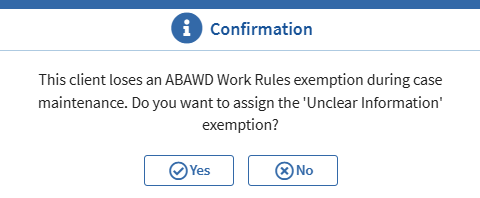
- Ensure that No is selected for Question 11 in the ABAWD Work Rules Screening tab: Did this client lose an exemption during case maintenance and it is unclear if they meet another exemption? BEACON will give the following pop-up: View/HideView/Hide
- Answer No.
- Complete the rest of the page with the client coded as non-exempt. See SNAP Work Rules Screening page for more information.
If You Find Out an Exemption Ended Without Client Contact
Sometimes, you may not be talking to the client when you find out that their ABAWD-specific exemption has ended. For example, a client who was exempt for being homeless may report a new address by just sending a copy of their new lease agreement. If this occurs, follow these steps:
- Update BEACON with the new information that the client reported.
- Example: If the homeless client sent a lease, uncheck “homeless” and update their address/shelter costs.
- Open the SNAP Work Rules Screening Page.
- Select No for all the blank General Work Rules Screening questions.
- Make sure No is selected for the ABAWD Work Rules screening answer that changed based on what the client reported.
- Example: If a homeless client reported a new residential address, make sure No is selected for the ABAWD Work Rules screening question: Experiencing homelessness or at risk of becoming homeless?
- Check if the client has any other ABAWD Work Rules exemptions on file. If no, proceed to the next step.
- Make sure Yes is selected for the ABAWD Work Rules screening question: Did this client lose an exemption during case maintenance and it is unclear if they meet another exemption? BEACON will give the following pop-up: View/HideView/Hide
- Answer Yes
- Recalculate the client’s exemption status and save.
- Wrap the case.
ABAWD Screening Questions Summary Table
The table below provides a summary of the ABAWD Work Rules screening questions in the SNAP Work Rules Screening Page. This table also details the related BEACON pages and VC-1 items:
|
ABAWD Work Rules Screening Questions |
Exemption Reason that will Appear in the “Reason” Field |
Exemption Description |
Is the Screening Question Automated/Greyed Out or Entered by Staff? *NoteNote |
How to Verify Exemption |
What Will Be the VC-1 Item? |
|---|---|---|---|---|---|
|
Exempt from the General Work Rules for reasons other than age? |
General Work Rules |
Client is exempt from the General Work Rules. |
Automated/ Greyed Out BEACON Page: SNAP Work Rules Screening Driven by General Work Required being set to No. |
No additional verification needed. This is driven by verification of the General Work Rules exemption. |
N/A |
|
Under age 18 or age 65 or older? |
Under Age 18 or age 65 or over |
Client is under age 18 or age 65 or older. |
Automated/ Greyed Out BEACON Page: Assessed Person Driven by DOB. |
No additional verification needed. This information is obtained by the client’s date of birth in the Assessed Person page. |
N/A |
|
Receiving SNAP with someone under age 14? |
Residing with person <14 |
Client has a child under 14 in the SNAP household. |
Automated/ Greyed Out BEACON Page: Household Driven by DOB. |
No additional verification needed. Based on household composition information gathered during the certification process. DOB verified by external database. |
Optional Exemption from SNAP ABAWD Work Rules verification. |
|
Living with someone under age 14 who is not receiving SNAP benefits but is a member of the household? This could be an ineligible child or a foster child. |
Residing with person <14 |
Client lives with a child under 14 who is not in the SNAP household. |
Entered by staff. |
No additional verification needed. Based on information about the ineligible child or foster child gathered during the certification process. |
Optional Exemption from SNAP ABAWD Work Rules verification. |
|
Pregnant in any trimester? |
Pregnant |
Client is pregnant. |
Automated/ Greyed Out BEACON Page: Pregnancy Driven by due date. |
|
Optional Exemption from SNAP ABAWD Work Rules verification. |
|
Experiencing a health problem that limits them from working/training 30 or more hours per week? This could be mental, physical, sensory, learning, intellectual, cognitive, developmental, substance dependency or as a victim of domestic violence, sexual harassment, sexual assault or stalking |
Unable to Work - DTA Determination |
Client has a disability that has not been recognized by SSA or any public agency. |
Entered by staff. |
|
Optional Exemption from SNAP ABAWD Work Rules verification. |
|
An American Indian or Alaska Native as described in the Indian Health Care Improvement Act? |
Indian per IHCIA |
Client meets the criteria detailed in Clarification of the Exemption: An American Indian or Alaska Native as described in the Indian Health Care Improvement Act. |
Entered by staff. |
|
Optional Exemption from SNAP ABAWD Work Rules verification. |
|
Unable to work based on responses from ABAWD Unable for Work Screening page? |
Unable to Work – ABAWD Screening |
This information is mapped into the screening page based on answers in the ABAWD Unable to Work Screening page. |
Automated/Greyed Out. Driven by answers provided in the ABAWD Unable to Work Screening page. |
No additional verification needed. This information is mapped into the screening page based on answers in the ABAWD Unable to Work Screening page |
N/A |
The below conditions make the client not subject to the ABAWD Work Rules based on certain case circumstances that are also reflected on the Work Rules Screening page.
|
ABAWD Work Rules Screening Questions |
Reason |
Description |
Automated/Greyed Out Description |
How to Verify |
What Will Be the VC-1 Item? |
|---|---|---|---|---|---|
|
A Resident of a Waived Area? |
Resident of a Waived Area |
Client resides in an area with high unemployment. |
Automated/ Greyed Out BEACON will automatically update based on the client’s residential zip code. |
No additional verification needed. This information is obtained by the client’s zip code in the Address page. |
N/A |
|
Approved for Discretionary Exemptions? |
Discretionary |
Applied by designated staff. Prevents household member from being subject to time-limits. One discretionary exemption is for one month. |
Greyed Out - except for designated staff. Only designated staff will be able to apply discretionary exemptions. |
No additional verification needed. This is entered by designated staff. |
N/A |
|
Not subject to time-limited benefits because it is unclear if they meet another exemption? |
Unclear Information |
If a client loses an ABAWD exemption during case maintenance, no other exemption applies and DTA was not able to screen the client, unclear information rules apply. If a client loses an ABAWD exemption during Interim Report, no other exemption applies, and the Reason was not already Unclear Information, unclear information rules apply. |
Automated/ Greyed Out - except during case maintenance and Interim Report, staff can select the option. BEACON will automatically batch over this exemption during Case Maintenance if a client loses an ABAWD exemption and no other exemption applies. BEACON will automatically batch over this exemption during Interim Report if a client loses an ABAWD exemption, no other exemption applies, and they did not previously have Unclear Information as a Reason. |
No additional verification needed. This is applied based on simplified reporting rules. |
N/A |
Other Procedures You Must Follow
Data Driven Selections
You must accurately fill out all the information related to the work rules. BEACON automatically updates certain exemption reasons based on what you enter. For example, BEACON will automatically exempt a client for pregnancy if you accurately complete the Pregnancy page. For more information, see the SNAP Work Rules Screening page.
Discretionary Exemption
DTA does not have any available Discretionary Exemptions. These will not be applied until further notice.
Referrals to Other Staff/Supports
When the client reports information pertinent to the ABAWD Work Rules, such as an exemption that they have, you must make sure that you are making the appropriate referrals and giving appropriate support. For example, if a client discloses that they cannot meet the rules due to domestic violence, you must follow the applicable domestic violence procedures.
Last Update: August 10, 2026
|
|
|
||
| Digital Accessibility Statement | Privacy Policy | Site Policies | Public Records Requests |
|
© 2026 Commonwealth of Massachusetts. Mass.gov is a registered service mark of the Commonwealth of Massachusetts. |
|||

