An official website of the Commonwealth of Massachusetts Here's how you knowHere's how you know

Simplified Reporting – Interim Report
SNAP clients classified as Simplified Reporting must complete an Interim Report (IR) at a check-in point during their certification period. This involves the completion of the IR form and verification of certain eligibility factors.
Who Is Required to Complete an Interim Report?
Simplified Reporting households are required to complete an IR at their certification midpoint.
Former EDSAP cases are required to complete an IR every 6 months for the remainder of their certification period. The frequency for Former EDSAP cases to complete an IR may vary for the initial IR as this will be based on when in their certification period they were converted to Former EDSAP.
Households that are receiving SNAP in combination with TAFDC or EAEDC will be subject to IR requirements if the household is certified as Simplified Reporting.
EDSAP Households
EDSAP Reporting households do not have an IR requirement while the household is certified as EDSAP Reporting. To assist in identifying these households, this indicator icon is applied to all EDSAP Reporting cases. This is displayed on the ECF Home page in BEACON: View/HideView/Hide
Reminder: In some circumstances, an IR may be mailed to a Simplified Reporting (Former EDSAP) household that has converted to EDSAP Reporting prior to the IR being received by DTA. In these situations, the EDSAP Reporting household is no longer required to submit the IR. However, if an IR is received for these households, it must be dispositioned as Reviewed & Entered. You must review the IR and any verification attached for changes and act upon those changes. Proofs supplied by the client are considered verified upon receipt, unless questionable.
IRs for Simplified Reporting (Former EDSAP) Households
Households that become ineligible for EDSAP Reporting will be converted to Simplified Reporting (Former EDSAP). When the household converts to Simplified Reporting (Former EDSAP), the household will be sent its first Interim Report 45 days before the IR closing date for the current period. When households convert and there are not 45 days before the IR closing date for the period, the household will receive an IR for the next scheduled IR period. The IRs will be issued in 6-month increments.
Simplified Reporting (Former EDSAP) will receive consecutive IRs for the duration of their certification period.
To assist in identifying Former EDSAP households, an indicator icon will be applied to all Former EDSAP households. This will be displayed on the ECF Home page in BEACON: View/HideView/Hide
Important: The 36-month certification period will not be shortened when a household converts to Simplified Reporting (Former EDSAP). The client will be responsible to complete an initial IR and subsequent IRs every six months until the time of recertification. When a household converts to EDSAP Reporting, the conversion will occur at the time the change is approved.
Kevin (they/them), aged 68, is an EDSAP Reporting certified, household of 1. Kevin’s certification period begins on December 1, 2025. On March 10, 2026, Kevin adds their son Mark (he/him), 26, to their case. Since Mark is 26 years of age and is not disabled, Kevin’s case is converted to Simplified Reporting (Former EDSAP). In addition, the fact that Mark has earned income also disqualifies the household from EDSAP Reporting. Based on the IR schedule prepared by BEACON, Kevin’s current IR period will end May 31, 2026. Since there are at least 45-days before the IR closing date for this period, Kevin will be sent an IR that they must complete and return. After this initial IR, Kevin will be required to complete IRs every six months for the remaining 30 months of the certification period, if the household continues to be ineligible for EDSAP Reporting.
Lara (she/her), aged 66, and her spouse Lewis (he/him), aged 67, are an EDSAP Reporting certified household with RSDI-only income. Their certification began on December 13, 2025. On April 15, 2026, Lara reports that she now has a small part time job and submits paystubs. Lara’s case is converted to Simplified Reporting (Former EDSAP). Based on the IR schedule prepared by BEACON, Lara’s current IR period will end on June 12, 2026. Since there are not at least 45-days before the IR closing date for this period, Lara will be sent an IR 45 days before the next IR closing date (December 12, 2026). After this initial IR, Lara will be required to complete IRs every six months for the remaining 24 months of her certification period.
Natacha (they/them), aged 54, is a disabled grantee of a HH of 3. The household includes their spouse, Carlos (he/him), aged 61, and their 17-year-old daughter (she/her), Morena. Natacha’s SNAP case is certified on February 12, 2025, and is eligible for EDSAP Reporting. On May 12, 2026, Morena turns 18. Natacha’s case is converted to Simplified Reporting (Former EDSAP) at that time. Based on the IR schedule prepared by BEACON, Natacha’s current IR period will end on July 3, 2026. Since there are at least 45-days before the IR closing date for this period, Natacha will be sent an IR that they must complete and return. After this initial IR, Natacha will be required to complete IRs every six months for the remainder of the certification period.
Tina (they/them), aged 68, opted-out of Bay State CAP reporting on March 18, 2025. Simultaneously with opting-out of Bay State CAP, they also reported that they are now working ten hours per week at Trucchi’s. They submit their last four paystubs in addition to the Bay State CAP Client Options form. Their certification end date is June 1, 2027. Tina’s case is converted to Simplified Reporting. They will be sent an IR that they must complete and return. After this initial IR, Tina will be required to complete IRs every six months for the remaining months of their certification period.
Steps in the Interim Report Process
The IR form is mailed to clients 45 days before the end of the first half of the certification period (SIMP-12). Former EDSAP clients receive IRs every 6 months (see below for more details).
Client completes an IR telephonically, electronically via DTAConnect, or submits the paper IR form.
The IR form must be reviewed to ensure that what the client reported on the IR is recorded in BEACON.
Important: Not all information entered by clients during the DTA Connect IR workflow will prepopulate into BEACON. Staff must review the datasheet in its entirety to determine what must be entered into BEACON and if there is any clarification needed from the client to process the IR.
- A cold call must only be attempted when there is information on the IR that needs clarification. An interview must not be scheduled or conducted at IR.
- If there is unclear information and the cold call is unsuccessful, a verification checklist (VC-1) must be sent using the language prescribed in the Establishing Contact at IR When Information is Incomplete, Questionable, or Contradictory section of this page.
- If the cold call is successful, a Verification Checklist (VC-1) is sent for any outstanding item(s).
- If all mandatory verifications are received and procedures for optional verifications (see below for more details) are followed, the case is recalculated and, if still eligible, approved for the remainder of the certification period.
- If the IR is not returned 20 days after it is sent, the client will receive an IR Warning Notice.
- If the IR form is not returned 30 days after it was sent or it is returned but mandatory verifications that were requested within that period have not been provided, the client will receive an IR Closing Notice.
What Changes Must be Reported During the Interim Report Process?
Certain changes must be reported during the Interim Report process. The item may then need to be verified by documentary evidence, collateral contact, or written/verbal self-declaration. (Whether self-declaration is acceptable depends on the item being verified, or if only allowed as a last resort.) The changes that must be reported at IR are as follows:
- Earned income.
- Unearned income at the household level of more than $125.
- Earned or unearned income from a new source.
- Household composition
- If changes are reported regarding the eligibility status of existing household members, the information must be verified.
- If the change pertains to the addition of a new household member, verification may be required based on the circumstances of the new household member. For example, adding a new household member who is a noncitizen.
- Address
- If the household moved, new housing expenses must be verified as an optional expense. If the expense is not verified, then the household cannot be credited with housing expenses. For households that have not moved, housing expense changes are optional and do not need to be reported. They will continue to receive their existing housing expenses.
- Child support expenses.
Verifying Earned Income at Interim Report
At IR, clients must report whether they have a new source of earned income or any change in earned income for an existing job (including the job ending). If either of these conditions are met, the income must be verified.
Clients at IR must verify earned income that changes due to a change in hourly rate, salary amount, source of income, or full-time (or part-time) status. The $125 reporting threshold only applies to unearned income.
Work Number
BEACON will automatically run the Work Number match at IR.
When a client completes the IR over the phone and signs the IR telephonically, and there is a Work Number match, you must review the Work Number information with them. If the client confirms that the Work Number information is correct, you must accept the Work Number as verification of earnings. Record the earned income in BEACON and mark it as Verified. If the client disputes the Work Number information, you must send a mandatory VC-1 for earned income (or termination of employment, if applicable).
For clients that do not initiate the IR telephonically, the procedures for using the Work Number are included in the sections below.
Procedures for Addressing Cases with No Earnings on File
If a client has no earned income on file, the following question will appear on the IR form or as part of the DTA Connect IR workflow: Is anyone in the household working or earning income?
See the sample below: View/HideView/Hide
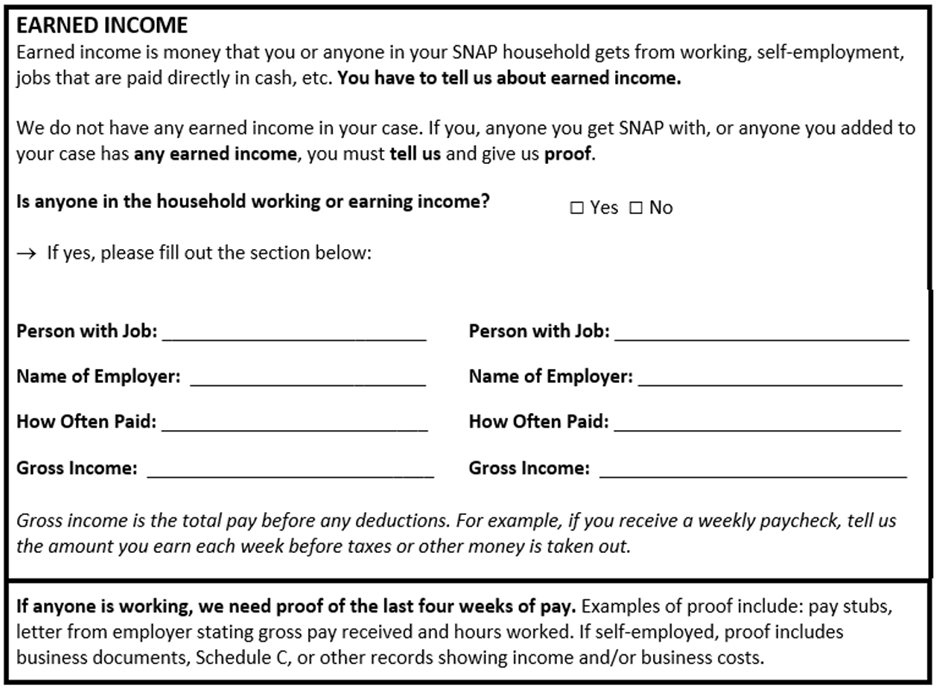
Clients who check Yes must fill out the information in the section below. If they do not, you must apply the procedures for Establishing Contact at IR When Information is Incomplete, Questionable, or Contradictory.
Note: For clients completing their IR on DTA Connect, any gross income amounts reported for a new earned income source will be found on the datasheet but will not prepopulate into BEACON.
If the client checks No, then:
- If there is no Work Number match (or the Work Number shows inactive employment or no wages in the last 30 days), no further action for earned income is required.
- If there is a Work Number match showing active employment and wages within the last 30 days, attempt to cold call the client two times.
- If both cold calls are unsuccessful, send a VC-1 for earned income.
- If one of the calls is successful, ask the client if the match information is accurate.
- If the client confirms the match information, disposition the match and mark earned income as Verified. Use the most recent wages in Work Number when processing the IR.
- If the client disputes the match information, send a VC-1 for earned income.
If the client checks Yes and provides the employment information, then:
- If the client submits verification of the earnings with the IR, mark earned income as Verified. Enter the gross wages on the verification into BEACON.
Note: If there is a Work Number match for the job that the client reported and already submitted verification for, you must disposition the match and use the wage verification that the client submitted with the IR.
- If the client does not submit verification of earnings with the IR and there is no Work Number Match (or the Work Number shows inactive employment or no wages in the last 30 days), send a VC-1 for earned income.
- If there is a Work Number match showing active employment and wages in the last 30 days for the job that the client reported on the IR, mark earned income as Verified. Use the most recent wages in Work Number when processing the IR. You must not send a VC-1 or cold call the client to confirm the information.
Important: Sometimes, the Work Number may show active employment and wages within last 30 days for an employer different from the one that the client reported at IR. Whenever this happens, you must cold call the client two times to confirm whether the information is accurate. If you are unable to reach the client, send a VC-1 for the employer on record and the matched employer. If the client confirms the information (e.g., they have a second job), you must use the most recent wages from this other employer when processing the IR. If the client disputes the information, you must send a VC-1 that includes a request for proof of earned income from the matched employer.
If the Work Number shows that the other job is inactive or displays no wages from the other job within the last 30 days, you must disregard the information and disposition the match.
Procedures for Addressing Cases with Earnings on File
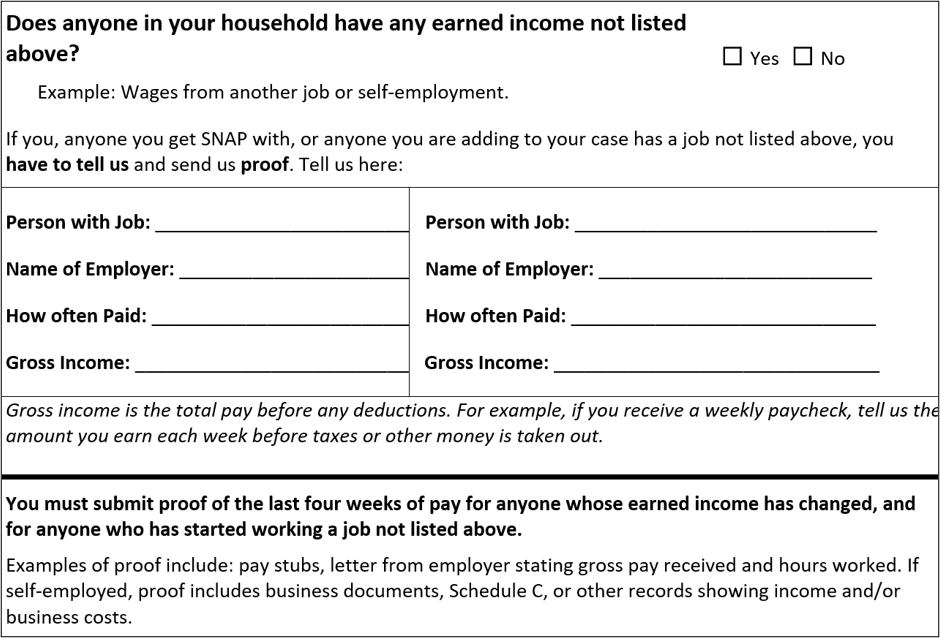
If a client has earned income on file, the following question will appear on the IR form or as part of the DTA Connect IR workflow: Has this income changed?
To answer this question, the client must choose one of the following answers:
- This income has not changed. I still work here and the amount shown is about what I earn now.
- This income has changed.
- If yes, how often paid?
- If yes, what is the updated gross income?
- This job has ended.
- If yes, when did this job end?
- If yes, why did this job end?
- Does anyone in your household have any earned income not listed above?
See the sample below: View/HideView/Hide
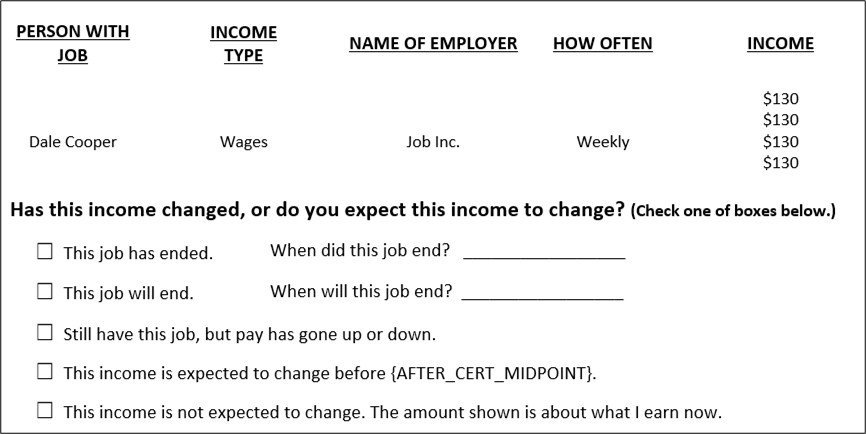
If the client does not answer any of these questions, you must follow the procedures for addressing incomplete information detailed in Establishing Contact at IR When Information is Incomplete, Questionable, or Contradictory.
Important: For IRs submitted via DTA Connect, it is crucial that you check the IR datasheet. This will tell you how the client responded to this question. This is how you will know which procedures to follow (detailed in the sections below). Staff must be aware that all income information provided by the client appears on the datasheet; however, not all reported income information prepopulates into BEACON, such as the ending of a job, the date a job ended or the gross amounts of any new earned income reported.
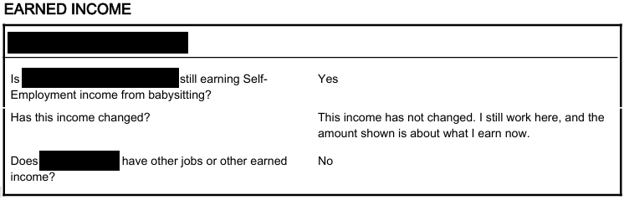
Client Selects “This income has not changed. I still work here, and the amount shown is about what I earn now.”
If the client indicates that their earnings have not changed and that the amount shown is about what they earn now, you must check whether the Work Number returned a match automatically.
If there is no Work Number match for that employer, process the case using the income that is in the case record and that the client indicated has not changed.
If there is a Work Number match for that employer, you must use the most recent wages in Work Number when processing the IR. You must disposition the match and ensure that earned income is marked as Verified. Record the earned income in BEACON. Do not cold call the client or send a VC-1.
Below is a sample datasheet for when the client submits the IR via DTA Connect and reports that their pay has not changed: View/HideView/Hide
Client Selects “This income has changed.”
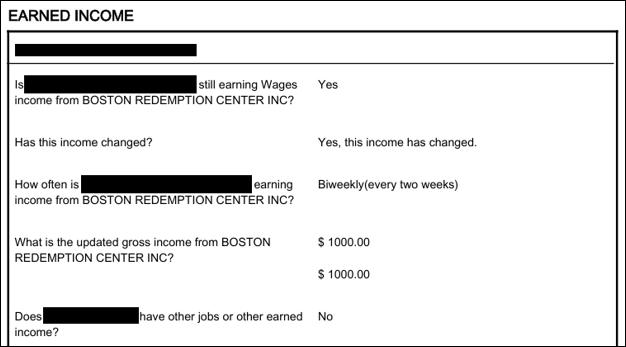
If the client indicates that the earned income changed, you must send a mandatory VC-1 for earned income if:
- the client does not provide verification of earned income with the IR; and
- there is no Work Number match.
If there is a Work Number match, you must:
- Check whether the Work Number information matches the employer on record and shows wages received within the last 30 days.
- If no, send a VC-1 for earned income.
- If yes, you must use the most recent wages in Work Number when processing the IR. Disposition the match and ensure that earned income is marked as Verified. Record the earned income in BEACON. Do not send a VC-1.
If the client submits verification of the earned income with the IR, you must update the earnings using the verification that the client submitted. You must do this even if the Work Number displays different earned income amounts because the verification supersedes the Work Number.
Below is a sample datasheet for when a client submits the IR via DTA Connect and reports that their pay has gone up or down: View/HideView/Hide
Client Selects “This job has ended”
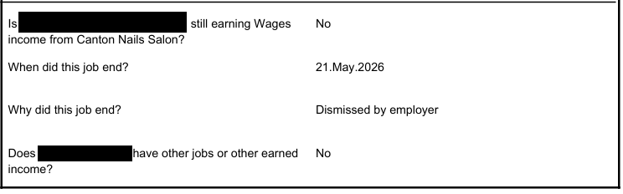
If the client indicates that their job ended, you must send a VC-1 for termination of employment if:
- the client does not provide verification of termination of employment with the IR; and
- there is no Work Number match for the employer, or the Work Number shows that the job is active with wages received in the last 30 days.
If there is a Work Number match showing that the employer on record is inactive or that no wages from that employer were received within the last 30 days, disposition the match and remove the employer from the BEACON record. Ensure that termination of the employment is marked as Verified. Do not send a VC-1.
If the client submits current verification of job termination with the IR (e.g., a letter from the employer dated within the last 30 days), mark termination of employment as Verified. Do not send a VC-1. Even if there is a Work Number match with conflicting information, i.e., active employment and wages within the last 30 days for the same employer, you must remove the job record because the verification that the client submitted with the IR supersedes the Work Number.
Below is a sample datasheet for when the client submits the IR via DTA Connect and reports that their job has ended: View/HideView/Hide
Client Reports New Earned Income
If the client indicates that they or another household member has a new job in addition to the earned income that is on record, you must follow the same procedures as those for addressing cases with earnings on file:
- If the client submits verification of the earnings with the IR, mark earned income as Verified. Enter the gross wages on the verification into BEACON.
- If the client does not submit verification of earnings with the IR and there is no Work Number Match (or the Work Number shows inactive employment or no wages in the last 30 days), send a VC-1 for earned income.
- If there is a Work Number match showing active employment and wages in the last 30 days for the job that the client reported on the IR, ensure that earned income is marked as Verified. Use the most recent wages in Work Number when processing the IR. You must not send a VC-1 or cold call the client to confirm the information.
See Procedures for Addressing Cases with Earnings on File for further details.
Earned Income Summary Table
The table below summarizes the IR processing steps for households with earned income on record and verification is not submitted with the IR.
|
Client Selection |
Did the job appear on the Work Number? |
What does the Work Number show? |
Next Steps |
|---|---|---|---|
|
This job has ended. |
Yes |
Work Number shows job active with wages received in the last 30 days. |
Send VC-1 for termination of employment. |
|
Yes |
Work Number shows job inactive or no wages have been received in the last 30 days. |
Mark termination of employment as Verified. Do not send a VC-1. |
|
|
No |
N/A |
Send VC-1 for termination of employment. | |
|
This income has changed. |
Yes |
Work Number displays wages received within past 30 days. |
Enter the Work Number wages and mark earned income as Verified. |
|
Yes |
Work Number does not display wages received within the past 30 days. |
Send VC-1 for wages. |
|
|
No |
N/A |
Send VC-1 for wages. |
|
|
This income has not changed. I still work here and the amount shown is about what I earn now. |
No |
N/A |
Process the case using the income that is in the case record and that the client indicated has not changed or use the wages the client provided if verification of wages was submitted with IR |
|
Yes |
Work Number displays current wages over the past 30 days. |
Process the case using the most recent wages in Work Number. |
What Changes Do Not Need to be Reported During the Interim Report Process
- Housing expense changes (unless the household moved)
- Dependent care expense changes
- Medical expense changes (for guidance on handling these changes, see Medical Deduction During Review Periods)
Important: Unless the client indicates that one of the above-listed elements changed or the Department has information that is verified upon receipt, the information that was used in the previous calculation must continue to be used.
Processing Interim Reports with Changes
When you work on an IR with reported changes, you must only update the applicable pages. Since the case is active and at IR, certain program integrity checks have automatically been applied to the case (i.e., Work Number, UC, and SDX/Bendex). The two external data sources that are not automatically run are RAPID and SAVE. At IR, you must only review data sources that are applicable to the case. For more information on which databases to review at IR, see External Databases.
If a client reported a change to earned income, for example, only the earned income section must be updated; other pages must be left alone.
Best Practices for Staff to Address IRs Submitted Via DTA Connect
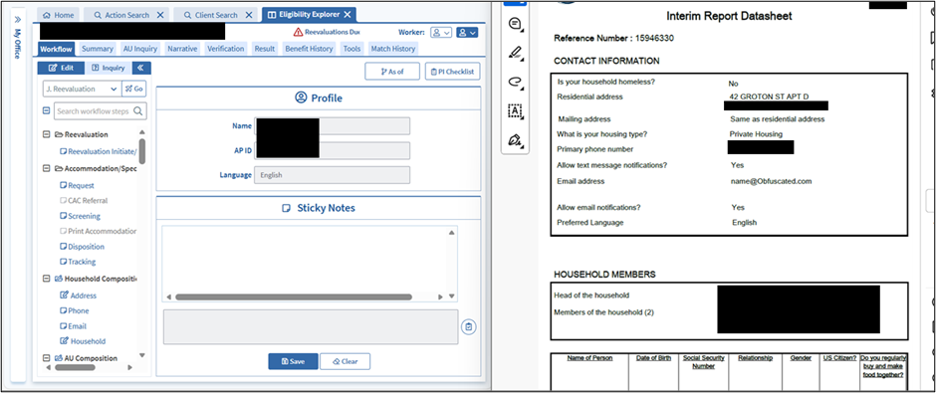
For IRs submitted via DTA Connect, a useful practice is to download the scanned IR form/datasheet from the Client Communications tab, and then tile it (or snap it to the side of your screen) so you have it side by side with BEACON. See the example below: View/HideView/Hide
As you navigate the workflow, you may also get a pop-up message if the client ended a record (e.g., an earned income source) via their DTA Connect Interim Report: View/HideView/Hide
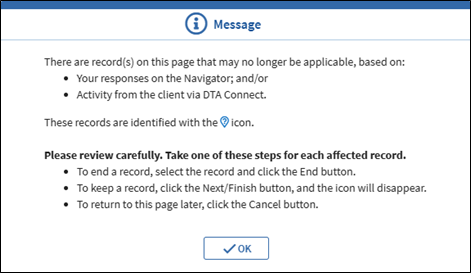
Reviewing the form/datasheet concurrently with BEACON (including pop-ups) helps ensure that you will not overlook items that are required to be addressed at IR.
Processing Interim Reports with No Reported Changes
You must authorize an IR when the client submits a complete Interim Report with no reported changes and no outstanding Program Integrity concerns. A “complete IR” means that the client:
- provided a signature,
- completed all sections where a response is required by providing the same information that is already on record, and
- left blank any sections that instruct the client to leave them blank unless reporting a change.
Regarding the paper IR form: If the sections that require a response are blank, the Interim Report is considered incomplete. Optional expense sections do not need to be completed or verified unless the client reports a change.
Reminder: The paper Interim Report form does not have checkboxes for the client to indicate “Change” or “No Change.” To determine whether anything has changed, you must carefully review each section of the form.
The IR Timeline for Warning and Closing Notices
If the Department does not receive the IR 20 days after it is sent, a Warning Notice will be issued explaining that the case is in danger of closing. The Warning Notice advises that the IR is due to DTA 10 days after the Warning Notice is mailed. If the Department does not receive the IR 10 days after the Warning Notice is sent, a separate notice will be issued explaining that the case will be closed on a future date because the IR was not returned. If the client does not follow up, the case will be closed automatically at the halfway point of the certification period.
Example of IR Not Received
Peter’s SSN ends in 0 and the halfway point of their certification period is June 30.
|
Date |
Timeline |
|---|---|
|
May 15 |
The IR is automatically mailed and is due back on June 5. |
|
June 5 |
The IR is not received by DTA. Peter is automatically sent the Warning Notice stating that they must submit the IR by June 15. |
|
June 15 |
The IR is not received by DTA. Peter is automatically sent the closing letter stating that their benefits will stop on June 30 because they did not submit the IR. |
|
June 30 |
The IR is not received. Peter’s case is automatically closed for Failure to Complete an Interim Report. |
If the Department does not receive mandatory verifications after receiving the IR, initiating it in BEACON and sending a VC-1, the client will be mailed a notice 30 days after the IR is sent explaining that the case will be closed because we did not get the verification(s) needed. If the client does not follow up, the case will be closed automatically at the halfway point of the certification period. It’s important to remember that the closing notice for missing verifications will not be generated unless:
- mandatory verifications are not verified on the BEACON Verifications tab 30 days after the IR was mailed, and.
- a VC-1 was issued within the first 30 days of the IR period.
The closing notice for missing verifications will not be generated if only optional verifications are missing.
Example of IR Received but With Verifications Missing
Kurt’s SSN ends in 0 and the halfway point of their certification period is June 30.
|
Date |
Timeline |
|---|---|
|
May 15 |
The IR is automatically mailed and is due back on June 5. |
|
May 23 |
The IR is received, but Kurt reports a change in earned and does not submit recent pay stubs. A VC-1 is sent for earned income. |
|
June 15 |
The pay stubs are not received. Kurt is automatically sent the closing letter stating that their benefits will stop on June 30 because they did not submit the required verifications. |
|
June 30 |
The pay stubs are not received. Kurt’s case is automatically closed in BEACON for Failure to complete Interim Report process. |
Interim Report Closing Reasons That Will Display in BEACON
If the case is not wrapped up by the BEACON release date and the IR form is not returned, the case will be closed for “Failure to Complete an Interim Report”.
If the case is not wrapped up by the BEACON release date and the client failed to provide missing mandatory verifications, the case will be closed for “Failure to complete Interim Report process”.
Establishing Contact at IR When Information is Incomplete, Questionable, or Contradictory
Once a signed IR form is received, it meets the minimum requirements for initiation and must not be dispositioned as Inadequate. Two cold calls must be attempted to discuss incomplete, questionable, or contradictory financial and nonfinancial household circumstances that impact eligibility.
Reminder: A “complete IR” means that the client provided a signature, completed all sections where a response is required by providing the same information that is already on record, and left blank any sections that instruct the client to leave them blank unless reporting a change.
If a paper IR form is unsigned or the sections that require a response are blank, the Interim Report is considered incomplete.
The cold call is used to clarify information, but does not necessarily mean an interview has been held or is needed. You must identify the reason for the cold call in the Phone page and case narrative. If the client is reached, you must discuss the areas requiring clarification and send a VC-1 (if necessary) based on the conversation. Do not update the Interview page just because contact with the client is made.
- If the client verbally indicates that they do not have any changes to report, you must document this in the narrative. You do not need to send a VC-1 or return the form to the client in this instance.
- If the client verbally indicates that they have changes involving verification items that can be verified with a telephonic self-declaration (such as dependent care mileage, reason a job ended, a college student’s meal plan), you must ask the client to verify them via telephonic self-declaration. See Telephonic Signature for more information. If the client verbally indicates changes involving mandatory or optional items that cannot be verbally/telephonically self-declared, you must send a VC-1 for the changes reported.
Important: You must not conduct a complete case review simply because you have the client on the phone or in front of you at a TAO.
If the client cannot be reached, you must send a VC-1 for clarification of the section that is incomplete, questionable or contradictory. The following sections if left blank are not considered incomplete: Contact Information (which includes address, phone, shelter costs and utilities) and Household Members.
The VC-1 must request items that would otherwise be discussed. You must send the VC-1 locally with a printout of the Interim Report which clearly identifies the missing information that the client did not complete.
Use Additional Verification and copy the following language:
“We received your Interim Report, but it is missing information that we need to process your case. You may call us to let us know what your current circumstances are, you may complete the highlighted sections of this form, or you may submit verification of any changes.”
If any of the missing/contradictory sections involve mandatory elements, such as earned income, the Additional Verification must be coded as Mandatory.
If the only missing/contradictory sections are for optional verifications, such as a rent expense, the Additional Verification must be coded as Optional.
You must not attempt phone contact at IR if:
- no change is reported;
- the information reported is consistent with what is known to the Department; and/or
- the change reported is clear, but proof has not been provided. In this situation, a Verification Checklist (VC-1) must be sent if the change is not available to the Department though a trusted source, documentary evidence already in the case record, or self-declaration.
Verifications
At IR:
- Income from a new source,
- a change in earned income, or
- a change in unearned income of more than $125 per month,
must be verified. You must send a mandatory VC-1 if the client reports any of these changes at IR.
Both the paper IR form and the DTA Connect IR workflow provide clients with the opportunity to report changes to shelter expenses, utility expenses, dependent care expenses, and/or medical expenses. If a client reports a change in any of these expenses, you must send a VC-1. Expenses that have changed must be verified to be included in the calculation.
If a client does not report a change in expenses, the expenses that were used in the previous benefit calculation must continue to be used when processing the IR. Exception: If the client reports a change in residential address, they must verify shelter and utilities (whether or not either of these items have changed).
Before you issue a VC-1, you must check whether the item requiring verification:
- is a permanent verification that was already provided;
- is available through a verified-upon-receipt source;
- can be verified by another scanned document in the Electronic Case Folder; or
- if telephonic self-declaration is allowable as a primary verification, can be telephonically verified or was already self-declared on the IR or another piece of paper.
If you send a VC-1, you must ensure that the outstanding item(s) is listed on the Verification tab. Verified items must be marked by selecting the appropriate Documents of Evidence on the Verification tab. An item must not be marked as verified before the corresponding verification is received.
Reminder: If you determine that the client is not reasonably able to provide documentary evidence (and the client has no one who can provide verification via collateral contact), you must accept a written self-declaration.
If a Client Reports Veteran’s Income on DTA Connect Interim Report
If a client uses DTA Connect to report VA income as new unearned income, the income will appear on the Other Income Status page as “Veterans’ Benefits” and cannot be edited.
To ensure the income is properly recorded, you must attempt to determine whether the VA income is VA State or VA Federal Service-Related. If no verification is available (or you cannot determine the VA income type from the verification that is available), you must cold call the client for clarification. For more information on recording VA income, see State Veterans’ Benefits and Federal Veterans’ Benefits.
If you do not have verification of the VA income, you must send a mandatory VC-1. However, you must not send a VC-1 solely to request proof of the VA income type. If you are unable to determine the type (after making the effort to do so) and you can otherwise process the case, you must process the IR with the income entered as “Veterans’ Benefits.” You must also write a narrative saying that staff must attempt to find out this income type at the client’s next review period.
Optional Verifications at Interim Report
If a client reports a change in one or more expenses at IR, specific procedures must be followed.
For shelter, medical, and dependent care expenses:
- If an IR is submitted via DTA Connect with a reported change in one of these expenses: BEACON will end the existing expense record and enter a new expense record as unverified once the IR is submitted.
- If a paper IR is submitted with a reported change in one of these expenses (including uploading a picture of the form via DTA Connect): You must end the applicable expense record, and enter a new record with the type and amount stated by the client. This will create a new, unverified expense record.
Important: When adding a new expense record after ending the old record, a pop-up message will appear to warn that a duplicate expense item is being entered. View/HideView/Hide
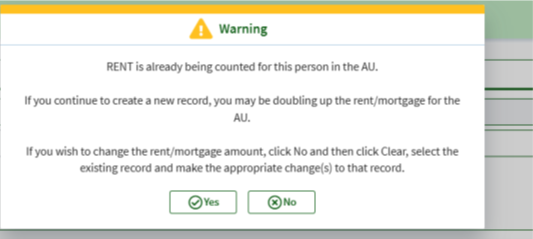
Creating a new expense record will create an outstanding VC-1 item. You must send the VC-1 that generates with the record. Do not verify the verification until the item is received.
For SUA:
- If an IR is submitted via DTA Connect with a reported change in SUA: BEACON will remove the old SUA record and enter the client’s newly reported utility selections (if any) as unverified. Send the VC-1 accordingly.
If the client reports no change to utility costs or leaves the SUA section blank, BEACON will retain the existing SUA record which will not need to be reverified by the client. - If a paper IR is submitted with a reported change in SUA (including uploading a picture of the form via DTA Connect): Upon initiating the IR workflow, you must review and update the SUA page based on the client’s responses on the form or otherwise. Update the SUA record by answering Yes to the applicable question(s) in the SUA page and clicking Next. Send the VC-1 accordingly.
If the client left the SUA section blank, you must continue to use the old SUA expenses, unless there was a change in residential address.
Important: If a household was previously receiving an SUA and the client (or a worker) selects SUA questions on the IR that triggers the same SUA, BEACON will automatically verify the new SUA verification item. Since the SUA will be auto-verified in this case, you must not send a VC-1.
Example: Grantee previously had marked Yes to the “Pay/share heating costs” question, which gave the household the HCSUA. At IR, the household marks “Pay/share heating costs” as Yes and newly marks “Have air conditioner, pay/share electricity costs.” BEACON will create a new HCSUA verification item but will auto-verify it since the household’s SUA has not changed. You must not send a VC-1.
If a Client Reports at IR that they Changed their Residential Address
If a client at IR reports a change in residential address but does not provide proof of their shelter or utility costs, you must send a VC-1 for shelter and/or utility costs.
- If an IR is submitted via DTA Connect with a reported change in residential address: BEACON will remove the old SUA record and enter the client’s newly reported utility selections (if any) as unverified. Send out the optional VC-1 for utility costs.
If the client did not respond regarding their utility costs, BEACON will automatically set all SUA questions to “No” and end the old SUA record. You must send a VC-1 by using the User-Entered Verification section. You must select:- Utility Costs in the Element section and
- the Heat SUA value (the VC-1 language is the same for all utility costs - Heat, Nonheat, Phone)
- If a paper IR is submitted with a reported change in residential address (including uploading a picture of the form via DTA Connect): BEACON will remove the old SUA record and automatically clear the answers in the SUA page after you save your edits to residential address on the Address page. You must then review and update the SUA window based on the client’s responses on the form and send the VC-1 accordingly. If the client did not respond regarding their utility costs on the form, you must set all the SUA questions to “No” and send a VC-1 by using the User-Entered Verification section as noted above.
Reminder: When a paper IR is submitted with a reported change in residential address, you must end the existing shelter record(s) on file, enter a new shelter record with the correct amount stated by the client, and send out the VC-1. (If the client did not specify their new shelter expenses, you may use $0 for the amount as a placeholder.) Unlike for the SUA page, BEACON does not automatically clear out/end existing shelter record(s) after edits to residential address are made on the Address page.
Note: A client may submit a completed paper IR by photographing the form and uploading the image through the DTA Connect document-upload function. The uploaded form is considered a paper IR and must be processed using paper IR procedures. For the purposes of this guidance, “IR submitted through DTA Connect” refers only to an IR initiated and completed electronically through the DTA Connect IR workflow—not an uploaded image of a paper IR.
Note: The online IR datasheet will display optional expense section(s) situational to a client’s reporting or non-reporting of any changes to optional expenses. For example, if a client did not move and did not report any changes to their existing shelter and utility costs, their IR datasheet will simply not display a shelter or utility cost section. The existing shelter and utility costs will remain in their case when processing the IR.
When to Process an IR with Optional Verifications Outstanding
IRs must be processed without delay if:
- the only outstanding verification(s) is optional; and
- the case will not be denied or reduced to a $0 benefit level if the optional verification(s) is not credited.
If a VC-1 issued at IR is only for an optional verification(s), you must review what the household’s benefit level will be if the verification(s) is not credited. Complete the workflow without entering the unverified item(s) and wrap up the case to confirm the outcome.
Steps if Not Counting Item(s) Results in Denial or Approval at $0
If not counting the item(s) results in a $0 benefit level or the case being denied for over-income, the IR must not be processed at this time. Rather, you must follow these steps:
- remove the authorization to process the case
- create an Action to process the case on the BEACON Release Date that occurs right before the halfway point of the certification period
- for more information on creating an Action, see Creating Follow-up Actions
- for help on determining the correct BEACON Release Date, follow the steps in Release Date Rules
- if the optional verification(s) is received on or before the BEACON Release Date, enter the item(s) and approve the IR
- if verification is not received by the BEACON Release Date, process the case without entering the expense(s)
Mary (she/her), whose SSN ends in 0, submits her IR for November 2025 on September 28, 2025, and only reports the following changes: her child support amount and rent have increased. Although Mary submitted verification of her new child support amount with the IR, the new rent amount was not verified. You unsuccessfully cold call two times and then send a VC-1 for rent and wrap up the case without giving credit for it. However, when the rent is not credited, Mary’s case is denied for over-income. Since Mary’s SSN ends in 0 and her IR is for November 2025, you create an Action to process the case on the BEACON Release Date, October 25, if the optional verification is not received. On October 25, you process the Action and the case is denied for over-income because Mary
did not follow up with the requested verification.
What to Do When Verification is Received
Once all the missing optional verification is received (regardless of whether the Interim Report was submitted via DTA Connect or as a paper form):
- Enter it into BEACON, verify on the Verification tab, and wrap/authorize the SNAP case to credit the household with the expense.
- Assess whether a related benefit is owed for SNAP based on when the verification was received and when the change will take effect.
Action: DTA Connect – Reported Change
If a client uses the DTA Connect to report a change to their residential address during their 45-day IR period, BEACON will create the Action: DTA Connect – Reported Change. When this occurs, BEACON will add a pencil to re-visit the page(s) pertinent to what the client reported on DTA Connect.
If you receive this Action, you must review the change(s) and send a VC-1 for the updated shelter and utility expenses by following the procedures outlined in When to Process an IR with Optional Verifications Outstanding. If the information from the client is not questionable, incomplete or contradictory; mark the item as verified and write a detailed narrative.
Note: If the pertinent item is not displayed on the Verification tab, it is likely because the client went back into DTA Connect and removed the item that they originally reported. If this occurs, just write a detailed narrative and disposition the Action. To find out what the client originally reported, open the Client Communication tab in BEACON and review the DTA Connect datasheet.
After taking the appropriate steps, you must disposition the DTA Connect – Reported Change action using the normal Business Process procedures.
The BEACON Interim Report Process
Staff will receive Interim Reports through the Process Online Interim Report Action, the Process Scanned Interim Report Action, or the Reevaluations Due View.
The Reevaluation workflow is used to initiate, complete and submit an Interim Report.
You must start the Interim Report process in the following situations:
- The client is in-person within the 45-day period and able to complete the Interim Report workflow with a case manager.
- A signed form is returned to the Department. This will be assigned to FAW staff as a Process Scanned Interim Report Action. Economic Assistance case managers will see the form availability on the Reevaluations Due View.
- The Interim Report process is completed online (BEACON will initiate this automatically). This will be assigned to FAW staff as a Process Online Interim Report Action. Economic Assistance case managers will see the form availability on the Reevaluations Due View.
Starting the Interim Report Process
- enter the Reevaluation workflow
- go to the Reevaluation Initiate/Reinitiate page
- click the SNAP program on the page and select the case needing to be recertified
- if the case is not already initiated, click the Initiate check box
- click Save
- Go through the applicable steps related to cold calls (if applicable) and verification requests as outlined above. After all client-involved steps are completed, you will be able to submit the Interim Report
- Make sure all required windows within the Reevaluation workflow have been reviewed and updated
- click Application/Reevaluation Print
- select Reevaluation from the drop-down box
- click Generate
- click Print. If an Interim Report form has already been received, the BEACON-generated form does not need to be signed
- go to the Reevaluation Submit page
- click Submit (The reevaluation type and date will be prefilled by BEACON. The type or date may be changed, if necessary)
- go to the Interview Wrapup page
- click Selection
- click the applicable checkboxes pertaining to the reevaluation
- click Finish
- click EBC Results
- click Calculate
- select the record in the page for the case being reevaluated on the Updates Tab. The Benefit Effective Date is automatically populated but can be changed if Proration is needed
- click Save
- click Finish
- review the calculation
- write a detailed Narrative
The client will be sent a notice showing the recalculated SNAP benefit or a closing notice if the household is no longer eligible for SNAP benefits.
Reinstating Untimely or Incomplete Interim Reports
BEACON will close a case if the IR process is not complete by the BEACON release date a few days prior to the end of the certification period. If a client submits an IR form after the BEACON release date, you must:
- reinstate case and enter Form Received date to initiate the IR. If the client comes to the TAO to complete the IR, you must print the BEACON-generated IR for the client to sign and enter the date of the in-office interview as the Form Received date
- click Save
- complete all required pages and follow procedures for Processing an Interim Report in BEACON
If verifications are received prior to closing, the Benefit Effective Date field will be blank on the Interview Wrap up page. Fault will not be determined because although late, the IR requirements were met by the closing date. Enter the client’s next cyclical issuance date (day after closing date) as the Benefit Effective Date and wrap up the case.
If verifications are received after the closing, the Benefit Effective Date field on the Interview Wrap up page will be set based on the BEACON fault reason. The Fault Reason and Classification will be displayed in Interview Wrap up. The Verification Received field will be enabled only for reinstatements of IRs closed for “Failure to complete Interim Report process”.
Extended Reinstatement Period
In limited and extenuating circumstances, a case can be reinstated up to 3 months after the recertification closing date if a scanned:
IR form with a DTA Received date between the SNAP Notice sent date and the closing date is available to be processed; or
verification with a DTA Received date between the SNAP Notice sent date and the closing date plus 30 days is available to be processed.
Denying a Reinstated IR
If a reinstated IR is not dispositioned by the 30th day following the closing date, BEACON will deny the reinstatement for “Failure to Complete Interim Report Process after Reinstatement” if the client fails to provide verifications.
The case will not be eligible to be reinstated again. The client must reapply through the normal application process.
Last Update: August 10, 2026
|
|
|
||
| Digital Accessibility Statement | Privacy Policy | Site Policies | Public Records Requests |
|
© 2026 Commonwealth of Massachusetts. Mass.gov is a registered service mark of the Commonwealth of Massachusetts. |
|||

