An official website of the Commonwealth of Massachusetts Here's how you knowHere's how you know

Telephonic Signature
A telephonic signature is a signature that a client provides through DTA’s Interactive Voice Response (IVR) system. Telephonic signatures can be used for applications, Interim Reports (IRs), recertifications, reevaluations, and certain verifications. For EAEDC clients, telephonic signatures may also be used to obtain a signature on the Social Security Administration’s Assessed Person Supplemental Security Income Authorization for Reimbursement of Interim Assistance form (AP-SSI-IAR).
Note: Once a client telephonically signs an application, recertification, reevaluation, IR, or AP -SSI-IAR form, BEACON will automatically mail the client a copy of the form they signed that includes a tag in the signature area to reflect that they provided the signature by phone.
Obtaining a Telephonic Signature
To obtain a telephonic signature from the client for an application, IR, recertification, reevaluation, or the EAEDC Authorization for Reimbursement of Interim Assistance, you must follow these steps after the entire BEACON workflow is completed and you are at the Application/Reevaluation Print page:
- To prevent mistakes during the authentication menu navigation process, tell the client the steps they have to follow to provide the telephonic signature.
- Create a conference call and dial 855-343-3162. Do not hang up the phone. You must remain on the line to assist the client, if necessary.
- Select the item for which the client is providing the telephonic signature. The telephonic signature line will present the following menu:
- Press 1 for SNAP application
- Press 2 for TAFDC or EAEDC application
- Press 3 for Combo application
- Press 4 for IR
- Press 5 for SNAP recertification or TAFDC/EAEDC reevaluation
- Press 6 for Self-declaration
- Press 7 for Appeal Withdrawals
- Press 8 for Authorization for Reimbursement of Interim Assistance
- Select the appropriate language. The telephonic signature line will present the following menu:
- Press 1 for English
- Press 2 for Spanish
- Press 3 for Portuguese
- Press 4 for Cantonese
- Press 5 for Vietnamese
- Press 6 for Haitian Creole
Important: If you require a language other than the six listed above, including but not limited to Deaf/Hard of Hearing clients, you must manually read the Rights and Responsibilities (R&R) slowly and clearly before you conference in the telephonic signature line so that the interpreter has time to translate.
Once you and the interpreter are done reading the R&R, you must explain the prompts that will be presented when conferencing the telephonic signature line, including that the R&R will be read again in English and that the client must press 1 at the end to sign. Once understood, you must conference the telephonic signature line.
See Accessing Interpreter Services and American Sign Language Protocols (ASL) for more information on how to make a conference call.
- Allow the client to authenticate their identity. The telephonic signature line will ask them to enter their:
- Social Security number (SSN), APID, or EBT card number; and
- Year of birth
- If the telephonic signature is for an application, recertification, reevaluation or IR, the telephonic signature line will play an abbreviated recording of DTA’s Rights and Responsibilities.
- If the telephonic signature is for the AP-SS-IAR form for EAEDC, the telephonic signature line will read the AP-SSI-IAR Disclaimer in the language the client has selected.
- After the recording, the telephonic signature line will ask the client to Press 1 to provide the telephonic signature.
If the client presses 1, the telephonic signature line will thank the client for providing the signature, terminate the conference call, and resume the original one-on-one call between you and the client. The telephonic signature line will also capture and store the following signature details into BEACON: client ID, date and time stamp, and type of signature.
If the client does not respond, the telephonic signature line will ask the client three times to Press 1 to provide the telephonic signature. After the third request, if there is no entry, the telephonic signature line will terminate the conference call and resume the original call between you and the client.
When obtaining the telephonic signature from the client, you must follow certain procedures based on whether the signature is for an application, recertification/reevaluation, IR, appeal withdrawal, self-declaration, or the EAEDC AP-SSI-IAR form. The procedures are detailed below.
Telephonic Signature Procedures for Applications
When completing an application over the phone for SNAP, TAFDC, or EAEDC benefits, you must create a Request for Assistance (RFA) for the applicable program (see Application (RFA) for more information). When entering the Method of Application, you must select Telephone.
Note: For SNAP, once you complete the RFA, BEACON will automatically mail the applicant the FS App Info Notice and applicable program brochures such as Your Right to Know, SNAP Program Brochure, and Help for Those in Need: A Resources Brochure.
For TAFDC and EAEDC, you must refer the applicant to the DTA website or DTAConnect.com to view all the program brochures. On DTAConnect.com, the program brochures can be found under the following links:
● Just applied for TAFDC? – Click here for information about the program and more supports for you and your family! or
● Just applied for EAEDC? – Click here for information about the program.
After completing the application workflow, you must follow the applicable steps outlined in Obtaining a Telephonic Signature, above.
If the client agrees to the Rights and Responsibilities for an application or reevaluation/recertification, BEACON will automatically insert a narrative indicating that the client provided a telephonic signature. If the client refuses to provide the required telephonic signature for an application, deny the application as a voluntary withdrawal.
When a Call is Disconnected Before the Client Provides the Signature for a SNAP Application
If the call gets disconnected before the client provides the telephonic signature, you must attempt to call the client back so that they can try again. If the call is unsuccessful, you must centrally print the application. You must send a VC-1 with an optional User-entered Additional Verification for Signature with the following language:
“You attempted to telephonically sign an application, but we were unable to obtain the signature. To sign the application, you may call 877-382-2363 to speak with a worker to telephonically sign, upload a signed copy of the application form on DTA Connect, or sign an application form and submit to it DTA.“
A detailed narrative must be entered. If the client subsequently calls to telephonically sign, applies via DTA Connect, or submits a signed application, the date of application must be the date the signature is first received.
If the signature is not received by a case manager, the item will remain unverified, and BEACON will generate a Verifications Due Action on Day 30. You must deny the case for Failure to Complete the Application Process.
Note: If you receive an Action to process a SNAP application and you realize that the form is unsigned (and the client has not already provided the applicable telephonic signature), you must cold call the client three times to obtain the telephonic signature. If all the cold calls are unsuccessful, you must follow the procedures outlined in Document Indexing and Dispositioning for unsigned forms.
When a Call is Disconnected Before the Client Provides the Signature for a TAFDC/EAEDC Application
If the call gets disconnected before the client provides the telephonic signature, you must attempt to call the client back so that they can try again. If the call is unsuccessful, you must centrally print the application. You must send a VC-1 with an optional User-entered Additional Verification for Signature with the following language:
“You attempted to telephonically sign an application, but we were unable to obtain the signature. To sign the application, you may call your case manager to telephonically sign or you can provide a signed copy of the application form via fax, mail, or uploading it to DTA Connect.”
A detailed narrative must be entered. If the signature is not received by a case manager, the item will remain unverified. The application must be denied for Failure to Submit the Required Verifications under Noncooperation.
Telephonic Signature Procedures for Recertifications/Reevaluations
If you:
- receive a call from a client and, while reviewing the case, realize that the client has not already submitted a signed reevaluation/recertification form and is within 45 days of their reevaluation end date for SNAP, TAFDC, or EAEDC; or
- contact the client to complete a TAFDC or EAEDC reevaluation; you must tell the client that they are due to recertify and ask if they want to complete the review process with you over the phone. If they agree, complete the review and obtain a telephonic signature using the procedures above.
Reminder: BEACON automatically flags households that are within 45 days of the reevaluation end date with a notification at the top of the My Office page near the grantee’s name, APID, and SSN.
If the client agrees to the Rights and Responsibilities, BEACON will automatically insert a narrative indicating that the client provided the telephonic signature.
If a SNAP client says that they are unable to complete the recertification/reevaluation at that time, and their signed form is not already in the ECF, you must not initiate the recertification/reevaluation. You must offer to schedule an appointment for an interview and inform the client that they may complete their recertification by submitting it online through DTA Connect or by calling the DTA Assistance Line/case manager/SAO to complete the telephonic signature process. (In addition, if a client needs to recertify for SNAP, you must inform them that they may complete the recertification form and mail/fax it to the Document Processing Center.) You must also advise the client that they will have to file a new application if they do not submit their signed recertification by their certification period end date.
If a TAFDC or EAEDC client says that they are unable to complete the interview during their scheduled appointment time, do not initiate the reevaluation, reschedule the appointment.
If the client misses the appointment for a SNAP-only case, BEACON will automatically send the NOMI and will automatically close the case if the client does not complete the process before the recertification end date.
For TAFDC/SNAP combination cases, BEACON follows the standard TAFDC reevaluation batch process. However, BEACON does not automatically generate a Notice of Missed Interview (NOMI) for the SNAP component of the case. If the client misses the interview, the case manager must manually issue a NOMI for SNAP.
For EAEDC/SNAP combination cases, the EAEDC case does not close through an automated batch process. If the client misses the interview, the case manager must manually close the EAEDC case. In addition, the case manager must manually issue a NOMI for the SNAP component of the case.
Note: You must be sure to check your voicemail and any available documents to see if the client has attempted to make contact to reschedule their appointment. If the client did attempt to reschedule their appointment, you must attempt a cold call and send out another appointment letter before closing the case.
If a client is completing a SNAP recertification telephonically and there is no form on record, you must follow these procedures to gather all required information even if the household is waived from the SNAP recertification interview requirement. You must navigate the workflow to review the case record with the client as you would for a non-waived household. The interactive review is necessary for telephonically-signed recertifications because staff have no other way to review the case for possible changes.
However, if the household only includes elderly/disabled adults with no earned income, you must indicate in the Interview page that the interview was waived.
Reminder: TAFDC and EAEDC staff must monitor their Daily Priority Actions – Reevaluation Due view. You must attempt to cold call the client to complete the review prior to scheduling an appointment. If you cannot reach the client, you must send an appointment letter.
- BEACON will continue to generate appointments for TAFDC clients who have not had an appointment scheduled within 30 days of their reevaluation end date.
- For EAEDC, no BEACON generated appointment are issued. You must send all appointment letters manually.
Note: If you receive an Action to process a SNAP recertification and you realize that the form is unsigned (and the client has not already provided the applicable telephonic signature), you must cold call the client three times to obtain the telephonic signature. If all the cold calls are unsuccessful, you must follow the procedures outlined in Document Indexing and Dispositioning for unsigned forms.
When the Client Refuses to Telephonically Sign a Recertification/Reevaluation
If a client refuses to provide a telephonic signature for a SNAP-only recertification, you must not submit the recertification or centrally print the recertification form. You must:
- inform the SNAP-only client of their recertification end date;
- send the SNAP-only client a VC-1 with a mandatory User-entered Additional Verification for Signature with the following language in the Detail(s):
“Call 877-382-2363 to Speak with a Worker to Telephonically Sign the Recertification, or upload a photo of your signed Recertification form on DTA Connect, or Sign the Recertification form you received in the mail and submit to DTA”; and - inform the SNAP-only client that if the SNAP recertification end date passes before they provide a signature, they will have to file a new application.
If a client refuses to provide a telephonic signature for a TAFDC/EAEDC reevaluation or combo case reevaluation, you must:
- inform the client of their reevaluation end date;
- select the Central Print option to generate the VC-1 with the reevaluation form. The reevaluation form will populate as a mandatory item that the client must sign and return to the Department.
- inform the client that they may either call DTA to provide a telephonic signature or sign and return the reevaluation from by mail, fax, or through DTA Connect before the reevaluation end date,
- explain that if the reevaluation end date passes before a signature is received, benefits may be closed or denied; and
- enter a detailed narrative documenting the client's refusal to provide a telephonic signature and the actions taken.
When a Call is Disconnected Before the Client Provides the Signature for a Recertification or Reevaluation
If the call gets disconnected before the client provides the telephonic signature for the SNAP recertification, you must attempt to call the client back so that they can try again. If the call is unsuccessful, you must send a VC-1 with a mandatory User-entered Additional Verification for Signature with the following language:
“You attempted to telephonically sign a recertification, but we were unable to obtain the signature. To sign the recertification, you may call 877-382-2363 to speak with a worker to telephonically sign, recertify on DTA Connect, upload a signed copy of the recertification form on DTA Connect or sign a recertification form and submit to DTA.”
If the call gets disconnected before the client provides the telephonic signature for the TAFDC or EAEDC recertification, you must attempt to call the client back so that they can try again. If the call is unsuccessful, you must select the central print option to populate the reevaluation form. The reevaluation form will be listed as a mandatory factor on the VC-1 for the client to sign and return to the Department. You must add a mandatory User-entered Additional Verification for Signature on the VC-1 with the following language:
“You attempted to telephonically sign a reevaluation but we were unable to obtain the signature. To sign the reevaluation, you may call your case manager to telephonically sign or you can provide a signed copy of the recertification form via fax, mail or uploading it to DTA Connect."
A detailed narrative must be entered explaining why a telephonic signature was unable to be obtained and the steps taken.
Telephonic Signature Procedures for the EAEDC AP-SSI-IAR form
When an AP-SSI-IAR form is required for EAEDC, the client may sign the form telephonically through the Interactive Voice Response (IVR) system.
Complete the initial telephonic signature procedures. See Obtaining a Telephonic Signature.
Once those initial steps are completed, the AP-SSI-IAR Disclaimer will be read to the client in the language they have selected through the IVR system, so that they understand what they are telephonically signing and agreeing to:
By signing this form, you are allowing the Social Security Administration (SSA) to repay the Department of Transitional Assistance (DTA) for any EAEDC benefits you received.
If you are later approved for SSI and SSA mistakenly sends you money that should have gone to DTA, DTA will require you to repay the amount SSA determines is owed for your EAEDC benefits.
The electronic signature will update in BEACON within 15 minutes.
Once the telephonic signature has been captured:
- A narrative will be entered into the clients Electronic Case File and View/HideView/Hide
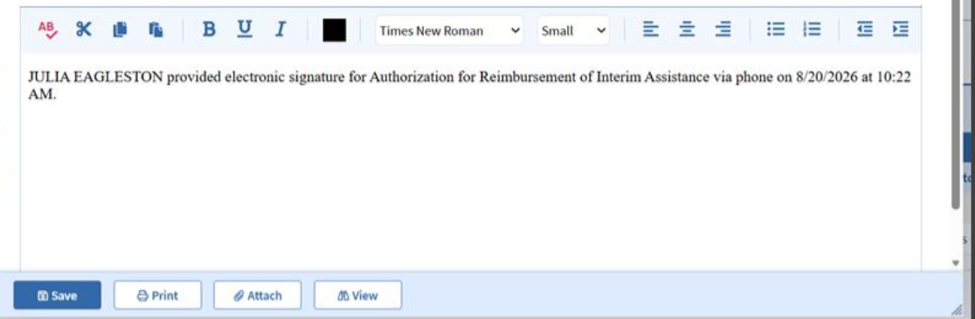
- The client’s telephonic signature will be converted to an electronic signature and populated on the AP-SSI-IAR form, along with the date and time the signature was provided. The form can then be printed with the client’s electronic signature displayed. View/HideView/Hide
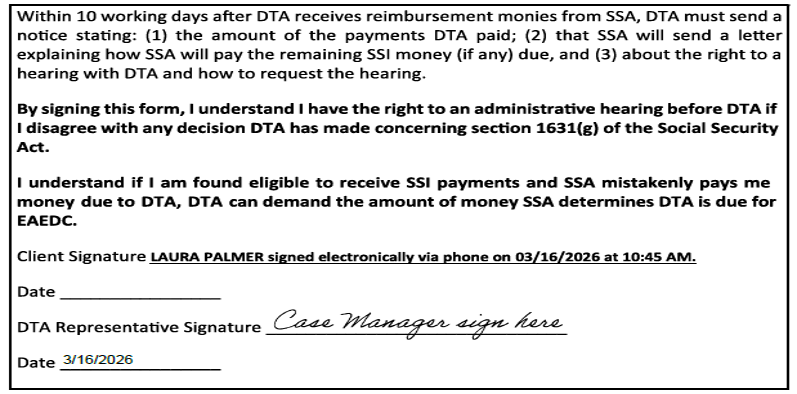
See Printing the AP-SSI-AR form from BEACON on the Authorization for Reimbursement of Assistance page.
When a Call is Disconnected Before the Client Provides the Signature for the EAEDC AP-SSI-IAR form
If the call gets disconnected before the client provides the telephonic signature for the EAEDC AP-SSI-IAR form, you must call the client back so that they can try again. If the cold call is unsuccessful, you must send a VC-1 with a mandatory User-entered Additional Verification for Signature with the following language:
“You attempted to telephonically sign the AP-SSI-IAR form for EAEDC, but we were unable to obtain your signature. You may contact your case manager for assistance completing a telephonic signature, or you may sign and date the enclosed AP-SSI-IAR form and return it to DTA by uploading through DTA Connect, fax or mail.”
A detailed narrative must be entered explaining why a telephonic signature was unable to be obtained and the steps taken.
When a Client Refuses to Telephonically Sign the EAEDC AP-SSI-IAR form
If a client who is required to sign the AP-SSI-IAR form states that they refuse to provide a telephonic signature for this specific form, send a VC-1 with a mandatory User-entered Additional Verification for Signature with the following language:
“You declined to telephonically sign the AP-SSI-IAR form for EAEDC. You must sign and date the enclosed AP-SSI-IAR form and return it to DTA by the due date listed on this notice. You may return the signed form by uploading it through DTA Connect, fax, or mail.”
A detailed narrative must be entered explaining why a telephonic signature was unable to be obtained and the steps taken.
If the signed AP-SSI-IAR form is not received by the VC-1 due date, deny or close the EAEDC case for Refusal to Comply with Lien Procedures.
Telephonic Signature Procedures for IRs
If you receive a call from the client and, while reviewing the case, realize that:
- the client has not completed an IR; and
- the client is within 45 days of the midpoint of their certification period, or the case closed for Failure to Complete an Interim Report and the client is within the 30-day reinstatement period,
you must ask if the client if they want to complete the IR process over the phone and provide a telephonic signature.
Reminder: BEACON automatically flags households that are within 45 days of the certification midpoint with a notification at the top of the My Office page near the grantee’s name, APID, and SSN.
Important: Because the SNAP IR form (on which the client would otherwise report a change) is not part of a telephonic IR process, you must follow these procedures even though interviews are not required at IR. The interactive review is necessary for telephonically-signed IRs because staff have no other way to review the case for possible changes.
If the client says that they are unable to complete the review at that time, and their signed IR form is not already in the case file, you must not reinstate the case and/or initiate the IR. You must advise the client that they are now in their IR period and may complete their IR by submitting it online through DTA Connect; calling the DTA Assistance Line/case manager/SAO to complete a telephonic signature; or completing the form and mailing/faxing it to the Document Processing Center. You must also advise the client that they will have to file a new application if they do not complete the IR process within 30 days of their certification period midpoint.
If the client indicates that they are available to complete the IR review, you must initiate the IR process. If the case is closed, but within 30 days, you must reinstate the case before initiating the IR process.
After initiating the IR process, you must ask the client whether:
- the household’s gross earned income changed;
- the household’s gross unearned income changed by more than $125 per month;
- someone has joined or left the household;
- the client is living at the same address or has the same mailing address; and
- the household’s child support, housing, dependent care, and/or medical expenses have changed.
If the household includes members who are not exempt from the ABAWD Work Rules, you must review whether the household member is participating and explore whether they meet any exemptions. For more information, see ABAWD Work Rules Overview.
You must remember to ask these questions because the IR workflow does not generate hard edits for the relevant BEACON pages. If the client indicates that one or more of these eligible factors have changed, you must manually visit and update the relevant BEACON page and, if necessary, request verification.
After completing the workflow at the Application/Reevaluation Print page, you must follow the applicable steps outlined in Obtaining a Telephonic Signature.
If the client agrees to the Rights and Responsibilities, BEACON will automatically insert a narrative indicating that the client provided the telephonic signature. Afterwards, you must process the case and/or send a VC-1 for outstanding verification.
Note: If you receive an Action to process a SNAP IR and you realize that the form is unsigned (and the client has not already provided the applicable telephonic signature), you must cold call the client two times to obtain the telephonic signature. If all the cold calls are unsuccessful, you must follow the procedures outlined in Document Indexing and Dispositioning for unsigned forms.
When the Client Refuses to Telephonically Sign an IR
If a client refuses to provide a telephonic signature for the IR, you must not submit the IR or centrally print the IR form. You must:
- inform the client of their certification midpoint;
- explain that the client has up to 30 days from the certification midpoint to either submit a signed form, or call DTA to telephonically sign the IR;
- send the client a VC-1 with a mandatory User-entered Additional Verification for Signature with the following language in the Detail(s):
“Call 877-382-2363 to Speak with a Worker to Telephonically Sign the Interim Report or Submit your Interim Report on DTA Connect or Sign the Interim Report form you received in the mail and submit to DTA”; and
- inform the client that if the SNAP certification midpoint passes before they provide a signature, they will not receive their SNAP benefits and will have 30 days to complete the IR process (or else they must file a new application for SNAP benefits). If the client is already within the 30-day reinstatement period, inform them that they must file a new SNAP application if they do not complete the IR process on the 30th day following the IR closing date.
When a Call is Disconnected Before the Client Signs the Interim Report
If the call gets disconnected before the client provides the telephonic signature for the SNAP IR, you must attempt to cold call the client so that they can try again. If the cold call is unsuccessful, you must send a VC-1 with a mandatory user-entered Additional Verification for Signature with the following language:
“You attempted to telephonically sign an Interim Report but we were unable to obtain the signature. To sign the Interim Report, you may call 877-382-2363 to speak with a worker to telephonically sign, submit the Interim Report on DTA Connect, upload a signed copy of the Interim Report on DTA Connect, or sign an Interim Report form and submit to it DTA.“
Telephonic Self-Declarations
A telephonic self-declaration is a self-declaration that is signed with a telephonic signature. To view a list of items for which you may accept a telephonic self-declaration as a primary verification, see Self-Declarations. Telephonic self-declarations are acceptable for TAFDC, EAEDC and SNAP.
If a client wants to provide a telephonic self-declaration, you must obtain the client’s verbal attestation of the applicable item and record it in the appropriate BEACON page(s). After the client gives the verbal attestation, you must follow the applicable steps outlined in Obtaining a Telephonic Signature. For self-declarations, the telephonic signature line will play the following recorded statement during Step 5 (above): “I state under penalty of perjury that the information reported is true and correct.”
If the client provides the telephonic self-declaration, you must write a narrative explaining what they are self-declaring because the automatic BEACON narrative will not identify the item. You must also:
- in the Verifications tab, click on the item for which the client provided the telephonically-signed self-declaration;
- under Documents of Evidence, select Other;
- type “Telephonic Self-Declaration” in the textbox; and
- click Save.
If the client does not provide a telephonic self-declaration (due to refusing or the call getting disconnected) for an item that cannot be verbally self-declared, you must attempt to call the client back. If the call is unsuccessful, you must send a VC-1 to give the client an opportunity to verify the item another way. You must remember to specify whether the item is mandatory or optional.
Note: If the client submits an unsigned written self-declaration for an item that can be verified with a telephonic self-declaration (and which has not already been verified), you must cold call the client to obtain a telephonic self-declaration. If the cold call is unsuccessful, you must follow the procedures outlined in Document Indexing and Dispositioning for unsigned documents.
Telephonic Self-Declarations at Reporting Periods
For most verification items, the primary and preferred verification method is for the client to submit documentary evidence. However, in a situation where:
- the client is submitting a telephonically signed application, recertification, reevaluation, or IR;
AND - self-declaration is a primary verification method for the multiple outstanding items (see Self-Declaration for a list of items for which self-declaration is the primary verification method),
the client is not required to submit separate telephonic self-declarations for each item.
If the client confirms the pertinent item to the worker during the interview/cold call, and the worker records the information in the appropriate BEACON page and in the narrative, the telephonic signature for the form covers the self-declarable verification items.
In instances where one telephonic signature is accepted for both a form (i.e., application, IR, recertification, or reevaluation) and a self-declarable verification item, you must record the self-declared verification item in the appropriate BEACON page and identify the item in the narratives.
Telephonic Signature Procedures for Appeal Withdrawals
As a part of the Fair Hearings process, staff must review the client’s case to determine if a Department error occurred and to conduct outreach to see if the issue may be resolved without the need for an appeal. At times clients may fill out the request for an appeal in error, or because they have a question about a change in their case and are unsure how to proceed. Outreach by the Hearing Liaison or case manager representing the appeal can offer the opportunity for the client to gain clarity and no longer feel the need to pursue an appeal.
After a client submits a request for an appeal, they may later decide that they no longer want to proceed. If a client chooses to withdraw their appeal, staff must give the client the option to withdraw electronically using the Telephone Signature Line menu option 7.
The appeal can be withdrawn by any DTA staff including:
- an appeals liaison
- eligibility staff and supervisors,
- managers, or
- Division of Hearings staff.
Important: If the client seems hesitant or confused about the process or outcome, do not take a telephonic signature. Instead, staff must advise the client to keep their hearing date or speak with a DOH staff.
After an appeal is withdrawn telephonically, the staff who assisted with the withdrawal must enter a narrative with details of the interaction using the following template:
- Name:
- Agency ID:
- Appeal Number:
- Date of withdrawal:
- Signature type: Telephonic
- Favorable or unfavorable:
(Favorable if the client’s benefits are restored, increased, or approved. Unfavorable if DTA's action/decision remains). - Reason for appeal withdrawal:
Note: As with all telephonic signatures, a batch narrative can take up to 15 minutes to appear in BEACON.
Appeals withdrawn by Local Office Staff
If the appeal is withdrawn by local staff outside of the Division of Hearings, you must notify the DOH of the client’s decision via secure email. The email to the DOH must include the information entered in your narrative.
Appeals withdrawn by Division of Hearings staff
If the appeal is withdrawn by the DOH, a secure email will be sent to the office or unit’s appeals liaison or the case manager informing them that the appeal is pending withdrawal. If the withdrawal of the appeal is not rescinded within 10 calendar days, DOH will send a secure email to the appeals liaison or case manager informing them of the official withdrawal of the appeal.
DOH will send a written notice of the withdrawal of the appeal to the client upon the initial request of withdrawal.
When a Telephonic Appeal Withdrawal is Unsuccessful
There are different reasons why a telephonic signature might be unsuccessful including system or connection issues, or if a call is unexpectedly ended.
If the telephonic signature to withdraw an appeal is unsuccessful; the client must be advised of alternate ways to submit their withdrawal:
- Contacting the Division of Hearings (DOH) directly via
- phone: 617-348-5321
- fax: (617) 348-5311, or
- mail: DTA Hearings, P.O. Box 4017, Taunton, MA 02780.
- Submit a written statement via DTA Connect,
- In person: submit a written request in person at their local office.
Last Update: September 10, 2026
|
|
|
||
| Digital Accessibility Statement | Privacy Policy | Site Policies | Public Records Requests |
|
© 2026 Commonwealth of Massachusetts. Mass.gov is a registered service mark of the Commonwealth of Massachusetts. |
|||

