An official website of the Commonwealth of Massachusetts Here's how you knowHere's how you know

Authorization for Reimbursement of Assistance (AP-SSI-IAR)
What is the Authorization for Reimbursement of Assistance (AP-SSI-IAR) Form?
The Authorization for Reimbursement of Assistance (AP-SSI-IAR) form gives permission to the Social Security Administration (SSA) to reimburse the Commonwealth for any EAEDC assistance received by the client while their Supplemental Security Income (SSI) application is pending a decision. If approved for SSI, the EAEDC amount received during that pending period is paid to the state out of any retroactive SSI amount owed prior to the client receiving their first benefit.
Which EAEDC Clients Need to Sign and Submit the AP-SSI-IAR Form?
Certain EAEDC clients must read, review with their case manager, and sign the AP-SSI-IAR form. This includes:
- Disabled - a person who is disabled or has a health condition,
- Elderly- a person over the age of 65, and
- Rest Home- EAEDC clients residing in a rest home.
Which Clients do not Need to Sign the AP-SSI-IAR Form?
- The grantee in an EAEDC Caring for the Disabled case is not required to sign the AP-SSI-IAR form.
- The grantee in an EAEDC Caretaker Family case is not required to sign the form AP-SSI-IAR form for the children receiving EAEDC.
When is the AP-SSI-IAR Form Needed?
- At each EAEDC application the form is required.
- At each reevaluation, a new form is required if the previously submitted form was not signed within a year.
It is important that a current and complete AP-SSI-IAR form signed by the client and a DTA staff member is always available in the Electronic Case File (ECF) or the state will not be reimbursed the correct amount.
The AP-SSI-IAR form is valid for one year or until:
- the SSA makes an initial or reinstated SSI payment or
- the SSA makes a final determination on the SSI claim or appeal.
Important: While a reevaluation can be approved if the previously submitted AP-SSI-IAR form was signed within a year, a new form must be submitted prior to the form’s expiration. The case manager must create an Outlook reminder to send a VC-1 with the form 20 days prior to the expiration of the form. At each application however, a new form is required and a previously submitted form cannot be used even if it is signed within a year.
Printing the AP-SSI-IAR Form from BEACON
To generate the AP-SSI-IAR form for an EAEDC client, who is Elderly or Disabled, you must create a User entered verification by:
- selecting New on the Verification tab
- selecting Agreement to Reimburse DTA-SSI from the Element dropdown,
- selecting either Initial Claim or Post eligibility Case under the Value dropdown, as appropriate and click Save, and
- printing the form locally or centrally.
Reminder: Use Initial claim for a client who has never received SSI before or who received SSI more than a year ago.
Use Post Eligibility claim when the client has previously received SSI, and their SSI benefits have been suspended or terminated for less than one year.
The AP-SSI-IAR form will print as an addendum to the VC-1, with the applicable claim type and client information prepopulated on the form.
Printing the AP-SSI-IAR Form from Online Forms
The AP-SSI-IAR form is available in Online Forms as a fillable PDF. To generate the AP-SSI-IAR form, you must:
- access the AP-SSI-IAR form in Online forms.
- enter the name, address, and SSN on the form,
- print the form locally,
- check either Initial Claim Only or Post eligibility Case Only,
- sign and date the Signature of State Representative section, and
- mail the form to the client to sign.
Reminder: Use Initial claim for a client who has never received SSI before or who received SSI more than a year ago.
Use Post Eligibility claim when the client has previously received SSI, and their SSI benefits have been suspended or terminated for less than one year.
AP-SSI-IAR Signatures
If you are meeting with the client in the TAO:
- sign and date the Signature of State Representative section,
- give the form to the client to sign and date the Signature of Individual Receiving Interim Assistance section,
- scan the form to the Document Processing Center (DPC), and
- give a copy of the form to the client.
Important: Be sure that you and the client date your signatures using the date you each signed the form.
If you are working in the TAO and the client is not with you:
- print sign, and date the form, and
- mail it to the client to sign with the VC-1.
If you are working remotely:
- print the form centrally to send it to the client and
- when the form is returned you can either:
- create an outlook reminder to print and sign the form on your in-office day, or
- send an email, including the name and APID for the client to your local office management team with a copy to your supervisor. The management team will determine which in office staff will be responsible for signing and dating the form and scanning it to the client’s Electronic Case File (ECF) according to current procedures.
See Guidelines for Scanning Documents to the DPC.
Note: If you are sending the form centrally to the client, you must tell the client to sign and date the Signature of Individual Receiving Interim Assistance section and that the Signature of State Representative is for a DTA staff member to sign.
Which DTA Staff Can Sign the Form?
The Signature of State Representative section of the AP-SSI-IAR form can be signed by:
an Economic Assistance Case Manager,
- a TAO Supervisor,
- a TAO Assistant Director, or
- a TAO Director.
What do I do with the AP-SSI-IAR Form Once the Client Signs it?
Each time the AP-SSI-IAR form is signed by the client you must:
- enter the date the client signed the form on the SSI Tracking page,
- review the form to ensure the State Representative Signature is completed on the form, and
- ensure a copy of the form with both signatures is available in the client’s scanned documents folder and is correctly indexed. View/HideView/Hide
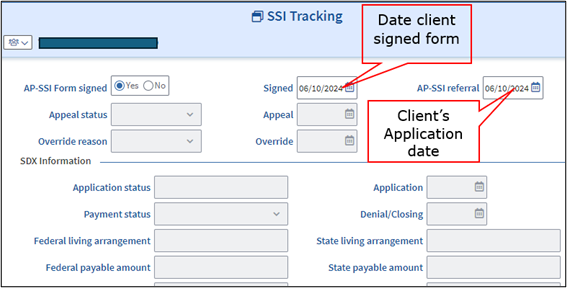
Each time the client submits a new AP-SSI-IAR form, the Signed field must be updated with the date the client signed the new form.
What if the Form is not Returned?
- If the form is not returned or is returned incomplete, the EAEDC must be closed or denied by selecting Failure to submit the required verifications, under Noncooperation.
- If the client states they do not agree to sign the AP-SSI-IAR form, the EAEDC must be denied or closed by selecting Refusal to comply with lien procedures, under Noncooperation.
Examples
Maria (she/her) applied for EAEDC as a disabled individual. The NewMMIS indicates Maria has an approved disability through MassHealth. The case manager sent a VC-1 for the AP-SSI-IAR form. On day 30 the form has not been returned, the case manager must deny the EAEDC for Failure to submit the required verifications.
Sam (they/them) applied for EAEDC and indicates they have a disability that is expected to last 12 months or more and prevents them from working. Sam has already applied for SSI. The case manager reviewed the program requirements regarding the reimbursement of interim assistance with the client and Sam states they are not willing to sign the AP-SSI-IAR form because they don’t agree with the reimbursement requirement. The case manager must deny the EAEDC for Refusal to comply with lien procedures.
Amar (he/him) submitted an AP-SSI/IAR form with his EAEDC application in June. When his case was approved the EAEDC synced with his existing SNAP certification date. In November Amar’s EAEDC and SNAP are due for recertification. Amar is certified disabled through MassHealth and has no income. Amar’s case manager can approve the EAEDC reevaluation without a new AP-SSI-IAR form because there is a completed and signed form on file that is dated within a year. The case manager must create an outlook reminder to send a VC-1 with the AP-SSI-IAR form 20 days prior to the one-year date of the signature on the form.
Related Topics
Quick Reference Guide EAEDC AP-SSI-IAR
Last Update: September 10, 2026
|
|
|
||
| Digital Accessibility Statement | Privacy Policy | Site Policies | Public Records Requests |
|
© 2026 Commonwealth of Massachusetts. Mass.gov is a registered service mark of the Commonwealth of Massachusetts. |
|||

