An official website of the Commonwealth of Massachusetts Here's how you knowHere's how you know

Unclear Information
Unclear information is information from which you cannot readily determine whether it will negatively impact an active household’s SNAP benefits.
Staff may receive unclear information from a third party or from the SNAP household itself. The information may be UNVERIFIED, or it may be verified but such that the effect on the household’s SNAP eligibility is not apparent.
For example, if an active client on Simplified Reporting verifies that a new member has joined the household, but the client does not provide any information about the new member’s income, the information is unclear. Because the new member may have income in excess of the household’s gross limit, you cannot add the new member to the household without first seeking additional information.
However, if the client provides the new member’s information (name, SSN, DOB, etc.) and their last four pay stubs, you must add the new member and their income because the income, even though unsolicited, is verified upon receipt. In this instance, the information is not unclear because all four pay stubs were received.
Significantly Conflicting Information
Significantly conflicting information is a subset of unclear information. Unclear information is significantly conflicting if it contradicts the circumstances used to certify the household at their reporting period.
All significantly conflicting information is unclear, but not all unclear information is significantly conflicting.
Following Up on Unclear Information
Step One: Is the Information Significantly Conflicting?
Upon receiving unclear information, your first step is to check whether the information is significantly conflicting. When unclear information is significantly conflicting, you must always pursue additional verification because it means that an agency or client error occurred at certification. Such errors must be corrected.
If the unclear information concerns a mandatory verification element and significantly conflicts with the information used to certify the household at a prior reporting period, you must send a mandatory VC-1 for the missing information. The case must be closed if the verification is not received by the VC-1 due date.
If the unclear information is not significantly conflicting, proceed to the next step.
Step Two: Is the Household Subject to a Gross Limit?
If the unclear information is not significantly conflicting, you must check whether the household is subject to a gross income limit. Households with no gross income limit include at least one elderly and/or disabled individual. Such households have no obligation under Simplified Reporting rules to report changes in income during the certification period.
If the household is not subject to a gross limit, you must not pursue additional verification under the unclear information procedures. If the household is on EDSAP Reporting and reports that they have earned income, you must follow the existing procedures to convert the household to Simplified Reporting (Former EDSAP); see Simplified Reporting During Case Maintenance for more information. Otherwise, any incomplete income information should not be entered into the BEACON income pages; you must disposition the document as “Reviewed Not relevant” and write a narrative advising staff to address the information at the next reporting period.
If the household is subject to a gross limit, proceed to the next step.
Step Three: Is the Unclear Information Less than 60 Days Old and Potentially Required to be Reported?
If the household is subject to a gross limit, you must check whether the unclear information meets the following criteria:
- The information is less than 60 days old (relative to the current month of review), and
- you cannot determine from the information whether the household is required to report it under the rules of their certification type.
If the unclear information does not meet both of these criteria, you must not send a VC-1 to pursue additional verification. Any incomplete income information should not be entered into the BEACON income pages. You must disposition the document as “Reviewed Not relevant” and write a narrative advising staff to address the information at the next reporting period.
If the unclear information meets both criteria, proceed to the next step.
Step Four: Cold Call the Client
If the unclear information is less than 60 days old and you cannot determine whether the household is required to report it, you must cold call the client.
If the cold call is successful, you must ask the client clarifying questions about the information to determine whether additional verification is required per their reporting rules. If the information is required to be reported, you must send a mandatory VC-1 for the missing information (as the client will be unable to verify this via telephonic signature because the item will not be self-declarable). By the time the verification is due, BEACON will create a Verification Due Action: The FAW must then close the case if the verification has not been provided.
If the information is not required to be reported, you must not send a VC-1 to pursue additional verification. Any incomplete information should not be entered into the applicable BEACON pages. You must disposition the document as Reviewed not relevant and write a narrative advising staff to address the information at the next reporting period.
If the cold call is unsuccessful, proceed to the next step.
Step Five: Handling Unsuccessful Cold Calls
If the cold call is unsuccessful, you must send the household a VC-1 and write a detailed narrative explaining what is unclear. You must enter a User-Entered Verification, select an Element of Additional Verification, enter “Unclear Information” in the Detail(s) field, select Mandatory under the Program(s) field, and enter the following language in the Document(s) of evidence field:
“We received information about a possible change to your household’s income or circumstances, but we need more information. Please call us at 1-877-382-2363 immediately so that we can determine if you need to submit additional information to DTA at this time.”
Reminder: Unclear information may pertain to income or other household circumstances. For example, the information would be unclear if the client submitted one pay stub (for a job that was not previously recorded in BEACON) in which the year-to-date information indicates that they have been working at the job for longer than a month.
If the household does not respond to the VC-1, or the household responds but does not provide sufficient information to clarify its circumstances, the FAW who receives the Verification Due Action must close the case if the verification has not been provided .
If you are contacted by the client in response to the VC-1, you must do the following:
- Enter the client’s ECF and check whether relevant verification was already received. If yes, process the verification per normal procedures, as it is verified upon receipt.
- If not, ask the client clarifying questions about the unclear information to determine whether additional verification is required per their reporting rules.
- If documentary verification is required, send a new mandatory VC-1 with a specific request for the item that is missing (for example, send the standard VC-1 for earned income). The VC-1 due date will be extended from the due date that was on the initial VC-1 with the user-entered request for Unclear Information. By the new VC-1 due date, the FAW who receives the Verification Due Action must close the case if the verification has not been provided. (The original request for Unclear Information should be marked as Verified, since the client responded to it with a phone call.)
- If the information is not required to be reported, rescind the previous request for mandatory verification. Mark the original request for Unclear Information as Verified and record your findings in the BEACON narrative.
When Unclear Information May Increase Benefits
If it appears that the reported change will cause the SNAP benefits to increase, you must cold call the client.
If the cold call is successful, you must inform the client that we do not have enough information to act on the change, but that they have the option to submit the missing verification and potentially receive a higher benefit level. You must clarify that this is not a mandatory requirement during case maintenance.
Do not send a VC-1. You must disposition the document as Reviewed not relevant and write a narrative advising staff to address the information at the next reporting period. This also applies if the cold call is unsuccessful.
Questions and Answers
Q1. Definitions
Q1. Are “unclear information” and “significantly conflicting information” interchangeable terms that apply to the same policy?
A1. No. These two terms are not interchangeable. Although related, these terms refer to two different policies that are applied in different situations.
Q2. Information You Do Not Have to Pursue
Q2. A client on Simplified Reporting sends in two weekly wage stubs from four months ago for a job already on file in BEACON. The household is subject to a gross income limit. Are we required to pursue verification of this income record under unclear information rules?
A2. No. To pursue verification under the unclear information policy, the information must be less than 60 days old relative to the beginning of the cyclical month in which it was received. However, if the unclear information appears to present significantly conflicting information from that used by the Department at the time of certification, then you must pursue verification under the significantly conflicting information policy.
Q3. Significantly Conflicting Information
Q3. A client on Simplified Reporting sends in two weekly wage stubs (representing less than four weeks’ worth of pay) outside of their normal reporting periods. The pay stubs indicate that the client started the job before their last reporting period. What should I do next?
A3. Since the household previously had no income on file during the last reporting period and the reported income shows that they had the income at that time, this situation meets the criteria for significantly conflicting information. Disposition the wage stubs as Reviewed & Entered. You must send a VC-1 for the remaining wage stubs and close the case if verifications are not received by the VC-1 due date.
Q4. Unclear INformation Less than 60 Days Old
Q4. A client on Simplified Reporting sends in two consecutive weekly wage stubs (representing less than four weeks’ worth of pay) outside of their normal reporting periods. The wage stubs are less than 60 days old relative to the beginning of the cyclical month in which it was received. The household is subject to a gross income limit and already has earned income on file for a different job. The client is reporting an additional earned income source, although there is no indication that they had this job when they were initially certified. What should I do next?
A4. A cold call must be attempted to clarify the wage information.
- If contact is successful and the client provides you with an estimate of the household’s gross monthly income, you must take the following steps:
- Confirm with the client whether they still have the job on record and review with the client the status of any other income on file.
- Add the estimated gross monthly income (for the new income source) reported by the client to the existing income that the client is receiving.
- If this combined amount is less than the gross income limit for the household size, you must disposition the wage stubs as Reviewed not relevant. Do not send a VC-1 for this reported change. You must write a detailed narrative instructing the next case manager to follow up on this income record during Interim Report or recertification, whichever comes first.
- If this combined amount is greater than the gross income limit for the household size, you must send a VC-1 for the remaining wage stubs and close the case if verifications are not received by the VC-1 due date.
- If the cold call is unsuccessful, you must send the household a VC-1. You must enter a User-Entered Verification, select an Element of Additional Verification, enter “Unclear Information” in the Detail(s) field, select Mandatory under the Program(s) field, and enter the following language in the Document(s) of evidence field:
- “We received information about a possible change to your household’s income or circumstances, but we need more information. Please call us at 1-877-382-2363 immediately so that we can determine if you need to submit additional information to DTA at this time.”
Q5: Unclear Information Potentially Leading to Increase
Q5. A client on Simplified Reporting sends in two weekly wage stubs for his current job at Dunkin Donuts. The wage stubs are less than 60 days old relative to the relative to the beginning of the cyclical month in which it was received. The household is subject to a gross income limit. The reported income appears to be lower than what was previously on record. What should I do next?
A5. You must cold call the client to inform them that the submitted wage stubs are lower than what was on file and therefore do not exceed the household’s gross income limit. You must inform the client that we do not have enough information to act on the change. The client must be made aware that they have the option to submit the remaining wage stubs, since it may result in a higher SNAP amount. However, you must make it clear that this is not a mandatory requirement during case maintenance.
For the time being, you must disposition the document as Reviewed Not Relevant and write a detailed narrative instructing the next case manager to follow up on the income record during Interim Report or recertification, whichever comes first. Simplified Reporting clients are not obligated to report decreases in income outside of their reporting periods. Although it may be advantageous for the client to submit lower wage stubs, we do not want to send a VC-1 because it would lead them to believe these verifications are mandatory. Furthermore, if the client does not respond to the VC-1, then the mandatory VC-1 will eventually cause the case to automatically close.
Q6: Unclear Information: Adding a Household Member
Q6. A client on Simplified Reporting submits a handwritten note stating that their brother has moved into their household and that they would like them added to the SNAP case because they purchases and prepares meals with the family. The note includes their brother’s name, DOB, and SSN; however, it includes no information about her brother’s income. What should I do next?
A6. You must cold call the client to determine whether their brother has any income because they may have income that places the SNAP household above its monthly gross income limit. If contact is successful, you must ask about the brother’s income. If the brother has income and the client provides you with an estimate of their gross monthly amount, you must add the estimated gross monthly income (for the new income source) reported by the client to the existing income that the client is receiving.
- If this combined amount is less than the gross income limit for the household size, you must add the brother to the case. Do not send a VC-1 for the income. You must write a detailed narrative instructing the next case manager to follow up on this income record during Interim Report or recertification, whichever comes first.
- If this combined amount is greater than the gross income limit for the household size, you must not add the brother to the case. You must send a VC-1 for the brother’s income and close the case if verifications are not received by the VC-1 due date.
If contact with the client is unsuccessful, you must send the household a VC-1. You must enter a User-Entered Verification, select an Element of Additional Verification, enter “Unclear Information” in the Detail(s) field, select Mandatory under the Program(s) field, and enter the following language in the Document(s) of evidence field:
“We received information about a possible change to your household’s income or circumstances, but we need more information. Please call us at 1-877-382-2363 immediately so that we can determine if you need to submit additional information to DTA at this time.”
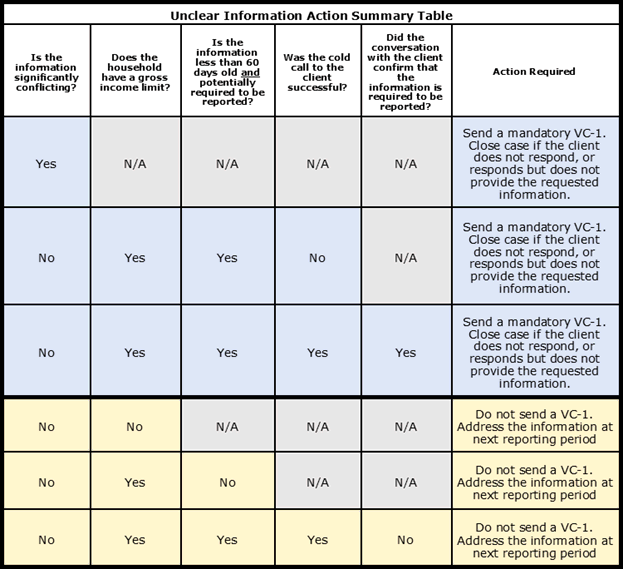
Unclear Information Action Summary Table
The table below is a summary of the information presented in this Online Guide page. This is to assist the worker in determining the appropriate action steps in response to unclear information.
Last Update: July 13, 2022
|
|
|
||
| Digital Accessibility Statement | Privacy Policy | Site Policies | Public Records Requests |
|
© 2026 Commonwealth of Massachusetts. Mass.gov is a registered service mark of the Commonwealth of Massachusetts. |
|||

