An official website of the Commonwealth of Massachusetts Here's how you knowHere's how you know

Overview - Electronic Benefit Transfer (EBT)
What is Electronic Benefit Transfer (EBT)?
Electronic Benefit Transfer (EBT) is an electronic system used by the Department of Transitional Assistance (DTA) to distribute benefits to clients.
All SNAP benefits and the majority of TAFDC and EAEDC benefits are accessed using Electronic Benefit Transfer (EBT) cards. By using EBT cards, the Department is able to streamline the benefit issuance process; significantly reducing the issuance of checks, replacement of lost or stolen checks, and delays in delivery.
The Primary EBT cards are designated as Photo and Non-Photo EBT cards. State law requires the use of grantee’s photo on each EBT card, with some exceptions. See Photo EBT Requirements for more details.
To ensure that clients have immediate access to benefits, EBT cards must be issued at the time of application whenever possible.
EBT and SNAP Benefits
SNAP benefits can only be deposited through a Department issued EBT card. To access the SNAP benefits, the client must use their EBT card and Personal Identification Number (PIN). The client can shop at SNAP authorized retailers in stores or online for eligible food items. At check out (similar to a credit or debit card) the client will tap, insert, or swipe their EBT card and then enter their PIN in the retailer’s card reader. If the purchase is completed online; the client will be required to enter their EBT card Primary Account Number (PAN) and PIN at checkout. This will authorize the account to be debited for the eligible amount of benefit dollars used.
Stores Without POS Terminal
Accessing EBT SNAP benefits at a store that does not have a POS terminal occurs through the manual voucher process which is similar to a credit card process. The vendor will write the client’s EBT card number on a voucher form for the amount of the food purchase and then call a toll-free number to ensure there is a sufficient balance and debit the client’s EBT SNAP benefits.
EBT and Cash Benefits
TAFDC and EAEDC benefits are issued through Electronic Benefit Transfer (EBT), Direct Deposit, or checks, which are mailed.
Cash Benefits via EBT Card
When a client receives their cash benefits on their EBT card, they can:
- access cash at bank automated teller machines (ATMs) displaying the NYCE logo, and/or
- access cash assistance and/or SNAP benefits at Point-of-Sale (POS) terminals in food stores displaying the QUEST logo. Accessing EBT cash assistance at a POS terminal in a store is called a cash-back transaction.
A client with both cash and SNAP benefits needs only one EBT card to access both. Cash benefits cannot be accessed without an EBT card unless the client has an alternate benefit issuance mechanism, such as direct deposit or check.
Cash Benefits via Direct Deposit
Direct deposit is the most efficient, cost-effective way for clients to receive their cash benefits, which makes it the Department’s preferred method. The Department requires participation in direct deposit for any client who has a bank account, with some exceptions. See Direct Deposit Procedures - TAFDC and Direct Deposit Procedures - EAEDC for more information.
When a client uses direct deposit for benefit issuance, their TAFDC and/or EAEDC cash benefits are deposited directly into their own bank account. The client must still use their EBT card to access the SNAP portion of their benefits if applicable.
See Direct Deposit Procedures - TAFDC and Direct Deposit Procedures - EAEDC for more information.
Cash Benefits via Check
There are circumstances in which certain clients receive cash benefits that are not issued by EBT or Direct Deposit. Those benefits are issued by check. These limited situations include:
- EAEDC clients whose living arrangement is a residential facility such as an institution, rest home, therapeutic community center, or detoxification center,
- EAEDC clients who do not have Direct Deposit and who are living temporarily out of state (temporary absence). See Checks-EAEDC, and
- TAFDC clients who do not have Direct Deposit and who are living temporarily out of state (temporary absence). See Checks-TAFDC.
Chipped Electronic Benefit Transfer (EBT) Cards
The Department has transitioned to the issuance of chipped Electronic Benefit Transfer (EBT) cards for both SNAP and cash benefits. Chipped EBT cards have a microchip embedded in them and offer a more secure and safer transaction process with enhanced security, fraud protection, and a modernized system of payment.
The features of chipped EBT cards include:
- chip technology that decreases the ability of EBT information being copied and stolen,
- modernized payments where clients can enter their chipped card or tap the EBT card on the retailer’s card reader, similar to major credit cards, before entering their PIN to complete a transaction, and
- magnetic strip fallback to complete transactions if:
- the retailer’s system is not reading the chip technology, or
- the retailer has an older terminal that does not have the chip technology.
Shopping in Stores
When using the chipped EBT cards in stores, clients can:
- tap their card on the retailer’s card reader then enter their PIN,
- insert their card into the card reader (chip first) then enter their PIN, or
- swipe the magnetic strip and enter their PIN.
Important: If tap or insert does not work after a few tries, most retailers will then allow swiping the magnetic strip.
Shopping Online
Shopping online is available for SNAP purchases only. To complete an online purchase, clients will need to enter the following information in the applicable payment fields:
- 16-digit card number, and
- the PIN when prompted.
Important: The chip technology does not replace the PIN. Online retailers will still require entering the PIN for authentication.
Locking and Unlocking EBT Card
Clients can lock and unlock their EBT cards using DTA Connect Online, the DTA Connect Mobile App, and through FIS using the EBT Customer Service number on the back of their EBT card (800-997-2555).
Note: A card's locked or unlocked status carries over. If the client’s old card was in a locked status to prevent fraud when replaced, when the new or replacement EBT card is issued, that card will also be locked, and the client must unlock the card prior to using it.
See Locking and Unlocking EBT Card for more information.
EBT Card Requests
New and replacement EBT cards may be requested through:
- FIS’ Assistance Line IVR system (800-997-2555 (EBT customer service number located on back of EBT card)),
- the DTA Assistance Line IVR system (877-382-2363),
- DTA Connect portal and the DTA Connect app,
- visiting a local DTA office, or
- in writing by mail or fax.
Requesting an EBT Card Through FIS Assistance Line
Clients can call the FIS Assistance Line phone number located on the back of their EBT card (800-99-2555) to request a new card.
Requesting an EBT Card Through IVR System
Automated System
Clients can call the Assistance line –> Choose Language –> Then Press “1” to authenticate –> Enter APID/SSN/EBT Card Number and Year Of Birth –> Listen to either SNAP or Cash Summary –> Press “3” to go to EBT Menu –>The Press “1” to request an EBT Card.
Speaking Directly to Staff
If speaking with a client by phone, staff must remind clients of all available options to request a card but are to process the request themselves in BEACON as authorized. Staff must ensure that the address on file is correct by confirming details such as apartment/unit number, street type (Rd, Pl, Terr, etc.), and zip code.
Requesting an EBT Card Through DTA Connect
Clients can request an EBT card by logging in to their account at DTAConnect.com at a kiosk or through a personal device. They can also request one by logging into the DTA Connect mobile app on a personal device. Details on how to request an EBT card through DTAConnect can be found at Requesting an EBT Card via DTA Connect.com and DTAConnect Mobile App.
Requesting an EBT Card at a Local TAO
Clients can visit their local TAO to be issued a new or replacement EBT card. If a client visits a local office specifically to get an EBT card, they must be registered with reason “EBT” and steps for issuing EBT cards locally must be followed. See Issuing and Printing EBT cards at Local Offices.
Requesting an EBT Card in Writing by Mail or Fax
Clients can request an EBT card in writing via mail or fax. When a client submits a request via mail or fax, the best practice is to call the client to confirm the request and mailing address prior to issuing the new card. Staff should also check BEACON narratives and the EBT Card Request window to ensure that a new EBT card request has not already been made/entered using an alternate method.
Note: While primary card holders/clients are able to use any of the methods above to request or be issued an EBT card; all methods are not available to authorized representatives and authorized payees (agency or non-agency). Authorized representatives and authorized payees must visit a local office to be issued an authorized rep/payee EBT card.
Agency Authorized Representative for EBT Transaction(s) may also opt to request a primary EBT card on behalf of the client by calling the DTA Assistance Line. They will be able to directly receive the client’s primary EBT card via mail.
Requesting a Primary Card for An Applicant
Request for Assistance Workflow
To request a Primary card, the Request for Assistance workflow must be completed. You must check the Request Primary EBT Card checkbox on the Request for Assistance view to initiate a request for a Primary EBT card for the applicant.
Note: If the Benefit Mechanism View shows EBT Purged, then the Request Primary EBT Card checkbox will be checked automatically.
The EBT Card Request Identity pop-up view will appear when the Request New EBT Card checkbox is selected. You must select the type of verification used to prove identity.
Note: This EBT verification is different and separate from the Eligibility Explorer verification. Once you complete the Request for Assistance view, the case will appear on the Pending EBT Card Request view. Staff with EBT clerk access will access this view to create the card.
EBT Card Request Window
There may be times when the need for a new EBT card is not recorded at RFA. If staff need to issue an EBT card after already completing the RFA workflow they must proceed to the EBT Card Request page in BEACON to enter a new request for an EBT card. See Issuing and Printing EBT cards at Local Offices for steps to request an EBT card.
Requesting an Initial Card for an Assisting Person for the Applicant
Clients may appoint an assisting person; an individual/organization designated by the client; to help with the management of their case. A client may be helped by anyone they choose, including a family member, friend, neighbor, or an agency staff member. The functions that an assisting person may help with are dependent upon the role authorized by the client. You must ensure that clients are aware of this option. See Assisting Person Overview for more information including how to add an assisting person in BEACON.
To request a new card for an Assisting Person, you must access the Assisting Person view and select the record from the select list; and check the Request New EBT Card check box and the Image-10 check box.
Requesting a Replacement Card for a Client or Assisting Person
A replacement EBT card must be issued, if requested, to any client with benefits in their EBT account, even if the case is closed. A replacement EBT card must not be issued to a closed case if no benefits remain in the EBT account and the client has not applied for benefits.
There may be a fee to replace the card. See EBT Card Fees Replacements, and Notices for more information.
The EBT Card Request icon  is accessed to initiate a request for a replacement card, a re-PIN or a new card. This method of requesting an EBT card can also be used for new applications when the RFA has already been completed but the card request process on the was not initiated on the applicants Request for Assistance/Signature view in BEACON.
Note: If a client’s identity is verified in BEACON, when you select Central print for a Primary card, the Identity field defaults to the verification type Processed by Batch. You do not need to change it.
When the replacement is for an Assisting Person, staff must also:
- select the type of verification used to prove the identity of the assisting person on the EBT Card Request Identity pop-up view; and
- have the client and assisting person complete the Image-10
Note: The Image-10 must be received to complete the card request. The Image-10 can be printed locally and given to the Assisting Person or can be printed centrally and mailed out the client.
Cancelling an Authorized Representative or Authorized Payee EBT card
A client may cancel an authorized representative or authorized payee EBT card at any time by calling FIS’ EBT Customer Service at 1-800-997-2555. FIS’ EBT Customer Service will immediately cancel the access of the authorized representative or authorized payee to the client’s cash or SNAP benefits.
Verifying Identity when Issuing an EBT Card
It is necessary to verify identity before issuing an EBT card. EBT cards must be issued on Day 1 provided the applicant provides proof of identity.
When Identity is Verified on Day 1
If identity is verified on Day 1, i.e. the client shows you proof of identity during the in-office interview, the client is already known to BEACON, or the client has mailed-in or dropped-off proof of identity, you must:
- upon completion of the RFA, check the Request Primary EBT Card box; and
- select the item used to verify identity from the EBT Card Request Identity dropdown list in the RFA or for Web applicants, verify identity in the EBT Card Request page in EBT Client List
For clients in office for an EBT card, after appropriately being registered, the staff assigned to print EBT cards will then:
- Search for the client’s ECF and enter the EBT Card Detail page;
- verify identity using the verification selected by you;
- create and issue the EBT card; and
- have the applicant select a PIN
Note: For authorized representative/payee cards staff must access the case through the Pending EBT Card Request under the Daily Priority Actions view in order to print the card.
For an EBT card by mail, you must:
- from the EBT Client list, EBT Card Request page, select the record and fill out the required fields; and
- select Central Print from the Print Location dropdown list so the request is processed for an EBT card/PIN by mail
When Identity is NOT Verified on Day 1
If identity is not verified on Day 1, you must:
- on Day 2, check the Verifications tab to see if the SSN has been validated through SVES.
- once the applicant’s SSN is validated through SVES:
- verify identity in the EBT Card Request page/EBT Client List by selecting Validated by SSA/SDX
- fill out the required fields; and
- select Central Print so the request is processed for an EBT card/PIN by mail
If no SSN is provided, or identity is questionable, you must request verification of identity before issuing an EBT card in person or by mail.
When a client requests an EBT card in-person and the client’s social security number has not yet been verified by SVES on Day 1, the issuance of the EBT card must not be denied if verification of identity is available. Verification of identity includes – but is not limited to – a driver’s license or state issued I.D., passport, birth certificate or hospital birth record, court or other government documents, military service papers, employment papers, and wage stubs. Verification of identity cannot be restricted solely to a photo I.D.
If the client provides acceptable verification of identity, the EBT card must be issued. Example
In office EBT Card Request When Card was Already Mailed
If an applicant comes to the TAO and requests an EBT card and the EBT card was initially issued by mail, the steps outlined above must be followed to issue a card/PIN without delay. You must be sure to explain to the applicant that the EBT card/PIN that was mailed will be immediately deactivated and must be destroyed upon receipt.
Pending EBT Card Request View
Once you have completed a request for an EBT card, the grantee will be listed on the Pending EBT Card Request view listed under Daily Priority Actions. You will see only your own caseload list while staff with the user capability of EBT clerk will see the entire TAO list. The view is sorted by Print location with Local first then alphabetically by the grantee’s last name. When the EBT card is created (printed) the grantee is removed from the view.
Emergency EBT Card
If an EBT card is needed but, but the card issuance system is inoperable, an emergency EBT Card can be issued. Staff with the appropriate systems access will:
- check Emergency Card Issued and enter the pre-numbered PAN from the Emergency Card on the EBT Card Detail view,
- click the Submit button to electronically transmit the Emergency PAN to the ebtEDGE system,
- have the applicant or client select a PIN, and
- give the applicant or client the pre-numbered Emergency Card
If BEACON is unable to electronically transmit to the ebtEDGE system the Emergency Card PAN just entered manually by you, the staff with the user capability of EBT clerk will:
- enter the client data and PAN onto the ebtEDGE system by using the administrative terminal.
- select the Admin Terminal checkbox on the EBT Card Detail view,
- have the applicant or client select a PIN, and
- give the applicant or client the pre-numbered Emergency Card.
Expedited EBT Card
Clients in emergency situations, such as those related to domestic violence or homelessness, may require alternative delivery methods. Similarly, if the mailing of an EBT card has been delayed or appears to be lost in transit, and an immediate replacement is critically needed, the Department may need to explore alternative options when the client is not able to obtain a card in person.
Solutions may include the expedited mailing of a new or replacement EBT card. There is no set criteria for the expedited mailing of an EBT card. Staff must take into account details including but not limited to:
- immediate need (confirming available balance via ebtEDGE and their next benefit issuance date);
- homelessness or ability to receive the card by mail;
- anticipated delivery date of a previously requested card;
- other delays in card issuance or delivery; and
- other critical or emergency circumstances.
When a client requests a new or replacement EBT card to be mailed to them expeditiously; the DTA staff assisting the client must send an email to the Ombudsman Unit’s distribution email. The email must contain the client’s name, APID, current address, and reason for the request. After review by Ombudsman unit management, the request is sent to Schrafts Print Shop for processing.
Personal Identification Number (PIN)
Each client, authorized representative and authorized payee must have a PIN to access EBT cash and/or SNAP benefits. A PIN is a four-digit number that must be used with the EBT card at an ATM or POS terminal. Staff must remind applicants, clients, authorized representatives and authorized payees that the PIN must be kept secret and must not be written on or near the EBT card. Staff must also encourage applicants, clients, authorized representatives and authorized payees to regularly re-PIN their EBT cards the day before their benefit issuance(s) to mitigate instances of benefit theft.
PINS for Applicants, Clients, Authorized Representatives and/or Authorized Payees
Most applicants, clients, authorized representatives and/or authorized payees who need a PIN should select a PIN at the same time that they get their EBT card.
Selecting PIN in office
An applicant, client, authorized representative and/or authorized payee may change their PIN at any time by coming to the TAO and requesting a new PIN. When a client is selecting their PIN while at a local DTA office, the staff printing the EBT card must verify the method of identification before a PIN is selected. The applicant, client, authorized representative and/or authorized payee enters their chosen PIN on the PIN Selection System and the staff issuing the card ensures system acceptance.
Selecting PIN using FIS’ EBT Customer Service
An applicant, client, authorized representative and authorized payee can also select a new PIN by calling FIS’ EBT Customer Service Assistance Line at 1- 800-997-2555. They will be required to enter their 18-digit card number, date of birth and the last four digits of their SSN to verify their identity before selecting a PIN.
PIN Issuance by Mail
A new PIN can be issued to a client by mail when necessary. Because of the ability to select a personalized PIN both at a local DTA office and by phone, the mailed PIN option, which generates a random PIN, is considered as a last option for PIN issuance.
PINs by mail are issued overnight. The client should allow five business days for receipt of the PIN in the mail. If a client notifies the TAO that a PIN was not received, either the case manager or staff with the user capability of EBT clerk must check the Card Issuance System to verify when the PIN was issued. If five days have elapsed, the PIN is to be reissued.
Lost or Stolen EBT Cards
Lost or stolen EBT cards must be reported to EBT Customer Service at 1-800-997-2555. EBT Customer Service will then invalidate the lost or stolen card. Once a lost or stolen EBT card has been reported by the client to DTA, a replacement card must be issued. The PIN can remain the same or be changed at the cardholder’s request.
Returned EBT Cards
When an EBT card is returned for any reason other than a change in the Social Security number, it will be automatically canceled on the ebtEDGE system when it is replaced. If an EBT card is returned and not replaced, the staff with the user capability of EBT clerk must manually cancel the card on ebtEDGE. All returned cards must be immediately hole-punched through the magnetic stripe and returned to the Schraffts Center at:
The Schrafft’s Center
DTA Document Production
529 Main St Suite 1M
Charlestown, MA 02129
Attention: Benefit Issuance Unit
EBT Cards and Expedited SNAP Benefits
A SNAP applicant eligible for expedited SNAP benefits must be given an opportunity to participate within seven calendar days following the date of application. Opportunity to participate means that the applicant must have: (a) an EBT card, (b) a PIN and (c) SNAP benefits deposited into the EBT account no later than the seventh calendar day after the application filing date.
Non-expedited or Regular EBT SNAP Benefits
An eligible applicant for SNAP benefits who is not eligible for expedited SNAP benefits must be given an opportunity to participate within 30 calendar days following the date of application. Opportunity to participate means that the applicant must have SNAP benefits deposited into the EBT account no later than the 30th calendar day after the application filing date.
Benefit Issuance
Benefit issuance refers to when and how benefits are issued to clients. To change the method by which benefits are issued or to view information about how benefits are issued in BEACON staff must:
- Access the BEACON Workflow Tab View/HideView/Hide
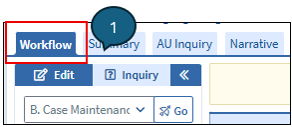
Figure 1: Image of BEACON's Case Maintenance Workflow - Click on the Program Administration workflow View/HideView/Hide
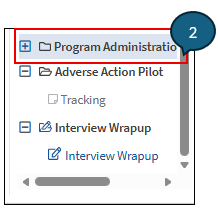
Figure 2: Image highlighting BEACON's Program Administration Workflow - Click on the Benefit Issuance Mechanism view; and View/HideView/Hide
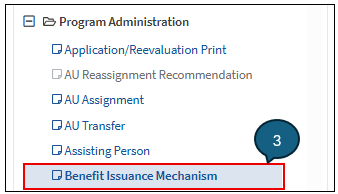
Figure 3: Image highlighting BEACON's Benefit Issuance Mechanism Workflow - Select the program (TAFDC, EAEDC, FS) - This will automatically populate the Program section under the Benefit tab View/HideView/Hide
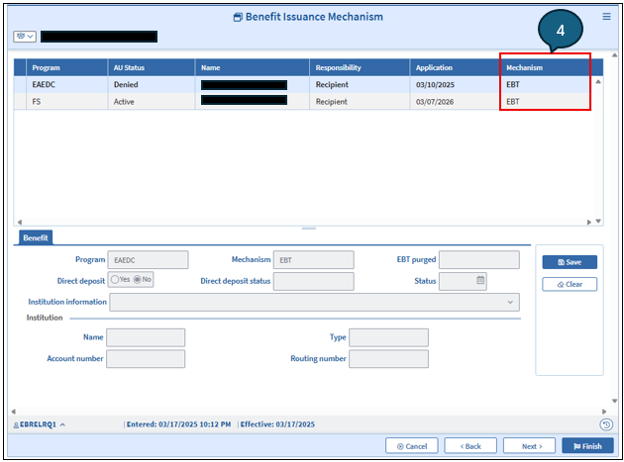
Figure 4: Image highlighting Mechanism column in BEACON's Benefit Issuance Mechanism Workflow
Iinformation found under the Benefit tab includes:
- Program - automatically populated when the program was selected above.
- Mechanism - shows the method by which the client receives benefits for a particular program: EBT, Direct Deposit, or Check. If the Mechanism field is blank or shows Purged, this is an indication that a new EBT card and PIN must be issued. It is important to ensure that the client or former client has an active Mass EBT card to access any benefits.
Note: Current Mass EBT cards will remain active until a replacement card is issued.
- Direct Deposit - Direct Deposit is only available to grantees with a valid SSN, and cannot be established without one.
- Direct Deposit Status - the status of the direct deposit
- Date - the date the direct deposit status changed
- Institution Information - Click on the dropdown box and select the bank or institution.
This will automatically populate the information in the following display-only boxes:
- Name - identifies the name of the bank or institution.
- Type - identifies the type of account, i.e., checking or savings.
- Account Number - identifies the client’s account number on their checking or savings account to which the cash benefit is being deposited.
- Routing Number - identifies the bank number where the client has the checking or savings account to which the cash benefit is being deposited.
Client Who Moves Out of State
If a client notifies you that they will be moving out of state, determine with the client whether the absence will be temporary, and explain program residency requirements. See Out of State EBT Card Usage Match for more information. When a client notifies you that they are moving out of state, you must:
Cash Programs
Advise the client that EBT cash may be accessed at an out-of-state ATM that displays the NYCE logo. However, since not all states have NYCE, the client should access all EBT cash assistance before leaving Massachusetts, and/or
Note: Clients temporarily absent from Massachusetts may receive a check while in another state. The system automatically stops cash assistance through EBT when the mailing address is a state other than Massachusetts. The system will automatically reestablish cash assistance through EBT when the address is changed back to Massachusetts.
SNAP Program
Advise the client to access the EBT SNAP benefits, if possible, before leaving Massachusetts. The client may also access their SNAP benefits in the State they relocate to using their EBT card.
Special SNAP Living Situations – Group Living Arrangements
Residents of group living arrangements, excluding Parents under 22 in Structured Living Programs, do not have to be certified the same way. Some residents of the group home may use an authorized representative, while others may not. The facility will determine how a resident must apply. The determination will be based on the residents’ physical and mental ability to handle their own affairs. Group home residents may apply and be certified in one of the following ways:
- on their own behalf,
- through an authorized representative of their own choice, or
- through an authorized representative who is an employee of the designated facility.
Authorized Representatives for EBT Transactions
The Authorized Representative for EBT transactions will usually conduct food purchasing activities for the resident(s).
Authorized Representative of Client’s Choice
If the authorized representative for transactions is someone chosen by the client, such as a family member or friend the representative may:
- use the SNAP benefits to purchase meals prepared and served to the client by the facility; or
- use any portion of SNAP benefits to purchase and prepare food for the client’s consumption.
These EBT cards cannot be centrally printed and may only be requested at a local office by the designated Authorized Representative(s) for EBT Transactions indicated on the Image-10 form.
Agency/ Facility Authorized Representatives
Agency Authorized Representatives for EBT Transactions will receive EBT cards for all residents in their care. The facility’s representative will:
- receive and spend the residents' SNAP benefit allotment for food to be prepared and served to the eligible residents; or
- allow the residents to use any portion of their allotments on their own behalf.
Agency EBT cards cannot be centrally printed and may only be requested at a local office by the designated Agency Authorized Representative(s) for EBT Transactions indicated on the Image-10A form.
See Group Home Processing for more information.
Young Parent Living Program (YPLP)
Young Parent Living Program (YPLP). Residents shall either apply and be certified for SNAP benefits on their own or using an authorized representative employed and designated by the YPLP. If the YPLP has an on-site POS terminal or uses the EBT manual voucher system, the resident or the facility, as the authorized representative, must authorize the transfer of the monthly SNAP benefits to the YPLP. The YPLP may either receive and spend the SNAP benefits for food prepared by and served to the resident and their children or allow the resident to use all or any portion of the SNAP benefits on his or her own behalf.
If the YPLP facility does not have an on-site POS terminal or EBT manual voucher system, the YPLP, as the authorized representative, may either receive and spend the SNAP benefits for food prepared and served to the resident and their children, or allow the resident to use all or any portion of the SNAP benefits on their own behalf.
Related Topics
Electronic Benefit Transfer - Policy and Procedures
Last Update: July 24, 2026
|
|
|
||
| Digital Accessibility Statement | Privacy Policy | Site Policies | Public Records Requests |
|
© 2026 Commonwealth of Massachusetts. Mass.gov is a registered service mark of the Commonwealth of Massachusetts. |
|||

