An official website of the Commonwealth of Massachusetts Here's how you knowHere's how you know

Requesting an EBT Card via DTA Connect.com and DTAConnect Mobile App
Electronic Benefit Transfer (EBT) cards are how most clients access their DTA benefits. Active and pending clients can request an EBT card via DTAConnect.com and the DTAConnect Mobile App at any time. Additionally, clients who apply for any Department program via the DTAConnect.com portal may request a new EBT card upon submission of their application.
Paper Applications - SNAP
Clients have the option on a SNAP paper application to indicate if they already have an EBT card. View/HideView/Hide

If a client indicates “Yes,” you must not issue a new EBT card as the client has reported that they already have an EBT card and wish to use the current card. If the client indicates “No,” you must issue an EBT card upon verifying identity and entering a valid mailing address. You must not wait for the application interview to be completed to issue the card if identity and the mailing address is verified.
If the client leaves the EBT card question blank, and you cannot get a hold of the client during the cold call process, you must issue a new EBT card upon validating the client’s identity and mailing address.
Requesting an EBT Card During the DTAConnect.com Portal Web Application
Before the client electronically signs the application, the system will ask the client, “Do you need an EBT card?” The client can then select Yes or No. If the client selects No, a request for a new EBT card will not be created for the client.
If the client selects Yes, a warning will appear to inform the client that if they select Yes for a new EBT card, any previously issued EBT card they may have will be deactivated immediately. The client’s answer, Yes or No, will be included on the client’s Web Application Data Sheet for staff to view. If the client leaves the question blank, the answer will be shown as blank on the Web Application Data Sheet.
For clients who enter Yes, upon completion of the RFA and once identity of the grantee is verified, BEACON will automatically create a new EBT card request and will send the card through central print.
For clients who did not answer the EBT card request question, a pending EBT request will be created, but a card will not be automatically sent. Once you receive the action to start the web application, and if the client cannot be reached during the cold call process, you must issue a new EBT card by completing the EBT card process in the EBT Card Request tab in BEACON once identity and a valid mailing address is verified.
Note: If a household member from an existing grantee’s case applies for either SNAP or Economic Assistance as the grantee of a new case and requests a new EBT card or leaves the question blank, a new EBT card will be generated.
Requesting an EBT Card on the DTAConnect Mobile App or the DTAConnect.com Portal as an Existing Client (Not During the Application Workflow)
Clients that are not active or pending on any DTA program(s) will not be able to request an EBT card.
Clients and providers can request an EBT card at any time while their case is active or pending on the DTAConnect Mobile App or the DTAConnect.com portals.
On the DTAConnect Mobile App
The client can request an EBT card by going to Home > Benefit Detail > Request an EBT card. The client must review their address and then click Submit. If the client is eligible to receive an EBT card, a pop-up notice will appear stating that the request was successful. View/HideView/Hide
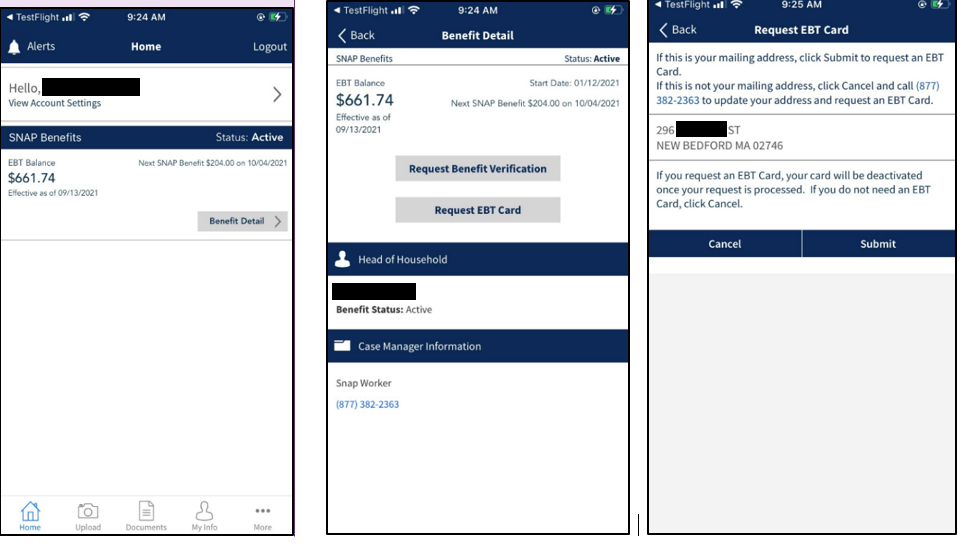
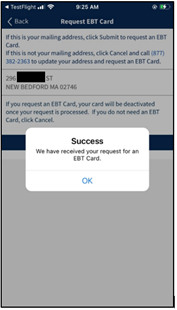
Once the EBT card is requested, the EBT Card Request Status on the EBT Card Request page will refresh with an anticipated delivery date once tracking information is obtained from USPS. For more information regarding tracking information for an EBT card, please see EBT Card Issuance Tracking page.
On the DTAConnect.com
Client and Provider portals, the EBT card request can be made by going to the My Info page. Then, the client must click View More on the top right-hand corner of either their SNAP Benefits or Cash Benefits section. There will be a button to request an EBT card. If the client has previously requested an EBT card, the anticipated delivery date will be above the Request an EBT Card button. Once the client clicks Request an EBT card, a pop-up notice will appear with the client’s mailing address to confirm the EBT card will be mailed to the mailing address on file. Once the client reviews and clicks Submit, a pop-up notice will appear indicating that the request was successful. View/HideView/Hide
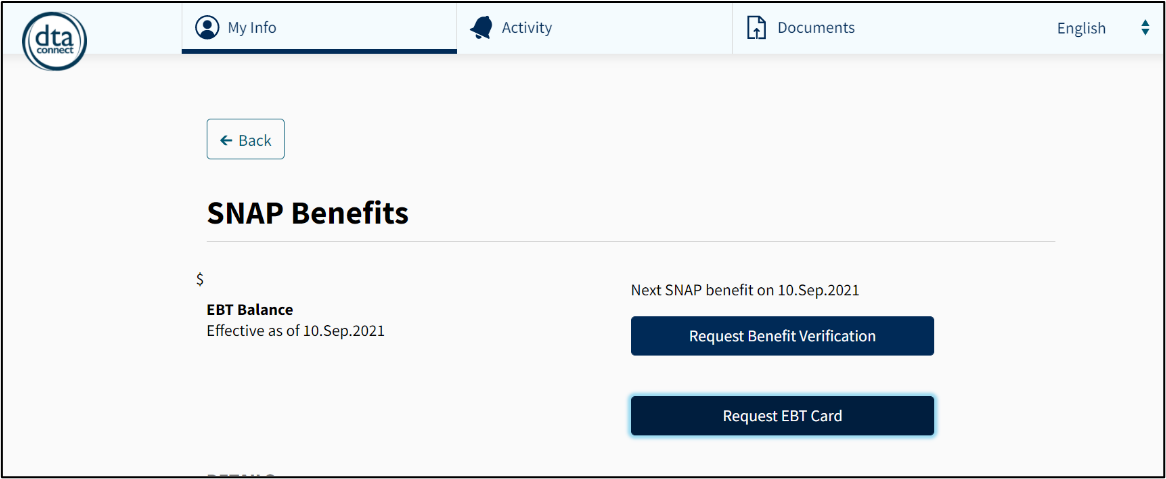
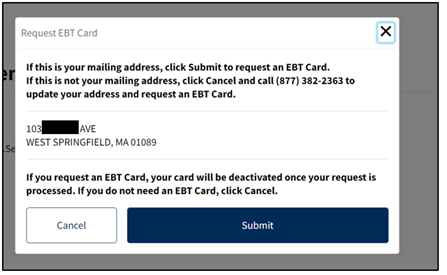
Important: Clients cannot request another EBT card within the 14 days of the previous EBT card being requested. However, if a client updates their address, the client will be able to request another EBT card within the 14 days to be mailed to their new address. The previously requested EBT card will be deactivated.
Scenarios When a Requested New EBT Card Will Not Be Generated at Application
If a client leaves the EBT card request question blank on the web application, an EBT card request will be in a pending status until a caseworker receives the action to start the web application.
- If a client requests an EBT card at application, but does not provide a valid mailing address, an EBT card request will be in a pending status until a caseworker confirms the client’s mailing address with the client.
- If a client is currently active on SNAP and applies for an Economic Assistance program and requests a new EBT card during the Economic Assistance application, the new EBT card request will not be generated.
Note: If a client is receiving Economic Assistance payments via direct deposit or check and applies for SNAP, a new EBT card will be generated for SNAP benefits only.
Scenarios When a Replacement EBT Card Will Not Be Generated
- An EBT card will not be generated for an existing client if they requested a card within the last 14 days. An Alert will pop up stating, “You requested an EBT card within the last 14 days. Please allow time for processing and delivery. If the card was not delivered or if it was lost or stolen since that request, please call us.” Requesting a replacement EBT card will count towards the client’s EBT card counter in the 12-month period. However, if a client updates their address, the client will be able to request another EBT card within the 14 days to be mailed to their new address. The previously requested EBT card will be deactivated.
- An EBT card request will not be generated if an existing client is only receiving Economic Assistance (is not receiving SNAP) and has opted into receiving their cash payments via direct deposit or checks.
Last Update: October 13, 2021
|
|
|
||
| Digital Accessibility Statement | Privacy Policy | Site Policies | Public Records Requests |
|
© 2026 Commonwealth of Massachusetts. Mass.gov is a registered service mark of the Commonwealth of Massachusetts. |
|||

