An official website of the Commonwealth of Massachusetts Here's how you knowHere's how you know

Locking and Unlocking EBT Card
Overview
Clients are now able to lock and unlock their EBT cards using DTAConnect.com, DTA Connect Mobile App. Additionally, the card may be locked and unlocked by calling the number on the back of their EBT card.
Important: Clients must be informed of best practices while using this feature:
- keeping the EBT card locked while not in use;
- only unlocking prior to making a purchase; and
- locking the card immediately after each use.
Locking EBT Card Using DTA Connect Online
There are certain steps clients must take to lock their EBT card when using DTA Connect Online:
- go to DTAConnect.com and press Log In
- client must enter their email and password and press Log In
- on the My Info page clients must scroll until they see EBT balance and press View More
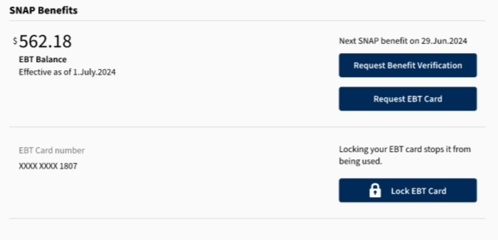
- client must press the Lock EBT Card button next to their EBT card number to lock the card. View/HideView/Hide
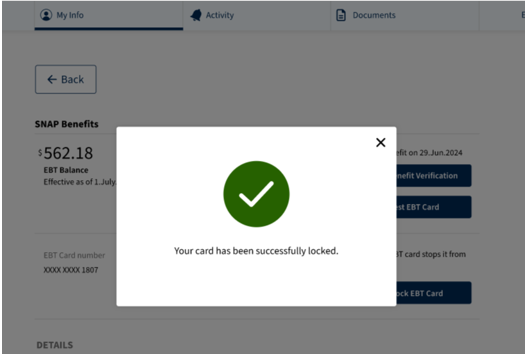
- If successful; the client will see a pop-up which states: “Your card has been successfully locked.” View/HideView/Hide
Unlocking EBT Card Using DTA Connect Online
To unlock the EBT card client(s) must:
- go to DTAConnect.com and press Log In
- enter their email and password and press Log In
- on the My Info page clients must scroll until they see their EBT balance and press View More.
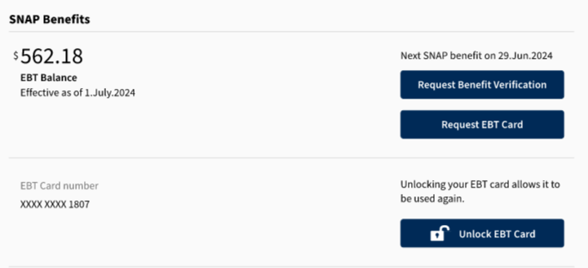
- press the unlock EBT Card button next to their EBT card number. View/HideView/Hide
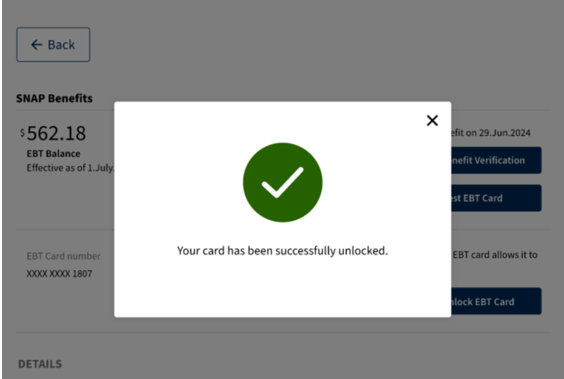
- If successful; the client will see a pop-up which states: “Your card has been successfully unlocked” View/HideView/Hide
Locking EBT Card Using DTA Connect Mobile App
There are certain steps clients must take to lock their EBT card when using the DTA Connect Mobile App:
- clients must first open the DTA Connect Mobile App and press Log In
- client must then enter their email and password and then press “Log In”.
- next to EBT card balance press Benefit Detail
- under EBT card number press Lock EBT card. View/HideView/Hide
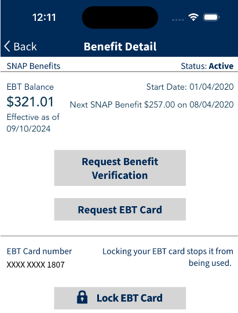
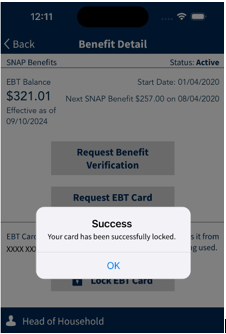
- If successful, the client will see a pop-up which states: “Your card has been successfully locked.” View/HideView/Hide
Unlocking EBT Card Using DTA Connect Mobile App
To unlock their EBT card client must:
- open the DTA Connect Mobile App and press Log In
- client must then enter their email and password and then press Log In
- next to EBT card balance press Benefit Detail
- under EBT card number press Unlock EBT Card. View/HideView/Hide
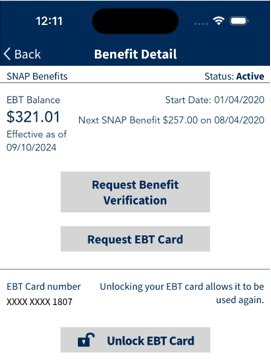
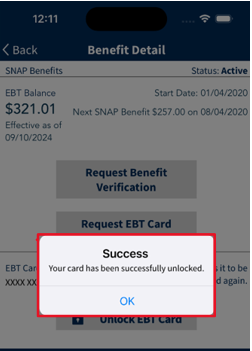
- If successful; client will see a pop-up which states: “Your card has been successfully unlocked.” View/HideView/Hide
Important: Some clients may choose not to use or may be unable to access the lock and unlock feature through DTA Connect. Staff must advise clients of the ability to lock or unlock their account by calling the number on the back of their EBT cards. Staff must also encourage those clients to re-PIN their EBT cards the day before their benefit issuance(s) to mitigate instances of benefit theft.
For helpful tips on how to download and navigate the DTA Connect app, please see the DTA Connect Job Aid for mobile apps.
DTA Connect is available in English, Spanish, Portuguese (Brazilian), Chinese (Simplified), Vietnamese, and Haitian Creole.
Locking EBT Card Using IVR
Clients can lock their EBT cards using the FIS IVR system. To lock the EBT card clients must:
- call FIS IVR system using the phone number located on the back of their EBT card-800-997-2555 and follow prompts to select the appropriate language and validate.
Once validated, the client will be directed to the main menu. On the main menu client will be prompted to press 5 to lock their EBT card.
- press 5
After pressing “5” IVR system states “Okay, I will assist you in locking your card now”.
Client will also be informed that “No transactions will be allowed until you unlock your EBT card”.
If the client has successfully validated their EBT card, the card will then be locked by the IVR system.
Unlocking EBT Card Using IVR
Clients can unlock their EBT cards using the FIS IVR system. To unlock the EBT card clients must:
- call FIS IVR system using the phone number located on the back of their EBT card-800-997-2555 and follow prompts to select the appropriate language and validate.
Once validated, the client will be directed to the main menu. On the main menu client will be prompted to press 5 to unlock their EBT card.
- press 5
After pressing “5” IVR system states “Okay, I will assist you in unlocking your card now”.
If the client has successfully validated their EBT card, the card will then be unlocked by the IVR system.
Last Update: April 24, 2025
|
|
|
||
| Digital Accessibility Statement | Privacy Policy | Site Policies | Public Records Requests |
|
© 2026 Commonwealth of Massachusetts. Mass.gov is a registered service mark of the Commonwealth of Massachusetts. |
|||

