An official website of the Commonwealth of Massachusetts Here's how you knowHere's how you know

Disability Verification EAEDC
When a client claims a disability or health condition for EAEDC, you must explore whether the client already has a disability decision made by Disability Evaluation Services (DES), a division of forHealth Consulting at UMass Chan Medical School available in their Electronic Case Folder (ECF) or has been determined disabled by another source.
If a prior DES disability decision is found and has not expired, it is to be used to verify the current EAEDC disability until it expires.
- You must create an outlook reminder to review the disability when the DES approval is due to expire and send an EAEDC Medical Provider Statement if no other disability source is found.
- A disability that has been verified by another source is to be reviewed at each reevaluation.
Important: Clients who have previously been approved or recertified for EAEDC based on a self-declaration of their disability or a previously submitted EAEDC Medical Provider Statement must verify their disability during the next reevaluation or next reapplication, whichever is sooner unless there is three months or more remaining on the disability duration on the form or they have become eligible for EAEDC due to age.
Case managers are able to verify disability for a client through the following:
- Disability Evaluation Services (DES), a division of forHealth Consulting at UMass Chan Medical School
- the Social Security Administration (SSA)
- MassHealth
Disability status for EAEDC eligibility can also be verified by:
- Massachusetts Rehabilitation Commission (MRC), or
- a competent medical authority.
For information on correctly entering the disability on the Disability and Disability Determination pages see Entering the Disability-EAEDC
An EAEDC client who is actively participating in a Massachusetts Rehabilitation Commission (MRC) training and/or rehabilitation program, including post-secondary education, is considered to be eligible for EAEDC based on a disability. The client must verify this by submitting a letter from MRC indicating that the client is actively participating in an education or training program with MRC.
For information on EAEDC eligibility based on participation in a Massachusetts Rehabilitation Commission (MRC) training and/or rehabilitation program see Participant in a Massachusetts Rehabilitation Commission Program - Overview
Determining a Previously Verified Disability
To determine if a previous disability determination exists that has not expired you must:
- Review the Disability page to see if there is a prior disability determination by DES. If one exists and it has not expired, it can be used for the current disability determination until it expires. PRO will be prefilled as the Disability determination source field and the expiration date will display in the applicable field. Do not make any changes if the PRO Disability has not expired.
- Review the State Verification Eligibility System (SVES) request that will automatically be made with any new application. This will indicate if there is a disability determination from SSA and verify any income received. At reevaluation, you must manually make a SVES request to see if there have been any changes, and
-
Reminder: Because SSI and EAEDC are both needs-based programs, a recipient of SSI (including SSP only) is not eligible to receive EAEDC. This includes anyone who is certified disabled for SSI but who is not receiving payments. However, if the SVES response shows the person as disabled for RSDI, the disability is verified and the client may be eligible for EAEDC if they meet the other financial and nonfinancial requirements.
-
- Check the Eligibility Data screen via NewMMIS found in Virtual Gateway to determine if the client has been determined disabled by MassHealth if no other disability determination is found. Please see Navigating New MMIS to Determine Disability for details on using this data source.
- There are two factors that must be indicated in the active MassHealth Record on the NewMMIS Screen to verify a MassHealth disability determination. They are:
- The MassHealth must be active as indicated by an expiration date of 12/31/2299, and
- The Disability Status must indicate one of the three codes below:
- DA – verified as federally disabled via SSA
- MA – verified as disabled via UMass Disability Evaluation Services, or
- BL – verified as disabled via Massachusetts Commission for the Blind View/HideView/Hide
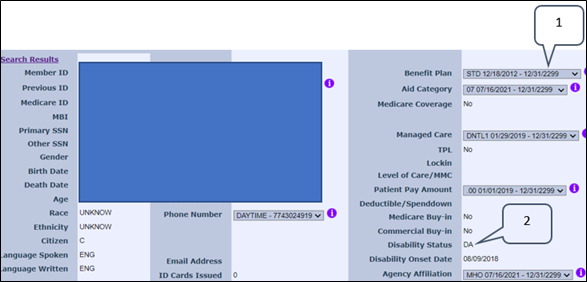
- If both factors are found, the disability is verified and you must select MassHealth from the Disability determination source in the dropdown box on the Disability page.
-
Note: The disability status code BL in NewMMIS verifies the client’s disability through the Massachusetts Commission for the Blind. However, clients may have additional documentation from MCB that also verifies this information and must be accepted.
- There are two factors that must be indicated in the active MassHealth Record on the NewMMIS Screen to verify a MassHealth disability determination. They are:
- Ask the client if they are participating in an MRC training and/or rehabilitation program. If so, the client must verify this by submitting a letter from MRC indicating that the client is actively participating in an education or training program with MRC.
When No Disability Determination is Found
If you are not able to verify disability by the above options, the EAEDC Medical Provider Statement must be used at application and reevaluation to verify the client’s disability. The form must be completed by a:
- Doctor (MD)
- Physician Assistant (PA)
- Nurse Practitioner (APRN or NP)
- Osteopath (DO)
- Psychologist (PhD)
- Podiatrist (DPM)
- Licensed Clinical Social Worker (LCSW)
- Licensed Mental Health Counselor (LMHC)
- Psychiatrist (MD), or
- Certified Nurse Midwife (CNM)who is licensed by the Commonwealth of Massachusetts who is familiar with the patient’s condition or who has conducted an exam within the last 30 days, may complete the form on behalf of the client, for pregnancy-related incapacity.
Important: At application, you must review the client’s Scanned Document History to determine if the client has a completed an EAEDC Medical Provider Statement on file that verifies their disability or health condition and has been signed by the provider within one year. If so, this can be used to establish the EAEDC case.
If the EAEDC is established using a previously submitted EAEDC Medical Provider Statement, you must:
- inform the client that they will need to submit a new form at their reevaluation, and
- tell the client when their next reevaluation will be, so they can schedule an appointment with their provider to have the form completed.
Important: At Application or Reevaluation, if a client indicates they do not have a Medical Provider to complete the form, you must provide them with the contact information for a Community Health Center or Community Behavioral Health Center in their area. See Find a Health Center or Community Behavioral Health Centers Locations.
Sending a VC-1 with the EAEDC Medical Provider Statement in BEACON
To send the EAEDC Medical Provider Statement you must:
- click New on the Verification tab,
- select the EAEDC Medical Provider Statement from the Element drop down and click Save (the verification element will display as mandatory for EAEDC),
- mark any other disability related verification elements as verified so as not to create confusion for the client, and
- print the VC-1 centrally if working remotely and locally if working in the TAO. The form will populate as an addendum to the VC-1 .
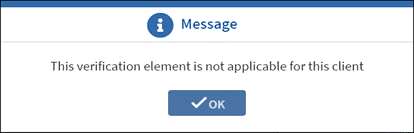
The EAEDC Medical Provider Statement verification is only for EAEDC and EAEDC-SNAP cases. If you attempt to send a VC-1 for the form for a TAFDC or SNAP-only case, a pop-up message below will display, and it will not be saved as an outstanding verification. View/HideView/Hide
Entering the EAEDC Medical Provider Statement in BEACON
Once the completed EAEDC Medical Provider Statement is returned:
- mark the eligibility item as verified on the Verification tab,
- reindex the document as an EAEDC Medical Provider Statement,
- enter a detailed narrative stating that the client has provided the verification and indicate if the client meets the disability requirements for eligibility, and
- enter the disability information as described in Entering the Disability-EAEDC.
If the client does not return the EAEDC Medical Provider Statement, the returned form is incomplete, or the provider did not indicate a disability or health condition on the form that will last 60 days or more and prevents the client from working; see Responding to the EAEDC Medical Provider Statement for next steps.
Verifying Disability at Review
At each reevaluation, you must review the client’s ECF and all available data sources for verification of disability.
Disability can be verified by a:
- DES approval that has not expired,
- determination by MassHealth,
- determination by SSA,
- verification that the client is participating in a Massachusetts Rehabilitation Commission (MRC) education or training program, or
- an EAEDC Medical Provider Statement that has an active duration with three months or more remaining. A new form will be required when the Disability Follow-up Report is sent.
If the EAEDC Medical Provider Statement has expired or will expire in less than three months and disability cannot be verified any other way, you must request a new EAEDC Medical Provider Statement.
For more information on what steps to take when the form is not returned at reevaluation see Responding to the EAEDC Medical Provider Statement.
Reminder: If the client has gained eligibility for EAEDC based on age, no disability verification is needed.
Last Update: March 14, 2024
|
|
|
||
| Digital Accessibility Statement | Privacy Policy | Site Policies | Public Records Requests |
|
© 2026 Commonwealth of Massachusetts. Mass.gov is a registered service mark of the Commonwealth of Massachusetts. |
|||

