An official website of the Commonwealth of Massachusetts Here's how you knowHere's how you know

Entering the Disability EAEDC
Disability Pages
The two pages in BEACON used to establish a disability are:
- Disability and
- Disability Determination
You must review the Disability page in the client’s case to see if there is an existing disability determination made by Disability Evaluation Services (DES) that has not expired. This is indicated by PRO displayed in the Disability determination source on the Disability page and an expiration date that has not passed, displayed next to Expiration on the Disability Page.
Important: You must never make any changes to the disability page if the disability page displays PRO and the expiration date has not passed.
If there is no current disability approval, you must explore whether there is any other available disability determination source that can be used to verify the client’s disability such as MassHealth or the Social Security Administration (SSA). See Disability Verifications-EAEDC
If no other disability determination is found, and the client has submitted an EAEDC Medical Provider Statement or other acceptable verification of their disability, enter the new the disability information into BEACON.
Disability Page
On the Disability page, enter the following information:
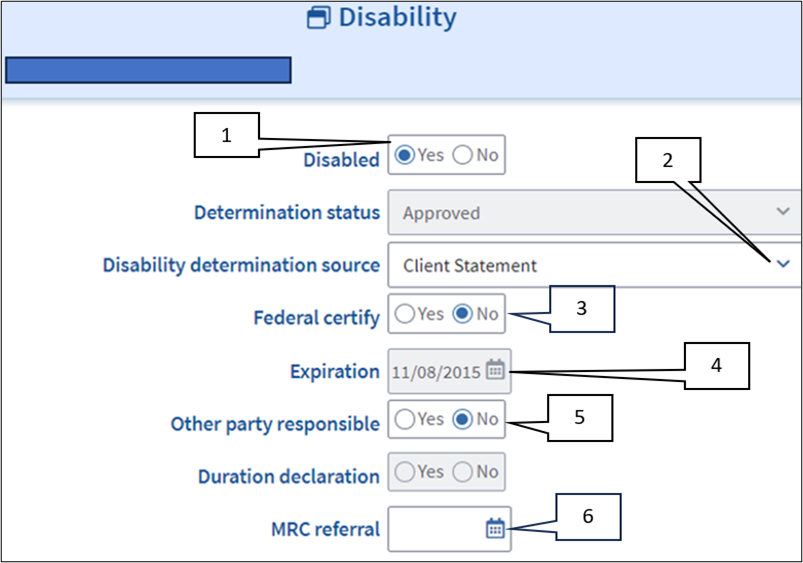
- Click Yes for Disabled
- Select the applicable drop down under Disability determination source
- SSA
- Client Statement
- Veteran
- MassHealth
- Mass Rehab Commission
- Federal/State Disability
-
Important: The Disability determination source is set to PRO for a disability determination made by DES. If the expiration date has not passed you must not change this selection, if it has expired and the client’s disability cannot be verified by any of the other sources, select Client Statement. View/HideView/Hide
-
Note: The figure above has an expiration date visible in the Expiration field indicating the client had a previous PRO disability determination made by DES that has expired. This does not go away when client statement is selected.
-
- There are four additional fields on the page, two of which must be entered to complete the page for EAEDC clients.
- Federal certify
- Other party responsible
- Duration declaration
- MRC referral
- Federal Certify
- The Federal certify defaults to Yes with a Disability determination source selection of SSA, MassHealth, or Veteran and defaults to No for a selection of Client Statement or Mass Rehab Commission.
- When MCB or Federal/State Disability are selected as the Disability determination source,
- select Yes for MCB
- select Yes or No for Federal/State Disability based on the verification you receive
-
Note: To verify the client is federally certified the client must have a 100% disability.
- This will determine whether the shelter cap and gross income limit will be lifted for an associated SNAP case.
- On the remaining fields:
- Other party responsible: select Yes or No based on if the client stated that another party bears responsibility for the disability. A Yes response makes the Accident and Incident pages Requires Reedit,
- Duration declaration: field is not available for edit for EAEDC clients, and
- MRC referral: select the date you referred the client to Massachusetts Rehabilitation Commission (MRC) on the pop-up calendar, if applicable.
When Client Statement is selected, the Disability Determination page will be set to reedit. If any other source is selected, no further action is needed on the disability pages.
Disability Determination Page
The Disability Determination page consists of two tabs, both of which must be completed when Client Statement is selected as the Disability determination source. They are:
- Medical Report and
- Review Tracking
Enter the information on the Review Tracking tab as follows: View/HideView/Hide
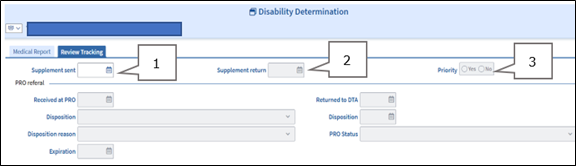
- Supplement sent: enter the date you are speaking to the client,
- Supplement Return: enter the date the date you are speaking to the client, and
- Priority: select No.
Enter the information on the Medical Report Tab as follows: View/HideView/Hide
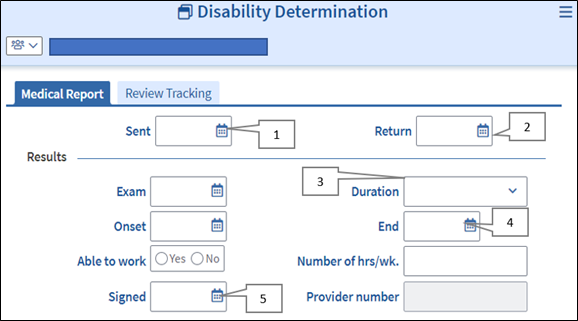
- Sent date: enter the date the EAEDC Medical Provider Statement was sent to the client,
- Return date: enter the date the EAEDC Medical Provider Statement was returned,
- Duration: select 10-12 months for a duration of ‘60 days-12 months’, and select 12 months or more for a duration of ‘More than 12 months or expected to result in death’,
- End: enter the date that is 12 months from the date the form was signed by the provider, for a duration of ‘60 days to 12 months’; and enter the date that is 12 months plus one day from the date the form was signed by the provider for a duration of ‘More than 12 months or expected to result in death’, and
- Signed: enter the date the provider signed the EAEDC Medical Provider Statement.
Sam submitted an EAEDC Medical Provider Statement indicating a disability that will last 60 days -12 months and the form was signed by the provider on 9/5/22. The end date that must be entered is 9/4/23 which is one full year from the date the form was signed.
In the above scenario, if the provider had entered a disability that will last more than 12 months or result in death, the correct end date you would enter is 9/5/23, which is one year and 1 day form the date the form was signed.
Americans With Disabilities Act (ADA)
Each claim for a disability will mark the Accommodation/Special Assistance workflow as mandatory for completion. Clients must be asked questions about whether their disability or health condition interferes with their ability to meet certain Department requirements. Clients must then be screened to determine for the need of an Americans With Disabilities Act (ADA) accommodation. For procedures on accommodation requests, please see Recognizing an ADA Accommodation Request.
Related Topics
Disability Policy and Procedures - EAEDC
Last Update: March 14, 2024
|
|
|
||
| Digital Accessibility Statement | Privacy Policy | Site Policies | Public Records Requests |
|
© 2026 Commonwealth of Massachusetts. Mass.gov is a registered service mark of the Commonwealth of Massachusetts. |
|||

