An official website of the Commonwealth of Massachusetts Here's how you knowHere's how you know

Verifying Social Security Numbers
The verification of a Social Security Number (SSN), or proof of application for one, is a critical, mandatory requirement for all applicants for DTA assistance programs. A valid SSN, or proof of application for an SSN, must be provided for each household member applying for DTA benefits prior to the initial certification period, unless good cause exists. For clients who do not have an SSN at the time of application, an Alternate Identifier will be assigned by the system.
Verifying SSNs helps to ensure accurate benefit determination by verifying a number of factors and SSA income and is used as a key data point with other Department matches. The Department must verify the SSN provided by each household member by computer match with the Social Security Administration (SSA) through the State Verification and Exchange System (SVES).
When a household member does not provide an SSN that can be verified by SVES, or proof of an application for an SSN, the household member is considered ineligible and is disqualified unless good cause for not doing so exists.
Important: Ongoing benefits cannot be authorized for any household member with an SSN that has not been verified by SVES and for whom good cause does not exist. The household member must be made ineligible in the AU Composition Results page for the Reason, “Did Not Apply for/Verify SSN”, under the Reason category “Noncooperation”.
Verifying an SSN
Clients may provide Social Security Number(s) for household members orally or in writing and are not required to provide a Social Security card or other government issued document to verify SSN, unless there is a discrepancy.
Ultimately, all clients will have the SSN they provide verified through the State Verification and Exchange System (SVES), an automated matching process that runs nightly. Staff must not approve any household member with an SSN for ongoing benefits unless a SVES inquiry returns a verified status, indicated by a “V” in the Verification Code field. SVES compares BEACON data to SSA data to find a match. If the data does not align it will not be matched. The information on the Assessed Person page in the Primary Details section in BEACON is used. The following fields: First, Last, Gender, and Birth must be entered as on file with SSA to return a match as verified.
How to Check SVES for a Verified SSN
To view past SVES requests for a client and their results:
- Open their Electronic Case Folder (ECF) in BEACON.
- Click on the Tools tab.
- Click on the household member in question.
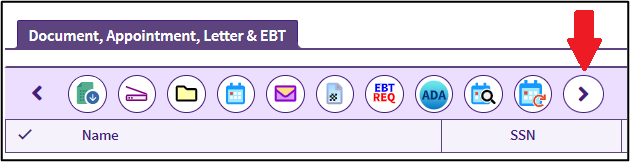
- Click the Right Arrow button on the far right to show more options. View/HideView/Hide
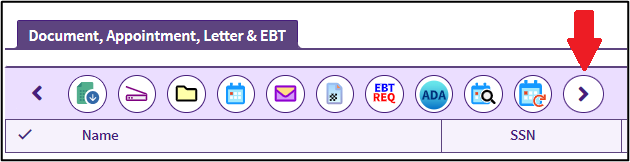
- Click the “SVES HIST” button. View/HideView/Hide
- The “SVES Request History” page will open. This will show all SVES requests made, whether automatically by batch or manually by a case manager. View/HideView/Hide
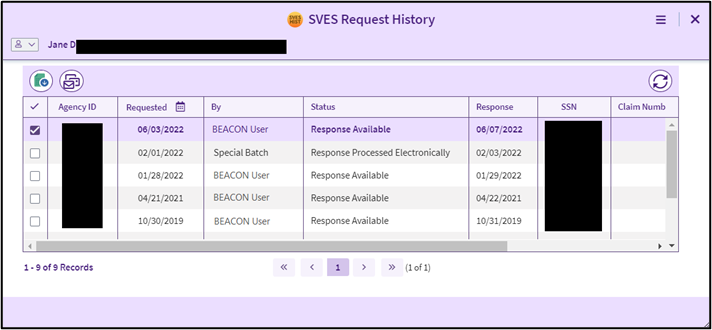
- Click on the most recent request, and then click the “Open SVES Request Detail” button. View/HideView/Hide

- Review the details. In the Verification field will be a code. If there is a code “V – Verified” then the SSN has been verified and no further action is required. View/HideView/Hide
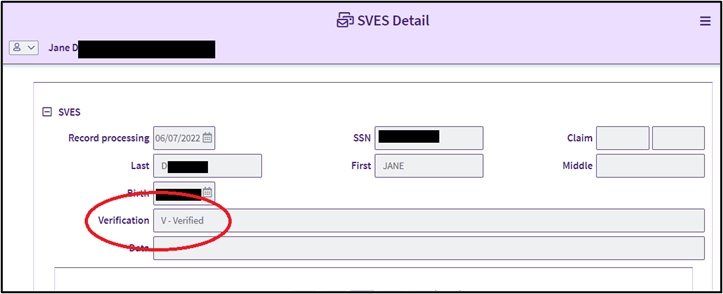
- If a code other than V is present, actions must be taken to obtain verification, update case information, or disqualify the household member.
See: Troubleshooting SSN Mismatch Codes
Reminder: SVES is used to verify an SSN. Simply presenting a Social Security (SS) card is not enough to verify an SSN. An SS card can be useful to enter information in BEACON to get a verification from SVES. Always check SVES before marking an SSN as verified in the Verification tab. If SVES does not return a “V” verification code for an SSN, an SS card does not override SVES. Further investigation is necessary to reconcile the SVES mismatch. For example, explore information in the ECF to determine if the SSN or other demographic information on the Assessed Person page may have been entered differently in BEACON.
Application Processing
During the application process, clients must provide the SSN, or proof of application, for all household members that have one. Household members’ SSNs are verified individually based on the information entered on the Assessed Person page. Case managers must pay attention to the information entered on this page for all household members and compare against existing data in the system to avoid duplicating cases or clients.
Clients that are new to BEACON will not have existing case information. When a new client or household member is added to BEACON, it is important to carefully double-check data entered into the case folder to make sure the client isn’t already in BEACON with an APID under a different name, DOB, or SSN that may have been entered in error.
Clients are not required to enter an SSN when submitting an application. Often, a match can be found in Name Clearance that solves this issue. When processing an application that does not have an SSN, this information must be collected as part of the interview process.
If the client cannot be reached by cold call, complete the Request for Assistance workflow to establish the application in BEACON. An Alternate Identifier will need to be assigned to the client or household member. Once contact is made and the correct SSN is given, update the Assessed Person window with the correct SSN.
See: Entering a Social Security Number0
If by the end of the application period no SSN is provided, and there is no good cause for not providing an SSN, the household member must be disqualified for the reason Did Not Apply for/Verify SSN.
See: The Web Application Workflow
SNAP Expedited Benefits
In general, clients will provide their SSN at application along with other identifying information, such as name, date of birth, and gender. BEACON will automatically request a SVES for all household members with an SSN that does not begin with ‘99’. Information provided by SVES will appear the next business day through a Review Returned SVES Inquiry Action and in the Returned SVES Queries view. This will often occur before an interview has taken place.
Important: Expedited benefits must be issued to all applicants who provide proof of identity for the grantee and otherwise appear eligible for expedited benefits following an interview. Verification of SSN must never delay the timely issuance of expedited benefits to qualified households.
When an interview with a client is held, it is important to check that a SVES request has been made. If the results are available, check that the SSN has been verified, indicated by a “V” in the Verification Code field. Other letters or symbols in the verification field are mismatch codes, indicating that the client’s SSN has not been verified. When SVES cannot verify the SSN, an alternate proof of identity must be obtained.
However, if the client appears to be otherwise eligible for expedited benefits, and identity has been verified for the grantee, the case must be wrapped for expedited benefits. Additional steps must be taken to resolve the mismatch to approve the case for ongoing benefits.
See: Expedited Benefits
Ongoing Benefits
Prior to approving the case for ongoing benefits, the SVES request must be reviewed:
- FAW staff must self-assign a follow up action to review the SVES.
- Economic Assistance case managers must create an outlook reminder to review the SVES.
This must be done on the next business day for day all cases that require a SVES request to be approved for ongoing, even if additional verifications will be required. Check the SVES results for all household members; if a “V” is in the Verification Code field, then SSN has been verified for that household member. Update the Verifications page.
Note: SVES overnight requests do not create follow-up actions if there is no SSA data on file. If a case manager is using a SVES request to verify other data, such as SSN or identity of the grantee, creating a follow-up action ensures that they will be able to complete the action and it will not be passed on to another FAW.
If a letter or symbol other than “V” is in the Verification Code field, then the SSN provided does not match the household member, and additional actions must be taken before that household member can be approved for ongoing benefits. See: Troubleshooting SSN Mismatches
Leave a detailed narrative explaining the mismatch and actions being taken to resolve it.
Any household member that does not have a valid or pending SSN, or has an SSN that cannot be verified, must be considered a disqualified household member, unless good cause exists. A good cause determination would allow an otherwise eligible household member disqualified for not meeting the SSN requirements to become eligible.
Determining Good Cause
Good cause for failure to comply with the SSN requirements exists when there is documentary evidence or collateral information that the household member has made every effort to supply SSA with the information necessary to apply for an SSN or to apply to have an already-existing number validated.
Good cause must be verified each month until the SSN is provided and verified by computer match with SSA.
Note: Some groups of applicants, such as Cuban/Haitian Entrants, are eligible for benefits but are ineligible for an SSN because they do not have a work permit. To get DTA benefits they must apply with SSA for a Non-Work SSN. For more information on applying Good Cause in these instances see: Cuban-Haitian Entrant: Good Cause for Not Providing a Social Security Number
Adding New Household Members
Whenever a person enters an active or pending household, they must be added to the case file and their SSN verified by SVES before the case can be approved for benefits for the new household size.
Verifying SSNs for Newborn Children
In many cases, a newborn child will not have an SSN when the household reports that they were born or adopted. When a newborn child’s presence in the home is first reported, and the household cannot provide an SSN nor proof of application for an SSN, the newborn shall be eligible to receive:
- SNAP benefits until the household’s next recertification or the sixth month following the month in which they were born, whichever is later, and/or
- TAFDC/EAEDC benefits until the child reaches four months of age, unless good cause exists.
Reminder: Until the household can provide an SSN, the newborn must be issued a Systems Generated SSN. For more information, see Alternate Identifiers.
In most cases, once the infant has applied for an SSN, their Systems Generated SSN will automatically be changed to their real SSN and verified through SVES once a valid SSN is assigned to them. If, by either of these times, the Department still has not received verification of SSN or SSN application, you must determine if the household has good cause for not complying with the Department’s SSN requirement. Place a cold call to the client to obtain the SSN; if you are unable to reach the client or the child still does not have an SSN, send a VC-1 for “Social Security Number or Proof of Application” for the child. If good cause cannot be established, the newborn must be disqualified.
Note: The above noted periods of presumptive eligibility only applies to newborns. If the new household member is not a newborn, then they cannot be added to the household until their SSN is provided orally or in writing, or when we receive verification of their SSN application, unless good cause exists.
Important: For children born in a Massachusetts hospital, the hospital can apply for an SSN for the child. When adding a child to the case, if the client has submitted a Hospital Birth Record or a Birth Certificate indicating the child was born in a Massachusetts hospital, you must not check “Unable to Obtain SSN” on the Assessed Person page. You must enter the child’s date of birth in the “SSN appl.” field. This will allow the Batch update from SSA to occur.
See: Add a New Person as a SNAP Household Member, Household Composition-TAFDC, and Household Composition-EAEDC.
Clients Without Social Security Numbers
To be eligible for SNAP and EA benefits, a valid SSN, or proof of application for an SSN, must be provided for each household member prior to the initial certification period. Some clients will not be able to provide an SSN for themselves or members of their household, for a variety of reasons.
Case managers must explore whether there is a good cause reason for not receiving an SSN. To process a case, you must assign an Alternate Identifier on the Assessed Person page for any household members who cannot or will not provide an SSN.
Note: Some groups of applicants, such as Cuban/Haitian Entrants, are eligible for benefits but are ineligible for an SSN because they do not have a work permit. To get DTA benefits they must apply with SSA for a Non-Work SSN. For more information on applying Good Cause in these instances see: Cuban-Haitian Entrant: Good Cause for Not Providing a Social Security Number
Clients that have applied for, but have not yet received, an SSN are eligible for benefits. Check the box “Request System Generated SSN” and enter the SSN application date on the Assessed Person page. This is most commonly seen with newborn children and newly arrived noncitizens. Send a VC-1 for “Social Security Number or Proof of Application” for the household member(s). Do this also if the grantee is unable to provide an SSN for a household member at the time of application, interview, or case maintenance.
Household members who refuse to provide an SSN or have not applied for an SSN are ineligible for benefits and must be excluded from the assistance unit. This can be self-declared, verbally or in writing, and must be detailed in the narrative. On the Assessed Person page, check the box “Request System Generated SSN” and then also check the box “Unable to Obtain an SSN”. Then, on the AU Composition Results page, select the Reason Category “Noncooperation” and Reason “Did not apply for/Verify SSN,” and then save. This will exclude the household member from the household, while still counting their resources. This does not exclude the client from the Enumeration Verification System (EVS) process.
Related Topics
Program Integrity Checklist - Overview
Last Update: May 5, 2026
|
|
|
||
| Digital Accessibility Statement | Privacy Policy | Site Policies | Public Records Requests |
|
© 2026 Commonwealth of Massachusetts. Mass.gov is a registered service mark of the Commonwealth of Massachusetts. |
|||

