An official website of the Commonwealth of Massachusetts Here's how you knowHere's how you know

Address (RFA)
Overview
DTA programs do not require a client to have a permanent address; however, the Department needs a mailing address for every household to send important correspondence regarding benefit approvals, reevaluations, requests for information, and any other pertinent changes.
Address information that has been entered into BEACON is formatted and matched to addresses found in the Address Validation database. If the address entered matches the Address Validation database, the address is marked as validated.
If the address entered does not match the Address Validation database, and the database does not display any additional addresses, an error message will appear prompting you to change the address.
The address must be reentered on the Address page. If the address entered does not match the Address Validation database, but the Address Validation database has suggestions, Addresses Suggested opens with all the suggested addresses, and prompts selection of one of the addresses. If changing a previously validated address, you must again click validate.
Entering Current Address Information
To enter information about the client’s current address:
- Select the Address Type from the drop-down list.
- enter all pertinent information about the Address by clicking the pop-up box in the Current Residence area. The Address Details page will appear
-
enter the information. (Street Address should go on Line 1 and Line 2 if needed)
-
click Validate. A message will appear indicating if the address is validated. Click OK and then follow the instructions in the pop-up boxes, and
- click Save
-
click the Address match button. The Address Match page will appear
-
if the address is a match, and the client lives at that address, click Match. If it is not a match, click the New button
-
in the Permanent Residence and Mailing Address boxes, if the address is the same as the Current Residence, click those boxes. If not, click on the pop-up box in each field and enter the appropriate information
-
click Next. This will save your data and take you to the next page, Phone
Important An Ext Data button appears to the right of the Type drop-down box to access a view-only version of External Agency—RMV page. You can view the address on file with the RMV on this page. If a SNAP client provides an address and the RMV has any Massachusetts address on file, you are to use the database to verify Massachusetts residency. The address does not need to be the same.
Clients Experiencing Homelessness
For clients experiencing homelessness, be sure to explain that the Department will send important notices to them about their benefits. If a client states that they do not have a mailing address or P.O. Box, explore with the client whether or not they can provide the address of a friend, relative, authorized representative or shelter where they can pick up mail on a regular basis. Be sure to ask what address they are using for other important benefits such as SSI, Unemployment Compensation, their employer, or health insurance. As a last resort, after consulting with the community liaison for the client’s catchment area, clients may use the Document Processing Center (DPC) as their mailing address. Clients must be made aware that they cannot pick up mail from the DPC.
Note If the client is having difficulty identifying a mailing address, please contact the Community Liaison for the client’s catchment area for further assistance. Staff may also consult the Statewide Resource Guide in BEACON for additional resources for the client.
Inform clients about the benefits of providing an e-mail address to be sent important Department updates and information. Clients must also be informed of the DTA Connect Mobile App if they own a smart device and the DTA Connect portal which can be accessed online from any computer or smart device. Please see DTA Connect Overview.
Be sure to determine eligibility for expedited SNAP benefits and/or Immediate Needs. Difficulties posed by lack of a mailing address must not delay issuance of expedited SNAP benefits or the processing of Immediate Needs to any client who is eligible to receive them. Part of issuing expedited benefit timely includes have accessing to the benefits. This means they have an EBT card to access the expedited benefits. You must discuss with the client if they already have an EBT card or need one. Furthermore, if they need an EBT card, explore how they would obtain an EBT card if they do not have a mailing address (i.e. provide the address of a friend, relative, authorized representative or shelter where they can pick up mail or come into the closest local office).
Note Click the Homeless check box to record in BEACON that the client is homeless. BEACON will allow the better of the Homeless Shelter Deduction or a regular shelter deduction when calculating SNAP benefits. If there is no current or permanent address, check the None check boxes.
Note Inform the client of the Department’s returned mail procedures that may stop benefits if a client does not respond to a mailed Special Projects-Returned Mail Notice (SP-RMN) form. If the client’s name is not on the mailbox at the mailing address, ask the client to consider putting the mail in care of the person living at the address to prevent mail from being returned to the Department. Complete the “In care of” field in the Address Details page, as needed. If that is not an option, the alternatives above must be explored.
Completing the In Care of Field
When sending mail, the prefix C/O is used to indicate that you are sending to mail to a person on behalf of someone else. C/O stands for the phrase, “in care of,” and it helps to ensure that the recipient receives the correspondence from DTA. For the purposes of BEACON, the proper way to address such letters is to enter C/O before the name of the other party. Failure to include C/O may result in the USPS not delivering the mail.
If you need to complete the In care of field in the Address Detail page, you must always type C/O followed by a space and then the name of the agency/representative receiving mail on the client’s behalf. If you do not type C/O, BEACON will generate the following error message:
You must enter C/O and a space before typing the subject in the In care of field. For example, C/O Jane Doe. The In care of field usually includes the name of an individual or organization who is expecting the mail.
Clients in Domestic Violence Shelters
Clients in domestic violence shelters are required to keep the location secret as a condition of placement.
To enter address information for a client in a DV shelter:
- in the Current Residence section:
- click the Homeless checkbox
- click the None checkbox
- in the Permanent Residence section:
- click the None checkbox
- in the Mailing section:
- click the “i” icon to open the Address Detail popup page
- enter the client’s mailing address
- click Validate. A message will appear indicating that the address is validated.
- click OK
- click Save to exit the Address Detail popup page
- click Finish to exit the Address page
Applications with Out-of-State Addresses
If you receive an application that has listed a current, permanent, and/or mailing address outside of Massachusetts, you must attempt two cold calls and take one of the following actions:
- If the applicant did not mean to apply in Massachusetts, provide the client with the contact information for the state or territory in which they must apply and deny the application for No longer MA resident.
- If the applicant recently relocated and is now residing in Massachusetts, update the current, permanent, and/or mailing address in BEACON and complete the application per existing procedures. Make sure the application date is effective the date the client moved here.
- If the applicant is in the process of relocating to Massachusetts, advise the client that the application will be denied due to residency requirements and that they may submit another application after the relocation is complete.
- If the applicant listed a current and/or permanent address in Massachusetts with an out-of-state mailing address, or indicated homelessness in Massachusetts with an out-of-state mailing address, then:
- advise the client to use a mailing address in Massachusetts, or
- refer them to the Community Liaison.
If an application with an out-of-state current, permanent, and/or mailing address has no phone number listed or the cold calls are unsuccessful, you must deny the application for No longer MA resident.
For each scenario, you must write a detailed narrative explaining the actions taken.
Address Confidentiality Program (ACP)
The Address Confidentiality Program (ACP) was established for survivors of domestic violence, sexual assault, and stalking. ACP is administered by the Office of the Secretary of the Commonwealth and allows participants to use a confidential address to stay safe from actual or threatened violence. The program is offered statewide.
To be certified as a program participant, the ACP applicant must be a Massachusetts resident and show that disclosure of their address threatens their safety and/or the safety of their children. The Secretary of the Commonwealth will certify that disclosure of the individual’s actual address threatens the safety of the individual or their children. The individual must be living at a permanent address that is unknown to their perpetrator.
ACP provides program participants with a substitute mailing address to use when interacting with government agencies. The substitute address is used as the program participant's legal residence, as well as work and/or school address. Consequently, government records may be disclosed to the public without identifying the victim's new location. State and local agencies like DTA are required to accept the substitute address unless the agency receives a written exception from the Secretary of the Commonwealth.
Clients who are interested in the program can call 1-866-723-3233 (1-866-SAFE-ADD). To apply to become a program participant, an applicant must complete the ACP application with an application assistant certified by the Secretary of the Commonwealth. The application is submitted by the application assistant to the Secretary for certification. ACP will notify the applicant whether they have been certified as a program participant.
Each program participant receives an authorization card which verifies that they are in the program. The card includes their identifying information, the expiration date, and the substitute ACP address which is P.O. Box 9120, Chelsea, MA 02150-9120.
TAFDC and EAEDC cases must not be transferred to the EOHHS Chelsea Center TAO based on the client using the ACP PO Box in Chelsea. ACP participants who have an established case must remain in their assigned TAO unless the client requests to be transferred to another TAO or they are no longer participating in the program.
The program participants must show their card to verify that they are in the program. Save an image or copy of the card into the client’s case record.
As long as it is safe to do so, clients can be encouraged to use the DTA Connect portal if they have a secure e-mail address and internet access (or the DTA Connect mobile app if they have a smartphone or tablet).
Important Any client participating in the Address Confidentiality Program (ACP) must be referred to a DV Specialist.
Once a client presents an ACP card, or other verification, to prevent DTA from disclosing their location, you must check the Address Confidentiality Program box on the left-hand side and select the client’s Residence type. view/hideview/hide
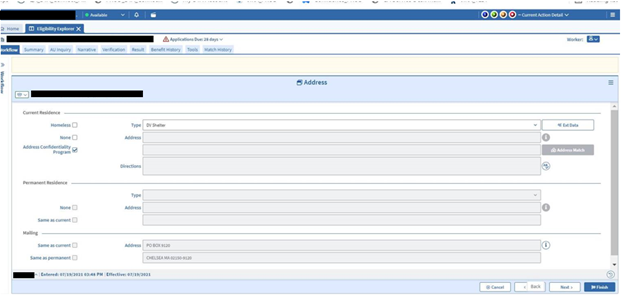
Both the Current and Permanent Residence sections will be greyed out and will not allow an entry. It will only allow an entry in the Mailing Address section. You must update the Address page as follows:
- in the Mailing Address section:
- click the i icon to open the Address Detail popup page
- enter the ACP address as follows:
- Line 1: P.O. Box 9120
- Line 2: leave blank
- City: Chelsea
- State: MA
- Zip / Postal code: 02150-9120
- In care of: leave blank
- click Validate. A message will appear indicating that the address is validated if properly entered.
- click OK
- click Save to exit the Address Detail page
- click Finish to exit the Address page
Note If Address Confidentiality Program box is checked under Current Residence for a client with an existing Current or Permanent address, those addresses will be automatically removed.
Important To ensure the safety of these clients, the Address Confidentiality Program box under Current Residence must be checked causing the current and permanent address boxes to be grayed out. The ACP participant is not required to disclose their physical address nor can you ask for it. No physical address is ever to be entered in BEACON for a participant of the ACP.
TAFDC and EAEDC web applications containing the ACP address will populate in the TAFDC/EAEDC Web Applications view for the Chelsea Center TAO. These applications must be assigned to a case manager in the Chelsea Center TAO and processed. As part of the interview, the case manager must ask the client which TAO is the most convenient for them, without asking them to disclose where they reside. This may include communicating the various TAO locations to the client so they can determine which is the best option for them. You must then transfer the case to the client’s preferred TAO once the TAFDC or EAEDC case is approved.
If you have any questions about the program or about working with a client who is in the program, please contact a Domestic Violence Specialist.
Action: DTA Connect – ACP Ended Update Residential
During case maintenance, if a SNAP-only client in the FAW model is coded in BEACON as an ACP participant and they use DTA Connect to report a new mailing address, BEACON will create the Action: DTA Connect – ACP Ended Update Residential. If you receive this action, you must follow these steps:
- Attempt to cold call the client two times.
Important If the case has an active heightened level of security indicator, do not call the client. You must use the current procedures for addressing HLS cases. Refer these cases to the Ombudsman Unit at: dta.ombudsmanunit@mass.gov.
The Ombudsman Unit will collaborate with the Domestic Violence unit to determine the best way to work with the client safely and address the case.
Cold Call Successful
- If one of the calls is successful, ask the client whether they are still in the ACP.
- If yes, advise the client that they must continue to use the standard ACP mailing address if they remain in the program. Change the mailing address back to the ACP address, wrap the case, and disposition the action.
If no, proceed to the next step.
- Check BEACON and/or the DTA Connect data sheet to confirm whether the client also updated their current residential address, shelter costs, and/or utility costs. If all three items were updated, wrap the case and disposition the action.
If no, proceed to the next step.
- If the client did not update residential address, shelter costs and/or utility costs on DTA Connect, ask the client whether any of these items have changed. If yes, update the BEACON record with the item(s) that changed.
- If the client reported they have a new residential address but they did not update their shelter and/or utility costs on DTA Connect, ask the client whether the shelter and/or utility costs changed.
- If yes, follow the Telephonic Signature procedures to have the client self-declare these items and proceed to the next step.
- If no, proceed to the next step without taking a telephonic self-declaration.
- If the client reported they have a new residential address but they did not update their shelter and/or utility costs on DTA Connect, ask the client whether the shelter and/or utility costs changed.
- Wrap the case and recalculate the benefits.
Remember During case maintenance, changes in residential address, shelter costs and utility costs are not required to be reported for Simplified Reporting households. However, if the client does report a residential address change during case maintenance, then they are required to give us the associated shelter and SUA changes. For more information, see Simplified Reporting Examples.
Cold Calls Unsuccessful
- If both cold calls to the client are unsuccessful, contact the ACP at 1-866-723-3233 (1-866-SAFE-ADD) to ask if the client is still part of their program. If ACP confirms that the client is still part of the ACP, change the mailing address back to the ACP address and wrap the case.
- If ACP confirms that the client is no longer part of ACP (or you are unable to reach them and/or obtain the necessary information from them), proceed to the next step.
- Check BEACON and/or the DTA Connect data sheet to confirm whether the client also updated their current residential address, shelter costs, and/or utility costs.
- If the client only reported a new mailing address, shelter, and/or utility costs; then wrap the case and disposition the action.
- If not, proceed to the next step.
- If the client reported on DTA Connect:
- that they have a new residential address; and
- they did not update their shelter and/or utility costs,
- then you must send a VC-1 for shelter/utility costs. To ensure that the client knows specifically what you are requesting on the VC-1, select Additional Verification for Element and type the following for Document(s) of evidence:
- “You reported on DTA Connect that your address changed. Please tell us your new housing costs and what utilities you pay for. You can do this on DTA Connect, by calling us or sending a written statement. If you do not provide the updated costs your SNAP benefits may change.”
- Disposition the action and wrap the case without crediting the client with shelter and/or the standard utility allowance (SUA). (However, if the client was already credited with H-EAT or LIHEAP, they will retain those credits and continue getting the Heating/Cooling SUA.)
- If not counting the expense results in a $0 benefit level or the case being denied for over-income, the case must not be wrapped at this time. Rather, you must follow these steps:
- Remove the authorization to process the case.
- Create an Action to process the day after the VC-1 Due Date (for more information on creating an Action, see Creating Follow-up Actions).
- If the optional verification is received, enter the expense and recalculate the benefits.
- If verification is not received process the case without entering the expense.
- If not counting the expense results in a $0 benefit level or the case being denied for over-income, the case must not be wrapped at this time. Rather, you must follow these steps:
- If the client follows up with verification, the FAW who receives the Action to review the documents must add them to the BEACON record and recalculate the benefits.
Related Topics
Address Changes Reported to DTA by DHCD
Americans with Disabilities Act Overview
Request for Assistance Policy and Procedures
Last Update: September 11, 2025
|
|
|
||
| Digital Accessibility Statement | Privacy Policy | Site Policies | Public Records Requests |
|
© 2026 Commonwealth of Massachusetts. Mass.gov is a registered service mark of the Commonwealth of Massachusetts. |
|||

