An official website of the Commonwealth of Massachusetts Here's how you knowHere's how you know

Pregnancy
A pregnant individual is eligible for TAFDC at any stage of pregnancy if they meet all other eligibility requirements and the pregnancy is verified by a competent medical professional.
Once the child is born and living with the parent, the child must be added to the TAFDC case. If the other parent is living in the household and is not already included in the assistance unit, they must also be added at that time.
Verification of Pregnancy
The pregnancy and expected due date should be verified by a statement from one of the competent medical professionals listed below.
- Medical physician (general practitioner, OB/Gyn, etc.)
- Osteopath
- Nurse practitioner
- Psychologist licensed by the Commonwealth of Massachusetts
- Physician or psychiatrist from a Veterans Administration hospital clinic
- Physician or psychiatrist from a Massachusetts Department of Mental Health facility
- Nurse-midwife certified by the state (for the limited purpose of diagnosing pregnancy and pregnancy-related complications)
If the verification does not include a due date, or the client provides an alternative form of pregnancy verification, staff must not deny the case. Instead, the Systems Information Specialist (SIS) or manager must submit an inquiry to the Procedural Mailbox for guidance.
Entering Pregnancy Information in BEACON
The Pregnancy question appears in the AU Composition Q & A Navigator. When Yes is selected for the pregnancy question, the Pregnancy page will automatically require a re-edit and populate the correct client’s Pregnancy page with the pregnancy information.
See screenshot below of the Pregnancy page in BEACON. View/HideView/Hide
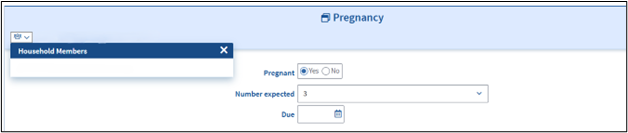
On the Pregnancy page, staff must:
- Confirm that the correct household member is selected in the Household Member field (top left corner of window).
- Enter the number of expected babies in the Number Expected field, if greater than one. The system defaults to 1.
- Enter the expected due date in the Due field.
- Click Next to save the information and continue to the next page.
If another household member is pregnant, return to the Pregnancy page, select the additional household member from the Household Member list, and repeat steps 1–4.
How to Update Pregnancy Information
If pregnancy information must be entered or updated after the initial entry, go to the Pregnancy page.
On the Pregnancy page, staff must:
- Select the pregnant household member from the Household Members dropdown list.
- Select Yes or No for the pregnancy question.
- If No is selected, click Finish to save the information.
- If Yes is selected, enter the due date, click Add, and then click Finish to save the information.
- Click Next to save the information and continue to the next page.
If pregnancy information must be entered or updated for another household member, repeat steps 1 to 3.
What if the Client Reports They are No Longer Pregnant?
If the client reports they are no longer pregnant (for example, due to miscarriage or stillbirth), staff must return to the Pregnancy page and update the pregnancy question to “No” for the applicable household member.
The case manager must also discuss any impact on eligibility, including potential case closure and possible overpayments, with the client.
TAFDC Work Rules for Pregnant Individuals
Pregnant clients who are more than 120 days (> 120) from their pregnancy due date are subject to work program rules and time-limited benefits.
For pregnant clients with other dependent children in the household, required participation hours are based on the age of the youngest child:
- 20 hours per week if the youngest child is between ages 2-5 or
- 30 hours per week if the youngest child is school age, 6 or older.
An exception applies to pregnant clients who do not have other children in the household. Due to current BEACON system limitations, these clients will default to an exempt status of Pregnant / Due Within 120 Days in the TAFDC Work Program window throughout the entire pregnancy. These clients remain exempt from TAFDC work program requirements and time-limited benefits until the youngest child receiving TAFDC turns age 2.
See Using the Work Requirements TAFDC Page.
School and Living Arrangement Rules for Parents Under 20
A parent under age 20 is eligible for TAFDC if they meet the school attendance and living arrangement requirements for parents under 20.
See Parents Under 20 - Introduction.
Reporting and Updating Pregnancy Status
Clients must report changes in household circumstances within 10 days, including when a pregnancy ends or a child is born.
When a child is born and living in the home, the child must be added to the assistance unit as of their date of birth (DOB) to ensure MA Health Coverage through DTA. Staff must also review and update TAFDC eligibility, household composition, and exemption status for all household members, as needed.
If a pregnancy ends and there is no child in the home, staff must update the Pregnancy page and review ongoing TAFDC eligibility for the assistance unit. Staff must determine whether the household remains eligible for TAFDC based on the presence of another eligible child or other qualifying circumstances. Staff must also review whether any overpayment or other case action is required based on the reported change.
If the child is not added to the assistance unit, or the pregnancy status is not updated on the Pregnancy page within 30 days after the due date, BEACON will automatically send a Pregnancy Information Update Notice to the household member. The notice instructs the client to contact their case manager within 10 days to report any changes in pregnancy status.
If the Pregnancy page is not updated within 20 days of the notice date, the TAFDC case will automatically close for failure to provide required verification. Any associated SNAP case will remain open.
See Closing or Denying the Entire Case.
Related Topics
Automating Client’s Pregnancy Status Update
Exemptions from Time-Limited Benefits and Work Program Rules
Pregnancy Policy and Procedures
Last Update: May 28, 2026
|
|
|
||
| Digital Accessibility Statement | Privacy Policy | Site Policies | Public Records Requests |
|
© 2026 Commonwealth of Massachusetts. Mass.gov is a registered service mark of the Commonwealth of Massachusetts. |
|||

