An official website of the Commonwealth of Massachusetts Here's how you knowHere's how you know

Pending Applications / Reinstatements View and RAPID Report - TAFDC
The following view and report are tools available to determine which clients require follow up for their TAFDC / Combo applications or reinstatements.
Daily Priority Actions – Pending Applications / Reinstatements View
This BEACON view lists all non-FAW cases that have a submitted application or have been reinstated but have not been wrapped up, for a given worker. You can find this view on the side bar by going to Views, then Daily Priority Actions, and then scroll down to find it in the alphabetized list.
The Pending Applications / Reinstatements view shows the following information for each client if applicable: View/HideView/Hide
|
Field |
What is displays |
|---|---|
|
Grantee |
Grantee of Name |
|
APID |
Grantee APID |
|
Program |
EAEDC, TAFDC, FS-PA, FS-NPA |
|
SNAP Combo |
Yes or No if the client filed a Web Application indicating whether they applied for SNAP as well, otherwise blank. |
|
RFA Status |
No RFA, Completed RFA |
|
Type |
Application or Reinstatement |
|
Days |
Number of days since Application or Reinstatement |
|
Due |
Due date for Application or Reinstatement |
|
Document |
The last document sent/given to the client |
|
Sent |
Date the last document was sent/given |
|
VC-1 Due |
Date verifications are due (Day 22 initially, Day 30 INT-1, Day 45 INT-2) |
|
Application |
Date application was filed if applicable |
|
Web ID |
Web Application Identification Number if applicable |
Identifying Web Applications Appearing on the View
Once a Web Application is assigned to you from the Pending EA/Combo Applications view for your office, the client will display on your Pending Applications/Reinstatements View. View/HideView/Hide
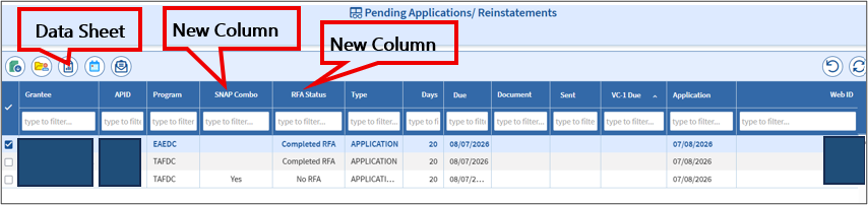
A new Tool and two new columns on the Pending Applications/Reinstatements view are associated with Web Applications assigned to you.
- The Application Datasheet will be available in a new tool on the view. The datasheet indicates whether the client is also requesting to apply for SNAP with the TAFDC Web Application.
- If the client provided their Social Security Number (SSN) or AP_ID, the datasheet will also be available in the Client Communication folder for the case.
- If neither were provided, the datasheet will populate to the Client Communication folder once the RFA is completed.
- The SNAP Combo column also tells you whether the client is requesting SNAP, indicated by a Yes displayed in the column.
This will remain until:- an RFA is completed for SNAP or
- the TAFDC Web Application is approved or denied, if the client already has SNAP
- The RFA Status Column shows whether or not the RFA has been completed for the application.
- No RFA indicates an Economic Assistance Web Application has been assigned to you to complete.
- Completed RFA indicates you have entered an RFA for the associate client.
RAPID Report – Pending Applications/Reinstatements Report
The RAPID report contains primarily the same information that appears in the corresponding BEACON view, but more succinctly and in a program that can be more user friendly for case managers and supervisors. The SNAP Combo and RFA Status columns from the view are not reflected in this report.
In RAPID, it is found under BEACON Reports / Field Ops Staff TAO Reports / Pending Apps and Reinstatements / Pend Apps and Reinstatements.
The report can be sorted by TAO, Supervisor, AU Manager, and Program. For instructions for using RAPID, see RAPID Reports.
Additionally, the Report offers 7 preset views to help case managers access relevant information without having to manually download and sort the full Excel report. Those preset views will display:
- Expedited FS
- FS at Day 30 or Greater
- FS Pending Denial at Day 30 or Greater
- TAFDC/EAEDC at Day 22
- TAFDC/EAEDC at Day 30
- TAFDC/EAEDC at Day 30 or Greater with No INT-2
- TAFDC/EAEDC at Day 45 or Greater
If the report table is still running, a message “Report is not complete yet. Please check again later.” will display. When it is ready, the message will read “Report Completed at DD_MON-YY.”
The raw data of the report identifies the following information for each client: View/HideView/Hide
|
Field |
What it displays |
|---|---|
|
TAO |
Local Office Name |
|
Supervisor |
Supervisor name for assigned case manager |
|
AUM Name |
Case manager name |
|
HH Grantee ID |
APID For Grantee of Program |
|
PGM |
TAFDC, EAEDC, FS-PA, FS-NPA |
|
App Due Date |
30 days after application date or 45 days for INT-2 |
|
Days |
Number of days since Application or Reinstatement |
|
Notice Type |
Named of last notice sent to client |
|
Notice Sent Date |
Date the last notice was sent to client |
|
VC-1 Date |
Date verifications are due |
|
App Date |
Date Client Applied |
|
Screened Date |
Date client was screened for immediate needs |
|
App Type |
Application or Reinstatement |
|
Aval Loc TAO Document |
Displays Y if client has an available scanned document in EDM |
Related Topics
Last Update: October 22, 2026
|
|
|
||
| Digital Accessibility Statement | Privacy Policy | Site Policies | Public Records Requests |
|
© 2026 Commonwealth of Massachusetts. Mass.gov is a registered service mark of the Commonwealth of Massachusetts. |
|||