An official website of the Commonwealth of Massachusetts Here's how you knowHere's how you know

Unearned Income EAEDC
What is Unearned Income?
Unearned income is any income a client does not earn through employment. Unearned income includes but is not limited to, government benefit programs, financial holdings, bank accounts, pensions and certain contributions.
Some sources of unearned income are countable for EAEDC and certain ones MUST be verified by accessing an external database (see External Databases).
Unearned Income Sources that MUST be Verified through an External Database
- Unemployment Compensation (UC): UC for Massachusetts is verified by accessing the external database of the Department of Unemployment Assistance (DUA). See Unemployment Compensation.
-
Reminder: Clients who are eligible for Unemployment Compensation (UC) are not eligible for EAEDC and should not be encouraged to apply. The guidance below will assist you in determining if the client is eligible for UC and as a result not eligible for EAEDC.
-
- The Department of Unemployment Assistance (DUA) Match is used to verify unemployment insurance claims, and, in limited circumstances, job terminations. However, the DUA Match does not verify wages or earned income.
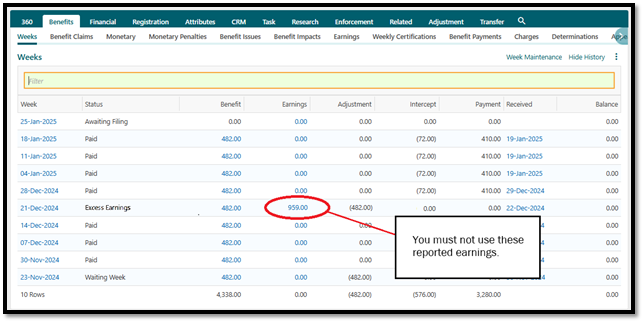
- A client may have reported earnings listed in their unemployment claim. You must NOT use the reported earnings for proof of earned income. Earnings must be verified with wages or a termination letter (see Verification Chart). View/HideView/Hide
- Social Security RSDI: (Retirement, Survivors and Disability Insurance) is verifiable via SVES. An overnight request must be submitted.
- Supplemental Security Income (SSI): including State Supplement Program (SSP) is verifiable via SVES. An overnight request must be submitted.
- Child Support: payments made to the household through the Department of Revenue are verifiable via MobiusView.
- Veterans’ Benefits: federal veteran benefits are verifiable via SVES for clients who receive SSI. An overnight request must be submitted.
- Pensions: sometimes verifiable via SVES. An overnight request must be submitted.
- Worker’s Compensation: verifiable via SVES for clients who receive SSI. An overnight request must be submitted.
Important: Staff must always use applicable electronic databases available as the primary source of verification for unearned income. These databases include EMT, SVES, SAVE, and MobiusView (see External Databases). Clients must only be asked to provide verification if there is inconsistent information.
What is a Contribution?
A contribution is a benefit received in any form other than money for a specific expense. It is considered unearned income and is usually verified by collateral contact of the person providing the contribution, preferably on paper.
For types of income that are noncountable for EAEDC, see Noncountable Income -EAEDC.
How to Enter Countable Unearned Income
Unearned income is counted when determining the client’s eligibility and grant amount. It must be entered in the Other Income Status page. If the applicant has countable unearned income, obtain verifications for up to the four previous weeks and enter the weekly amounts according to the procedures below. For current clients, enter verified countable income as soon as it is reported.
To enter unearned income, you must:
- go to the Assessed Person Income and Expenses workflow and
- open the Other Income Status page.
- On the Source tab, select the appropriate type of unearned income by clicking the Type drop-down box. Click the check box next to the appropriate selection. For these Income types, entries in certain fields must be made.
-
Income Type Field Name Contribution or Donation Select Purpose Education Assistance Enter Number of E/T months RSDI or Railroad Retirement Enter a valid Claim Number Employment Related Pension Enter the Country from which the client receives his or her pension
-
- Select how often the payments are received by clicking the Frequency drop-down box and selecting the appropriate interval. If the amount is a lump sum, you must select Monthly.
- Select Active from the Status drop-down box and
- click Yes in the Countable EAEDC field.
- Click either the Yes or No Countable FS radio button. See Earned Income Introduction in the SNAP Income book for information on how income is counted for SNAP.
- Select the appropriate Form of Payment from the drop-down box and
- click Save.
- Click the Income tab.
- Click the Yes or No radio button for Garnished. Garnishment is the withholding of all or part of a client's or former client's wages to satisfy a judgment. Often, wages are garnished for child support or alimony, but garnishment can be applied to many other debts.
- Enter the amount of Unearned Income for the most recent periods displayed, but not for any period after the current date. The period displayed is determined by the frequency in the Frequency drop-down box.
- Click Save.
- Click the Prospective tab, check the appropriate Prospective Averaging box(es) and
- click Calculate. This will provide the monthly prospective amount for calculating the grant, once all income has been entered.
- Click Save.
When the client’s total countable monthly income exceeds the Need Standard, the client is ineligible for cash benefits.
Important: Always remember to verify information the client provides on the Verification tab, enter a case narrative and complete an Interview Wrapup.
Related Topics
Income Policy and Procedures EAEDC
Last Update: August 14, 2025
|
|
|
||
| Digital Accessibility Statement | Privacy Policy | Site Policies | Public Records Requests |
|
© 2026 Commonwealth of Massachusetts. Mass.gov is a registered service mark of the Commonwealth of Massachusetts. |
|||

