An official website of the Commonwealth of Massachusetts Here's how you knowHere's how you know

Client Search (RFA)
The Request for Assistance (RFA) is the first step in processing an application or reapplication.
Searching for an Existing BEACON Case Record
Prior to completing an RFA to process an application or reapplication for TAFDC, EAEDC and/or SNAP, you must first determine if the client has an existing BEACON case record that the application must be matched to, and whether or not they already have a pending or active case for the same program. This helps prevent multiple case records and APIDs for the same client and prevents errors.
To search for an existing BEACON case record, open the Client Search page under My Office in BEACON. View/HideView/Hide
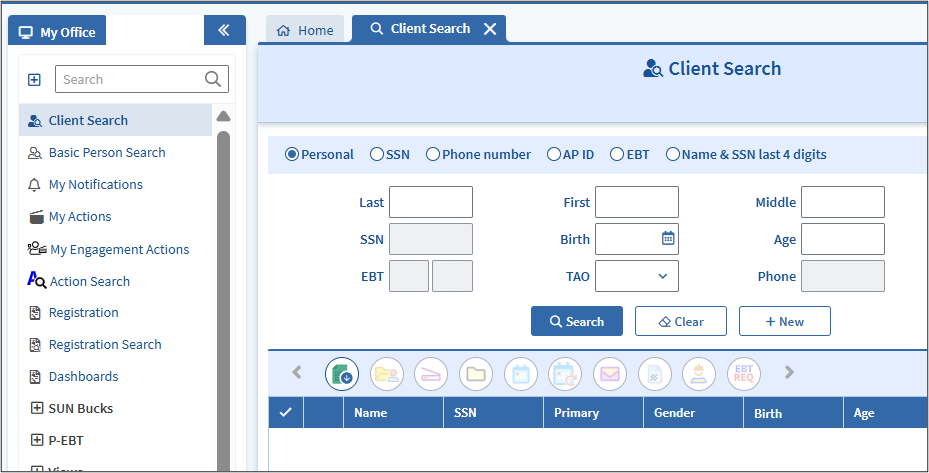
Click the Radio button at the top of the Client Search page to indicate which method to use to complete the search. You can search for the client using their:
- Personal information - Name, DOB, Age, and assigned TAO (if applicable)
- Social Security Number (SSN) or temporary number held in the SSN field
- Phone Number
- APID
- EBT card number
- Name and the last 4 digits of their SSN
Note: Client Search may be performed through individual factors or a combination of identifying information.
Below are helpful suggestions to determine which method to use based on information the client has provided:
- If the client provided an APID or SSN, use one of these to begin the client search, as these are the most unique identifiers to each client.
- If using the client’s personal information, enter as much information as is available depending on the method of application.
- The name and last four digits of the SSN can also narrow down your search.
- If the client can provide their EBT card number, try searching with that.
- The Phone number can be used as a last resort.
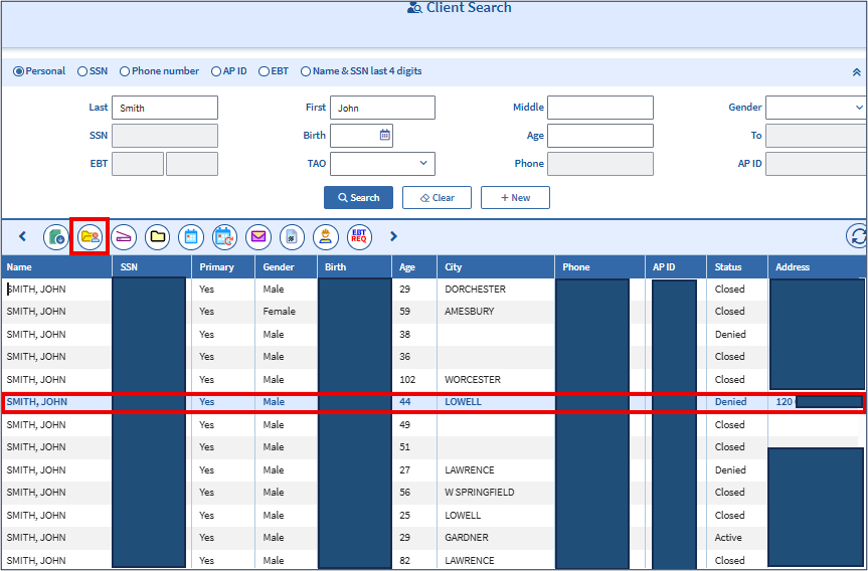
The results of the search will display in the section below the search. It will include the most recent BEACON information for all clients matching the search criteria.
Example
The figure below shows the search results for John Smith. The highlighted client matches the information provided by a client completing a phone application. The client was not able to provide their SSN or APID at the time, but provided their name, date of birth, and an address that matches the information displayed in the results. View/HideView/Hide
If the client is found:
- click on the client’s name,
- click the Electronic Case File (ECF) icon in the tools at the top of the list to enter the case
- click the Inquiry (Work in Progress) radio button, and then
- review the following tabs before beginning the application process:
- AU Inquiry,
- Result,
- Benefit History, and
- Match History to determine the case history and reason(s) for the previous case closing,
- complete the RFA if appropriate based on the case status.
- Note: In a two-parent household, you must complete a client search for each parent separately to determine if each one is already known.
If the client is not found:
- click New
- select Request for Assistance from the Workflow drop-down box, and
- click Go to begin the application
- click Application in the Request for Assistance workflow
Special Instructions for TAFDC and EAEDC Web Applications
For TAFDC and EAEDC Web Applications, if the client search results in an existing ECF for the client, do not complete the RFA from the client search results. Instead, you must follow the instructions in TAFDC Web Applications and EAEDC Web Applications to complete the RFA from the ECF in the case manager Pending Applications/Reinstatements view using the SSN found in the client search.
Related Topics
Americans with Disabilities Act Overview
Request for Assistance Policy and Procedures
Last Update: October 22, 2026
|
|
|
||
| Digital Accessibility Statement | Privacy Policy | Site Policies | Public Records Requests |
|
© 2026 Commonwealth of Massachusetts. Mass.gov is a registered service mark of the Commonwealth of Massachusetts. |
|||