An official website of the Commonwealth of Massachusetts Here's how you knowHere's how you know

DOR CSS Child Support Data - RAPID Report
Child Support Payments Overview
When a client is receiving payments from the Department of Revenue Child Support Services (DOR/CSS), case managers and FAW staff must verify the income received.
Effective December 31, 2025, child support information will no longer be updated in MobiusView. MobiusView will remain available to access information for historical purposes only.
Beginning January 1, 2026, staff must use the DOR/SSS Child Support Data report, located in Reports Analysis & Protected Information Dashboard (RAPID) under BEACON Reports, to verify payments made through DOR/CSS.
See RAPID Reports Job Aid for instructions for logging into and navigating RAPID.
How do I find the DOR/CSS Child Support Data Report?
After you have logged into RAPID, to locate the DOR/CSS Child Support Data report from the landing page:
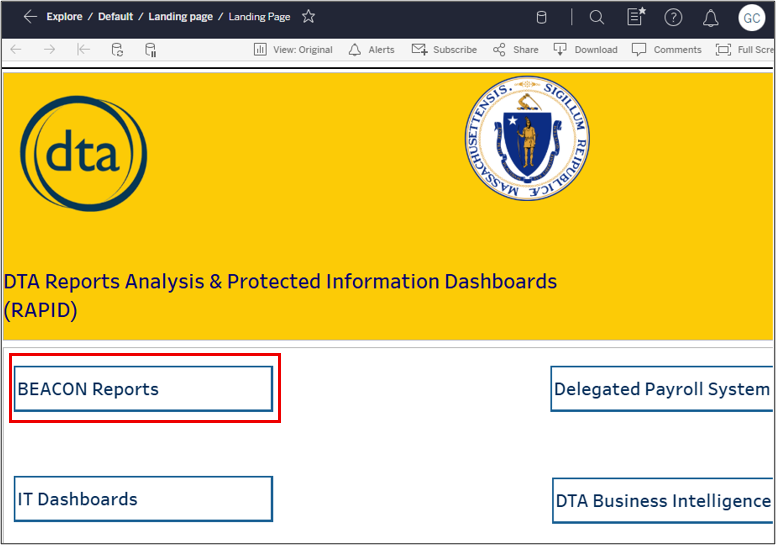
- Click BEACON Reports View/HideView/Hide
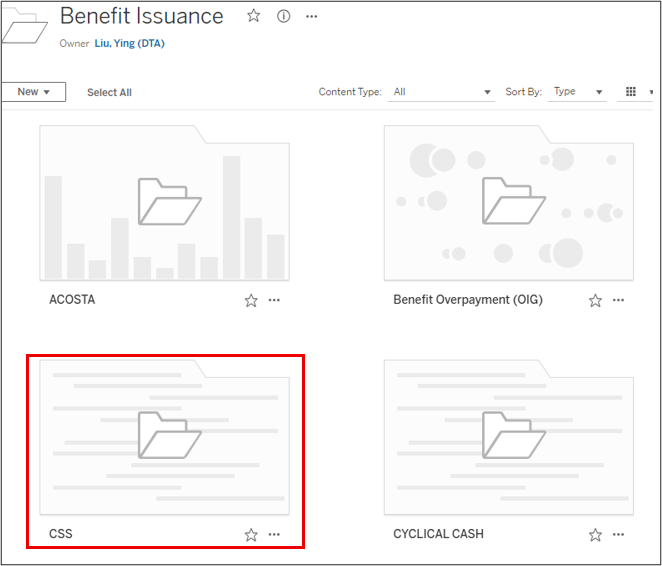
- Click Benefit Issuance View/HideView/Hide
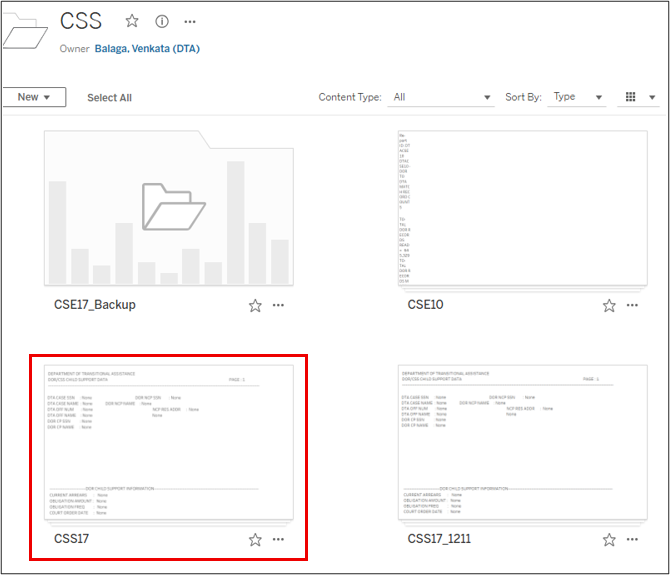
- Click CSS View/HideView/Hide
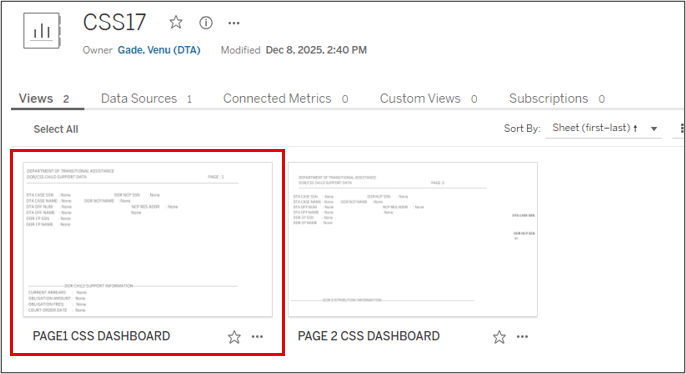
- Click CSS17 View/HideView/Hide
- Click on Page1_CSS Dashboard to bring up the search page. View/HideView/Hide
How do I find my client’s information?
The DOR/CSS Child Support Data report is available in RAPID weekly. It is updated each Tuesday and provides payment information as of the prior Sunday. Unlike other RAPID reports that provide a list of all clients included in the report, this report will initially display no client information. Instead, you must search for a specific client.
To locate child support payment information:
- enter the client’s Social Security Number (SSN), with no dashes, in the DTA Case SSN field, and
- hit enter. View/HideView/Hide
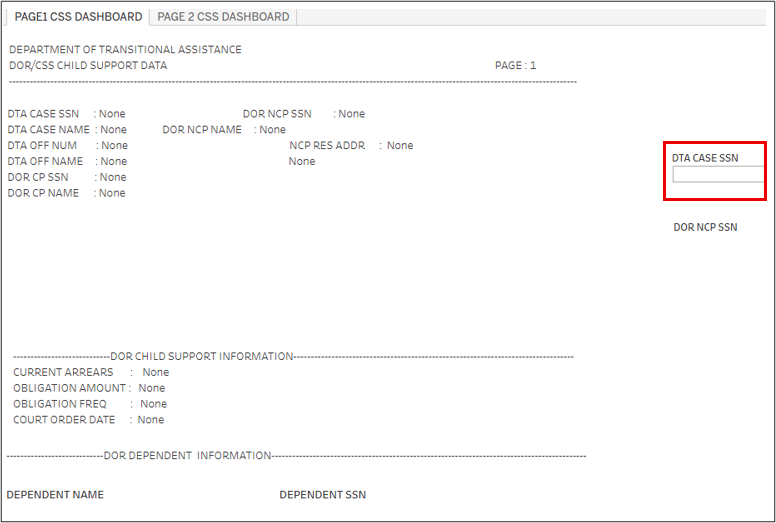
The client’s information will now be displayed.
Page one of the report shows the identifying information for the family, all dependents and all noncustodial parents that DOR/CSS has information for. The DOR NCP SSN field lists the SSN/s for each noncustodial parent.
The image below shows that DOR/CSS has provided information for two noncustodial parents and three dependents. No child support order information or noncustodial parent name and address will show when there are multiple noncustodial parents. View/HideView/Hide
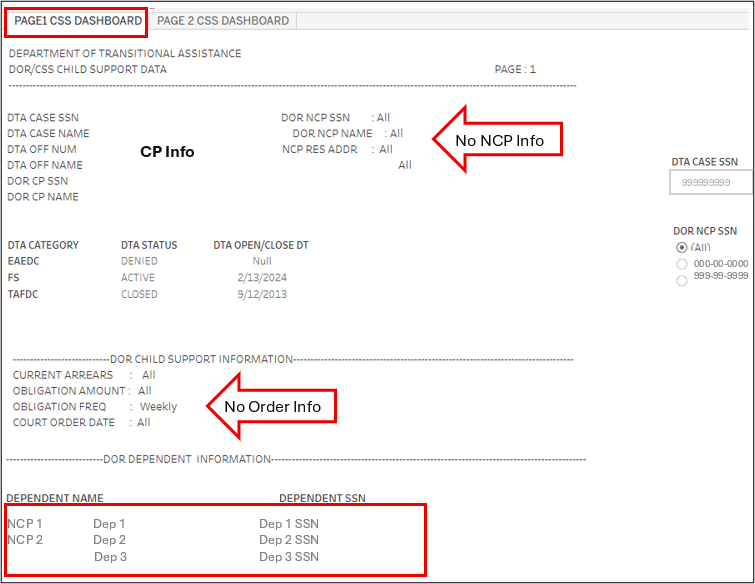
Important: You must view each noncustodial parent’s information separately to obtain the payment information. Do not navigate to page two without selecting an SSN. If no SSN is selected, you will not be able to obtain accurate child support payment information.
Click the radio button next to the SSN to view the name, residential address, dependents, and support order information for that noncustodial parent. The image below shows that when clicking on the radio button next to the first SSN listed, one of the three dependents is associated with this noncustodial parent. View/HideView/Hide
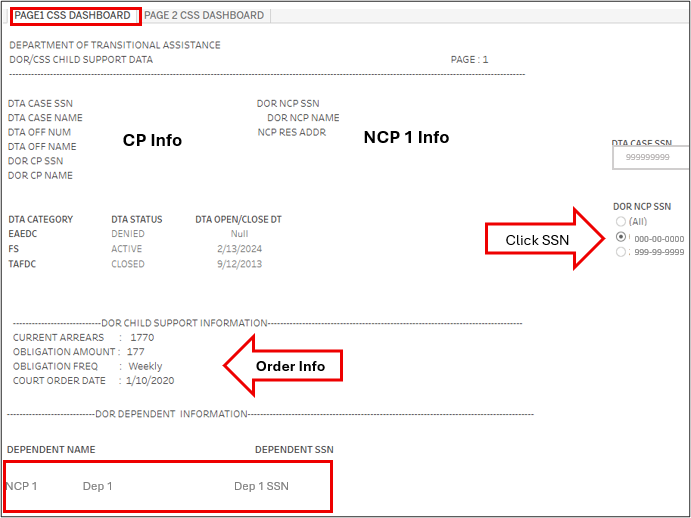
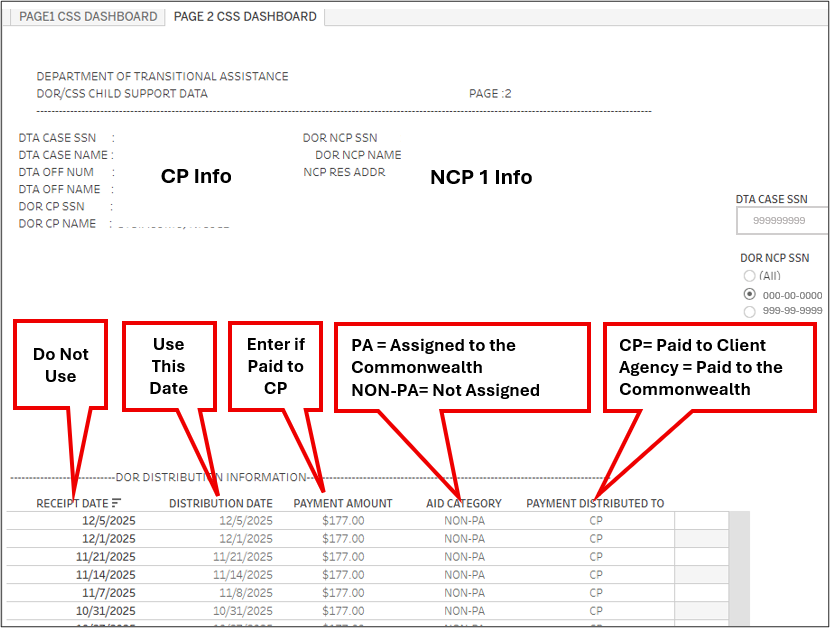
Click the page two tab to see payment information for the noncustodial parent. The report will display payments made to the Commonwealth and/or paid directly to the client in the last 120 days.
In the image below you can see that all payments made were to the custodial parent as indicated by CP. View/HideView/Hide
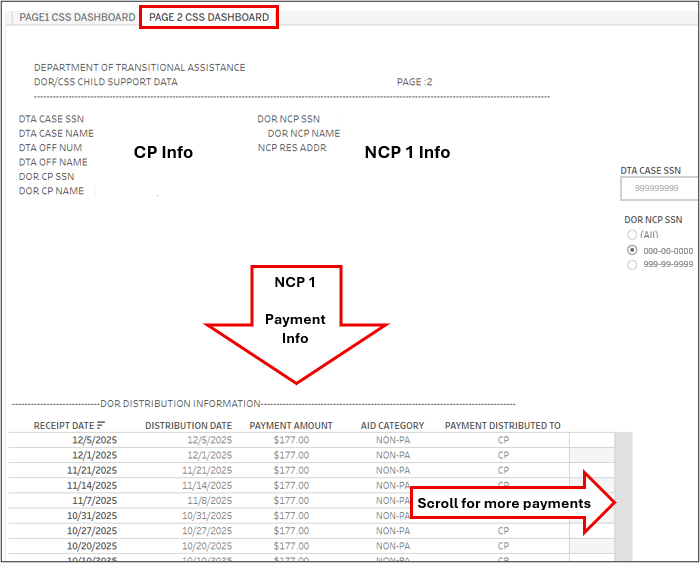
If there have been no payments in the past 120 days, the DOR Distribution Information field will be blank.
Understanding the Payment Information
The chart below provides additional information for identifying each data field and understanding the information provided in the RAPID report.
| Data Field | What it Means | How to Use It |
|---|---|---|
| Agency | The Commonwealth received the money | Payments are not entered on the Other Income Page. See Acosta Payment for exception to this. |
| Aid Category | Tells us whether or not the payment was assigned to the Commonwealth for a period when the dependent was receiving TAFDC | Clients will receive arrears payments for a period when the dependent/s were not on TAFDC, even if they are currently on TAFDC. You will enter payments made to the custodial parent (CP) for arrears with the Aid Category of NON-PA even if they are on TAFDC. |
| CP | Custodial Parent (client) received the money | Payments are entered on the Other Income page |
| Distribution Date | The date the payment was made to the Client or Commonwealth | Used to determine when payments were received in order to enter a weekly, bi-weekly, or monthly amount on the Other Income page if paid to the client. |
| NON-PA | Payment was for a period the dependent was/is not receiving TAFDC or is a DEFRA paid to a TAFDC client |
Non-PA payments to the client are countable income and used for determining initial and ongoing eligibility for all DTA Programs. DEFRA payments are excluded from the TAFDC benefit calculation |
| PA | Payment was for a period the dependent was/is receiving TAFDC and is assigned to the Commonwealth | These payments are assigned to the Commonwealth and are not used in eligibility determination. See Acosta Payment for exception to this. |
| Payment Amount | Amount/s paid to Client or the Commonwealth | Payments paid to CP are used to determine eligibility by entering on the other income page. Payments for a child support order showing more than one dependent are split between the dependents on page one of the report. |
| Payment Distributed To | Indicates whether DOR paid the money to the client or the Commonwealth | Used to determine if the income needs to be entered on the Other Income page. |
| Receipt Date | The date DOR received the payment from the noncustodial parent | DTA does not use this date. However, if the Receipt and Distribution dates are significantly different this may be an indication of a retroactive lump sum payment that was held prior to distributing to the CP or Agency. When the payment is then made, the Distribution Date reflects the date the Commonwealth or the client was paid the money. |
The RAPID report above is for a SNAP only client with two noncustodial parents listed, as indicated by two SSN’s showing under DOR NCP SSN. You must click the radio button next to each SSN to view the information provided for each noncustodial parent.
Examples
Example One- SNAP Only
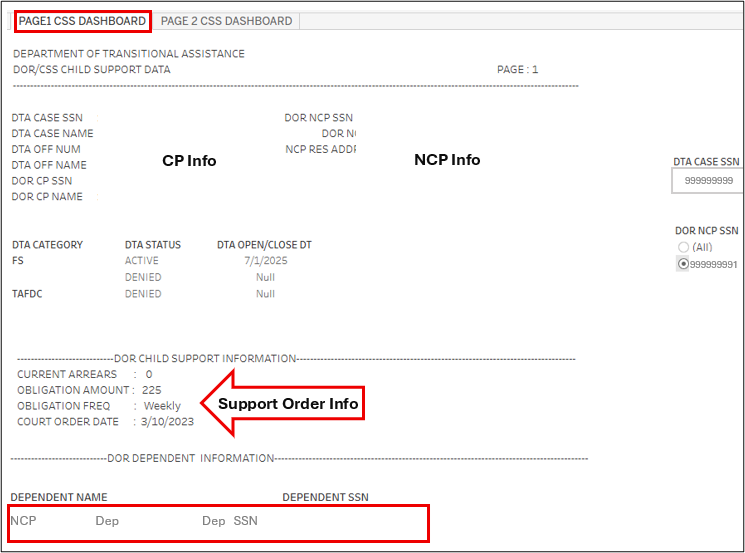
The RAPID report below is for a SNAP only client with one noncustodial parent listed, as indicated by one SSN showing under DOR NCP SSN. You must click the radio button next to the SSN to view the information provided for the noncustodial parent.
On page one we can see that the court order amount is $225 weekly, there is one dependent, and no arrears amount. View/HideView/Hide
Page two displays all payments made in the past 120 days. To determine the amount to enter on the Other Income page, you must consider the amount and frequency of the payments, who receives the payments, and which dependent/s the payments are for as indicated on page one. View/HideView/Hide
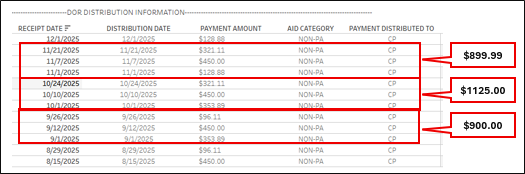
In this case, even though the amount paid differs on each date, since there are no arrears owed and the total amounts reflect the $225 weekly amount obligation for the three month period, you can enter the income as a weekly amount of $225. If the total amount paid did not reflect the current order you would add the payments for each full calendar month and complete a three month prospective to determine the ongoing monthly child support amount.
Example Two- Active TAFDC
The RAPID report below is for a family receiving TAFDC and SNAP. Page one of the report shows there is one noncustodial parent for the two children on the case. The child support order is $77 per week and there is an arrears amount owed. View/HideView/Hide
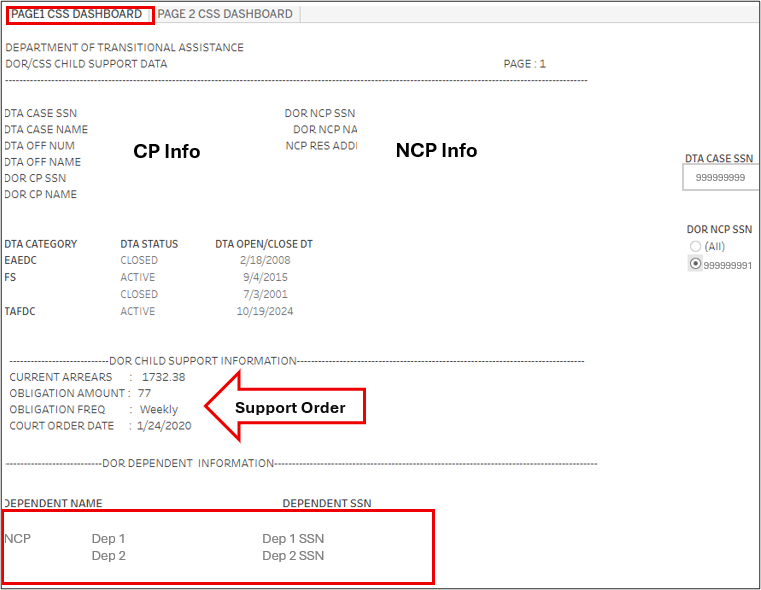
On page two of the report, you can see the payments to the Commonwealth and the DEFRA amount being paid to the parent (CP) each month. The noncustodial parent is paying a total of $96.25 per week. ($77.00 current support and $19.25 toward arears).
Since the parent is only receiving the first $50 each month for the DEFRA payment, the remainder is going to the Commonwealth for the current order and assigned arrears payments. View/HideView/Hide
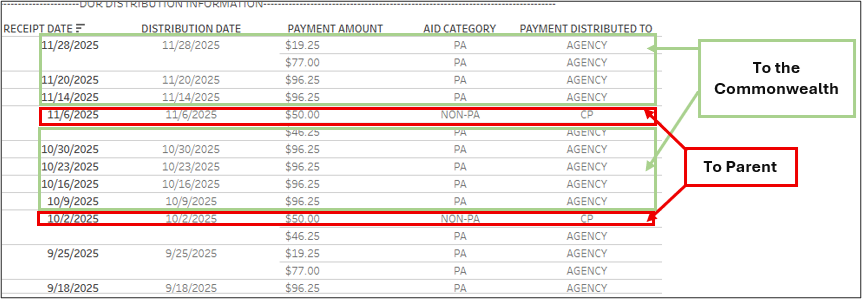
In this situation you would not enter any of the payments on the Other Income page because DEFRA Payments are entered by BEACON for the SNAP calculation and the CP is not receiving any other payments.
When/if the TAFDC closes, this will change.
Example Three- Acosta
TAFDC recipients receive up to the first $50 paid in child support in the form of a DEFRA payment. DEFRA payments are made on the 15th of the month based on child support paid in the previous month. Unlike MobiusView, the DOR/CSS Child Support Data report displays DEFRA payments paid to the parent or caregiver. These payments will be indicated on the report as a NON-PA Payment to CP. They can also be seen on the Benefit History tab in BEACON as a Child Support payment. This is important when recalculating ongoing eligibility due to Acosta payments.
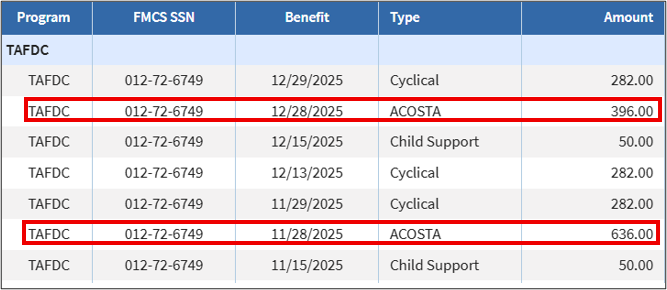
When the child support paid on the current order is more than the monthly TAFDC amount, the client will receive an Acosta payment. Acosta payments are made on the 28th of the month based on child support received in the previous month. This can be seen on the Benefit History tab in BEACON identified as ACOSTA. It does not show on the DOR/CSS Child Support Data report as a separate payment to the CP. It shows as a payment made to the Agency (the Commonwealth) and is later distributed to the client by DTA.
The Acosta report can be found in RAPID under BEACON reports using the 1st of each month. It identifies TAFDC families that have received Acosta payments for the given month. When the family shows on the Acosta report for two consecutive months, the case manager must enter the total child support paid to the CP and the Agency to determine ongoing eligibility for TAFDC.
The TAFDC family below showed on the Acosta report for two consecutive months. The figure below shows the TAFDC benefit history and the Acosta payments. View/HideView/Hide
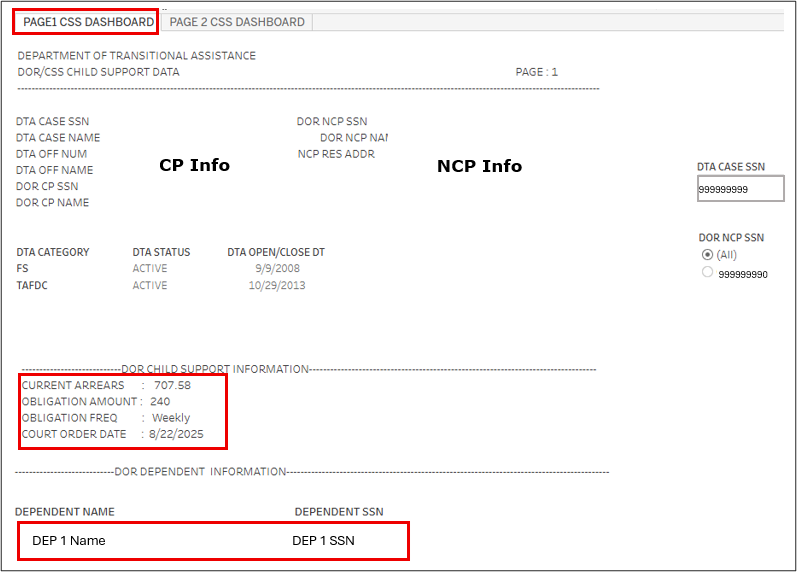
Page 1 of the DOR/CSS Child Support Data report for the client shows that there is a child support order of $240 weekly for the one child receiving TAFDC. There is a relatively small arrears balance. View/HideView/Hide
The figure from Page 2 of the report below shows the payments received from the noncustodial parent for the last 120 days. The first $50 each month is being paid to the CP for their DEFRA payment. The remaining amount is assigned to the Agency (the Commonwealth). View/HideView/Hide
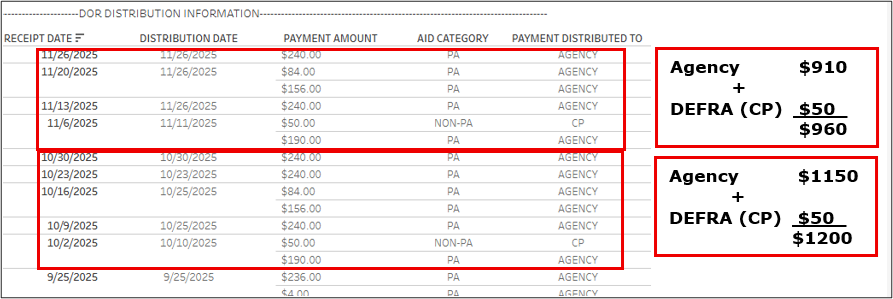
This client received two consecutive Acosta payments and showed on the Acosta report because the total child support paid in October and November on the current order of $240 per week exceeds their TAFDC amount of $564 per month.
Since the client received two consecutive Acosta payments, the TAFDC must be recalculated. To do this, you must enter the total amount of child support received by the CP and Agency on the Other Income page for the applicable child as Child Support/DOR.
- If there is more than one child on the order the income is split between them.
- The total amount paid for each child receiving TAFDC is entered under each applicable child as Child Support/DOR.
- If a child on the order is not receiving TAFDC due to SSI or is not part of the TAFDC filing unit, their portion of the income is entered as Support Income for SNAP purposes.
The payment information shows that the noncustodial parent made payments totaling four weeks in November and five weeks in October. Since this corresponds to the number of weeks in each month, the noncustodial parent is paying the full child support amount of $240 per week and the income must be entered in that amount.
If the payments were not consistent, you would enter the total amount paid for each month and average the income.
Once the income is entered, an Interview Wrapup must be completed to determine ongoing eligibility for TAFDC. In this case, the TAFDC will close. However, if the TAFDC remains open, you must zero out the income. If the client displays in the Acosta report the following month, you must complete these steps again.
Last Update: January 23, 2026
|
|
|
||
| Digital Accessibility Statement | Privacy Policy | Site Policies | Public Records Requests |
|
© 2026 Commonwealth of Massachusetts. Mass.gov is a registered service mark of the Commonwealth of Massachusetts. |
|||

