An official website of the Commonwealth of Massachusetts Here's how you knowHere's how you know

Infant Allowance Payments
What happened to the Crib and Layette Payment?
The Crib and Layette payment has been renamed the Infant Allowance payment.
What is an Infant Allowance?
An Infant Allowance is a one-time payment of $300 to help cover the costs of caring for a newborn.
Who can get an Infant Allowance?
Children six months of age or younger who are receiving TAFDC.
How does a Child get the Infant Allowance?
BEACON will automatically issue an Infant Allowance to any child who is six months of age or younger and:
- is part of a TAFDC application or
- is added to a TAFDC case.
- is currently receiving TAFDC and:
- the child was 6 months or younger at the time of application for the child,
- they have not received an infant allowance in their name,
- there was no Infant Allowance issued (converted from Layette) for them without an identified child, prior to the automated process, and
- an Interview Wrapup is completed and approved for any reason that includes an EBC result.
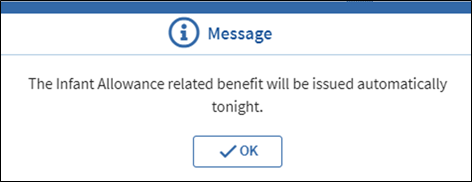
In each case you will receive the following message once the Interview Wrapup is approved and you click Save or Finish: View/HideView/Hide
When will the Infant Allowance be Issued?
The infant allowance is issued the next business day following application approval or adding a child to an active case.
Who is not Eligible for an Infant Allowance?
- Children who are not eligible for TAFDC for reasons including but not limited to:
- Receiving SSI
- Immigration status
- Being eligible for clothing allowance only, and
- Children older than six months who become eligible for TAFDC.
Does the Infant Allowance Ever Need to be Issued manually?
On rare occasions the Infant Allowance will have to be issued manually when a delay caused by the Department prevented an otherwise eligible child from being added to the TAFDC case within the first six months of age.
How do I issue the Infant Allowance Manually?
- select the Case Maintenance workflow,
- go to the Program Administration section,
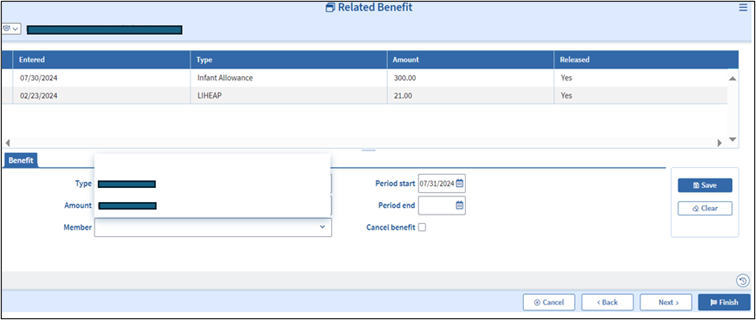
- select the Related Benefit page,
- review the Related Benefit page for the grantee to ensure the payment has not previously been issued,
- select Infant Allowance from the Type drop down,
- enter $300 in the Amount field,
- select the child for whom you are issuing the benefit in the Member drop down,
- enter the current date in the Period start field and click Save, View/HideView/Hide
-
Note: For multiple infants you must create a separate Infant Allowance payment for each eligible child by repeating steps 4-8.
-
- go to the Interview Wrap up page,
- click Selection,
- select Related Benefits Infant Allowance from the Interview Wrap up Selection page, and
- authorize the payment.
The request must be authorized by the case manager and supervisor.
Can a Child Receive More than One Infant Allowance Payment?
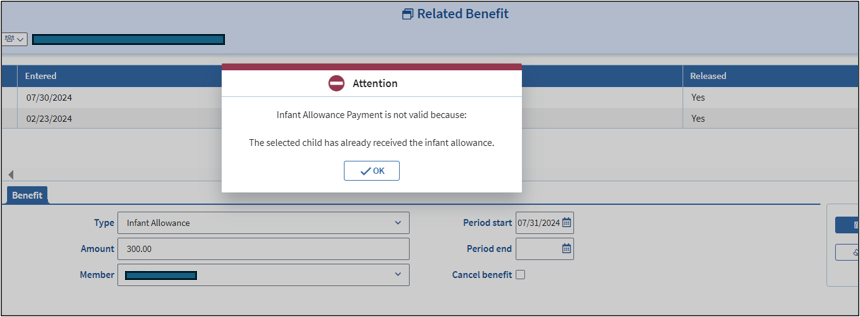
No, each infant is only eligible for one Infant Allowance Payment. BEACON will check to make sure no Infant Allowance payment was previously issued for that child.
If you attempt to issue an Infant Allowance for a child who has already received one in their name you will receive the following message and will not be able to save the related benefit: View/HideView/Hide
How will the Family Know they Received an Infant Allowance?
Once an Infant Allowance payment is issued the Infant Allowance Notice will be sent to the grantee informing them of the amount of the payment, the date of the payment, and the name of the child the payment is for.
What are My Responsibilities as a Case Manager?
When parents and caregivers are expecting a new child, you must tell them that an Infant Allowance payment can only be issued if the child is added to the TAFDC case when they are six months of age or younger.
You must issue the Infant Allowance payment manually:
- if a delay caused by the Department results in the child being added to the TAFDC case when the child is older than 6 months, or
- if an appeal decision instructs the department to issue the Infant Allowance.
What are My Responsibilities as a Supervisor?
Supervisors must make sure all eligible children receive an Infant Allowance by checking the Related Benefit page to ensure it was issued for the specific child.
What if There is a Future Release Date for the Interview Wrapup?
When an Interview Wrapup contains both an automated or manual Infant Allowance payment and a request with a future release date, BEACON will immediately issue the Infant allowance the following day, despite the release date.
Related Topics
Infant Benefits – Infant Allowance Payments Policy and Procedures
Last Update: August 15, 2024
|
|
|
||
| Digital Accessibility Statement | Privacy Policy | Site Policies | Public Records Requests |
|
© 2026 Commonwealth of Massachusetts. Mass.gov is a registered service mark of the Commonwealth of Massachusetts. |
|||

