An official website of the Commonwealth of Massachusetts Here's how you knowHere's how you know

Earned Income Disregards and Counters – TAFDC
Earned Income Disregards Overview
The Income Disregards page, located in the Assessed Person Income section of the workflow, records information about Earned Income Disregards (EID) and includes:
- disregard counters:
- TAFDC 100%- shows the 1st and 2nd TAFDC cyclical payments for each month indicating whether the 100% EID was used, and
- EAEDC 30 1/3- shows the months the client has received EAEDC with the $30 and 1/3 EID,
- a feature to manually Suspend Disregards, and
- a feature to manually reset the 100% EID, if BEACON does not correctly do so when applicable.
See Understanding the 100% Earned Income Disregard and Eligibility for the 50% Earned Income Disregard.
How Do I Adjust the 100% Earned Income Disregard Counter?
The start date for the 100% Earned Income Disregard is automatically established. When a parent or caregiver receives a cyclical payment that includes the 100% EID, the counter will be updated indicating Yes under Countable for that payment. (1st payment or 2nd payment for the month).
If an adjustment to the number of payments used is needed, the case manager can make an adjustment for each applicable cyclical payment that was issued.
When changing a cyclical payment from Countable Yes to No or No to Yes, you will select the applicable Override Reason. Some Override Reasons are system entered and others are user entered and are available for selection. The chart below identifies each:
| User Entered | System Entered |
|---|---|
| Retroactive Benefits Issued | Conversion Balance* |
| Reporting Delay | Cyclical Benefit Issued |
| Department Delay | System Error |
| Appeal Decision |
Note: The Conversion Balance is the number of cyclical payments with the 100% EID the parent or caregiver had received prior to the updates to the Income Disregard page. Payments received prior to the August 2025 project release date will not be reflected as individual cyclical payments.
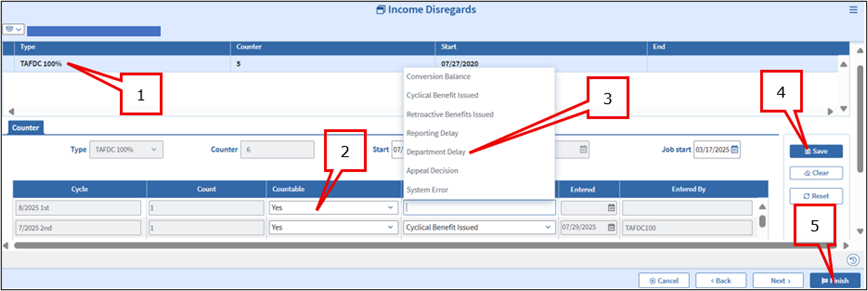
After carefully reviewing the case to determine which cyclical payments need to be added or removed from the existing counter, on the Income Disregards page you must:
- Select TAFDC 100% (the cyclical payments will display below),
- Change Countable to Yes or No for each cyclical payment that needs adjusting,
- Select the applicable Override Reason,
- Click Save, and
- Click Next or Finish (the Entered By section will display your wel-ID). View/HideView/Hide
Once all adjustments are made, complete and Interview Wrapup to be authorized by:
- the case manager,
- a supervisor, and
- a director or assistant director.
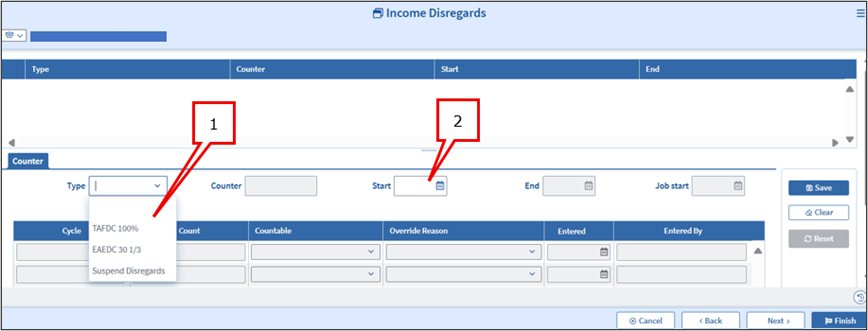
If no 100% earned income disregard counter has been established due to a good cause delay in reporting the income or a system error and the income no longer exists, you must manually add the 100% EID counter and the cyclical payments the parent or caregiver received that should have counted toward their 12 cyclical payments. To add the counter:
- select TAFDC 100% from the Type drop down, and
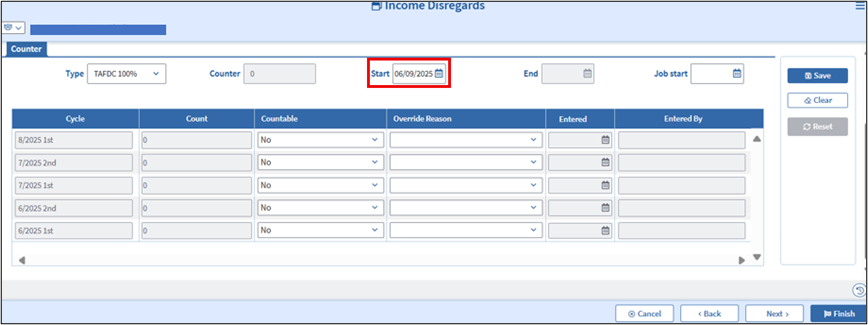
- enter the applicable start date for the counter (this defaults to the current date but must be changed to the date the employment began to open up the previous cyclical payments) View/HideView/Hide
- follow the steps in the previous section to add each cyclical payment during which the parent or caregiver received income. View/HideView/Hide
See Understanding the 100% Earned Income Disregard
How do I Reset the 100% Earned Income Disregard?
When the parent or caregiver meets the program eligibility for a new 100% EID, the counter will reset automatically. In the rare instances where this does not occur, the 100% EID can be reset manually by your supervisor.
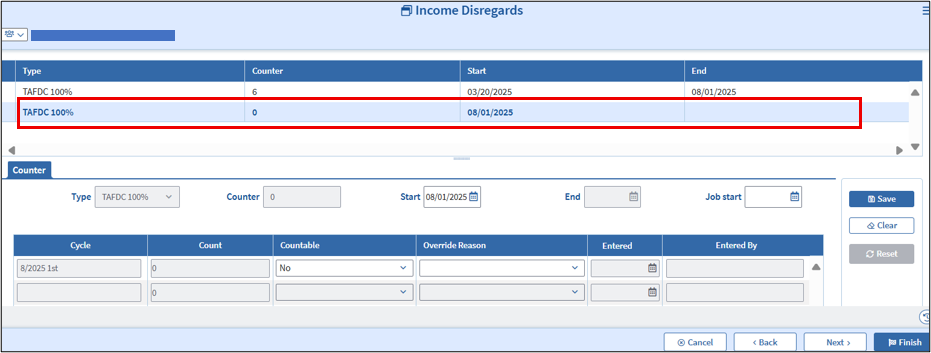
You must consult with your supervisor and explain why you believe the counter should be reset according to the rules for the 100% EID. After reviewing the case if your supervisor agrees, they can reset the 100% EID Counter by:
- Selecting the TAFDC 100% counter on the Income Disregards page,
- Clicking the Reset button on the right side of the page,
- Clicking Save and Finish.
A new TAFDC 100% will populate with the current date as the start date. This can be changed if needed based on when the parent or caregiver began working. View/HideView/Hide
Inform the case manager so they can complete the Interview Wrapup. The Interview Wrapup will require a case manager, supervisor, and director or assistant director authorization.
See Understanding the 100% Earned Income Disregard
When Do I use the Suspend Disregard feature?
Most rules governing the suspension of disregards are automatically applied to the case based on whether the parent or caregiver meets the program rules to receive the disregard. In specific circumstances the disregards must be manually suspended.
The Suspend Disregards feature on the Income Disregards page is used to manually suspend the earned income disregards in the rare circumstance it is needed. You must follow the guidance for each disregard to determine when and if manually suspending the disregards is appropriate.
See Understanding the 100% Earned Income Disregard and Eligibility for the 50% Earned Income Disregard.
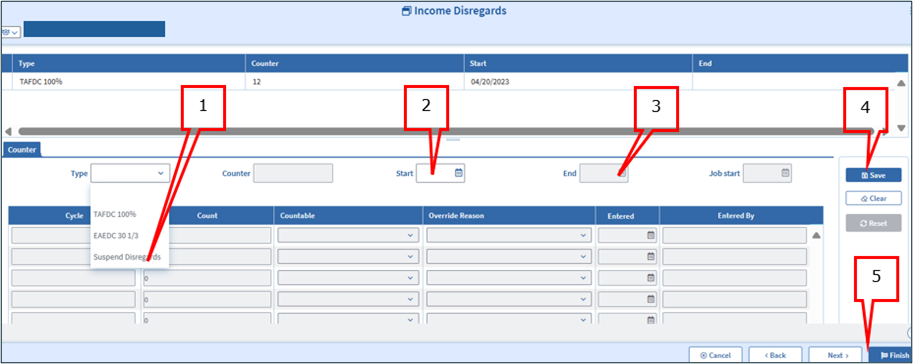
How Do I Suspend the Earned Income Disregards?
To suspend the disregard for an applicable situation:
- Select Suspend Disregards from the Type drop down selection on the page,
- Enter the Start date for the period to be suspended (this will default to the current date),
- Enter the End date for the period to be suspended,
- Click Save, and
- Click Next or Finish. View/HideView/Hide
Once finished, you must complete an Interview Wrapup to be authorized by:
- the case manager,
- a supervisor, and
- a director or assistant director.
See Understanding the 100% Earned Income Disregard and Eligibility for the 50% Earned Income Disregard.
Last Updated: August 14, 2025
|
|
|
||
| Digital Accessibility Statement | Privacy Policy | Site Policies | Public Records Requests |
|
© 2026 Commonwealth of Massachusetts. Mass.gov is a registered service mark of the Commonwealth of Massachusetts. |
|||

