An official website of the Commonwealth of Massachusetts Here's how you knowHere's how you know

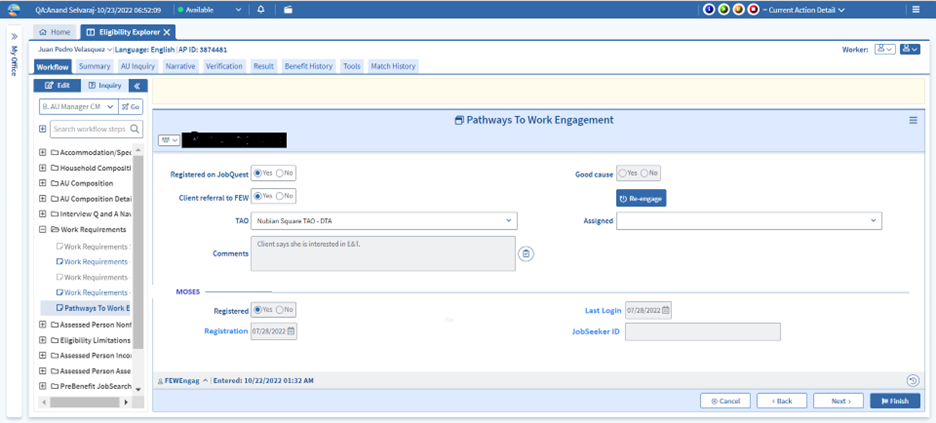
Pathways to Work Engagement Page
The Pathways to Work Engagement page has been developed for economic assistance case managers to promote discussion, capture information, and initiate a referral to a Full Engagement Worker (FEW). This referral will be received by the FEW as an Initial Engagement action.
Case managers will review the benefits and opportunities of registering with MassHire and connecting with the FEW. Case managers must complete this page to verify that they informed the client of the education, training, and employment opportunities available through DTA Pathways to Work. The page is available in the Request for Assistance, Case Maintenance, Reinstatement, and Reevaluation workflows, and must be completed after an application or reevaluation has been initiated.
Case Manager Responsibilities
As one of the first points of contact with DTA, case managers play a critical role in introducing families to the opportunities available to them as recipients of TAFDC. During an application interview, case managers must introduce Pathways to Work opportunities, connect families to the MassHire JobQuest system and inform families about the role of the FEW. Case managers must also confirm the client’s email address in BEACON and that they want to receive emails about engagement activities.
Case managers set the stage for a successful first call from the FEW by telling clients who they can expect a call from, when they can expect the call and what they can expect to learn during the call. Case managers must use the Pathways to Work Engagement page to create direct referrals to the FEW that works with clients in their caseload. Case managers must provide families with the name of the FEW that will be calling them, explain that they should expect contact within 5 days and what they can expect to learn about Pathways to Work opportunities and support services through this phone call.
Those clients who are subject to work rules must be referred to the FEW at application. Other eligible clients not already working with a FEW must be encouraged to connect with the FEW at each contact. All clients can benefit from being connected to a FEW, including those who are already enrolled in a program, employed or not sure if they are ready to engage in an activity. FEWs will ensure that clients receive support services, complete goal setting activities, have a Pathways to Work Plan created and discuss how they will check-in on progress and engagement.
While all clients are to be encouraged to connect with a FEW, in some circumstances, a client may not be ready or able to engage. Examples are a parent who just had a baby, a family experiencing a crisis or emergency or a client who has a medical condition preventing them from engaging at that time. The client must be informed that they may connect to a FEW when they are ready and can be referred at any time.
Note: A TAFDC client who is assigned to the Central Case Management Office (CCMO) will be connected to a FEW in the area in which they reside if they are interested in Pathways to Work activities, support services or subject to the work rules. In some circumstances CCMO staff may work with the FEW directly on behalf of the client to have program referrals or supports issued.
Self-Sufficiency Specialist (SSS) Responsibilities
SSSs continue to be the primary points of contact for clients in their caseload; including engagement activities. SSSs may complete a client referral to the FEW if collaboration is needed, and the referral comments must include what additional support or information the FEW can provide.
Referral to JobQuest at TAFDC Application
At application, case managers are required to assist all clients aged 18 and older to register with MassHire JobQuest. They must be informed of the services offered by MassHire and provided with assistance signing up. Exceptions to this rule are clients who are not authorized to work and non-liable relative caregivers.
Clients subject to work rules are required to complete the JobQuest registration during their Pathways to Work Planning Period after case approval.
JobQuest Match from the Department of Career Services (DCS)
The Pathways to Work Engagement page will be updated by the Department of Career Services (DCS) weekly with the most recent JobQuest data. DTA staff will be able to view:
- if the client is registered with JobQuest
- the last date they accessed JobQuest services in the system
- the last date BEACON was updated with DCS information
- the client’s JobSeeker ID
Pathways to Work Engagement Page at TAFDC Application
As part of the TAFDC application, all TAFDC grantees and other parents must have the Pathways to Work Engagement page completed.
- Record whether they have referred the client to register with MassHire JobQuest
- If the client is work program required, but the case manager is unable to connect them to JobQuest at that time, Good Cause – Yes must be selected.
- Select whether a referral to the FEW is to be made
- To create the referral, case manager must select Client referral to FEW – Yes
- If not making a referral, select Client referral to FEW – No
Important: Any TAFDC client who is subject to the work rules must be referred to the FEW at application, even if they are currently excused through a Compliance Reason.
- Select the client’s assigned TAO
- Select the FEW the referral is to be assigned to
- Enter Comments
- if a referral is being made, it must include the client’s interests, goals, supports needed and/or challenges for the FEW to review in the Action details.
- if a referral is not being made, it must explain why a referral is not being made and will be stored in the page History.
- If a referral is being completed, BEACON will create an Initial Engagement action for the assigned FEW when the application approval is released.
Note: When a referral is created, a batch narrative will be entered as: Pathways to Work referral to the FEW has been created.
When a referral is not created, a batch narrative will be entered as: No Pathways to Work referral was created.
Pathways to Work Engagement Page at TAFDC Reevaluation
When a TAFDC reevaluation is initiated, this page will be set to re-edit and will prompt case managers to determine whether a client is to be referred to the FEW at that time.
During a TAFDC reevaluation, staff must visit the Pathways to Work Engagement page for all clients to:
- Determine whether a client who has not registered for MassHire JobQuest will register at that time
- Determine whether a client will be referred to the Full Engagement Worker. Clients who must be referred are:
- those subject to the work rules who are not actively engaged in a Pathways to Work activity, are not working, or have had no recent contact with a FEW
- those who are interested in discussing engaging in Pathways to Work activities or available support services
- If the Pathways to Work Engagement page has been completed previously, the “Reengage” button must be selected to clear the prior answer for the Client referral to FEW field.
- Select whether a referral to the FEW is to be made
- To create the referral, case manager must select Client referral to FEW – Yes
- If not making a referral, select Client referral to FEW – No
- Select the client’s assigned TAO
- Select the FEW the referral is to be assigned to
- Enter Comments
- if a referral is being made, it must include the client’s interests, goals, supports needed and/or challenges for the FEW to review in the Action details.
- if a referral is not being made, it must explain the reason why no referral is being made and will be stored in the page History.
- If a referral is being made, BEACON will create an Initial Engagement action for the assigned FEW after completing the Pathways to Work Engagement page through an overnight BEACON batch.
Pathways to Work Engagement Page During Case Maintenance
Case managers may also use the Pathways to Work Engagement page to initiate a referral to the FEW at any point when a family would benefit by being connected or reconnected to a FEW for Pathways to Work related activities.
A referral to the FEW would be appropriate when a family:
- expresses interest in engaging in Pathways to Work activities
- becomes work program required
- needs to reconnect with the FEW after being disengaged or needs additional support for engagement activities
- has questions about child care or other support services
- If the Pathways to Work Engagement page has been completed previously, the “Reengage” button must be selected to clear the prior answer for the Client referral to FEW field.
- The case manager must select Client referral to FEW – Yes and an overnight BEACON batch will create the Initial Engagement action for the selected FEW.
Last Update: August 9, 2023
|
|
|
||
| Digital Accessibility Statement | Privacy Policy | Site Policies | Public Records Requests |
|
© 2026 Commonwealth of Massachusetts. Mass.gov is a registered service mark of the Commonwealth of Massachusetts. |
|||

