An official website of the Commonwealth of Massachusetts Here's how you knowHere's how you know

ADA Accommodation: Client Email Communication
Client Assistance Coordinators (CACs) work with clients in navigating the process of identifying and requesting accommodations. Email is an effective way to provide communication access for some people with disabilities. CACs must offer the option of email correspondence as an accommodation to support clients in accessing and retaining DTA benefits when appropriate.
Email Communication as an Accommodation – CAC Only
CACs must have a conversation with the client regarding email communication as an accommodation. Email communication is limited to communicating when a client has something they need to act on and responding to general client inquiries such as case status information, notice clarification, referral sources, etc. If email is requested as an accommodation, you must confirm the client’s email address on file in BEACON on the Email page. BEACON will not allow the selection of email communication if there is no email address on the Email page. The client must be informed that email will only be used for specified communication purposes and cannot include personal identifiable information (PII) such as their social security number or date of birth and cannot include document attachments.
Regular case maintenance duties and verifications must be submitted through DTA Connect, the Document Processing Center (DPC) or at a local office. If verifications or completed forms are sent as an email attachment, the client must be sent a return email advising them to resubmit the documents through DTA Connect or DPC.
CAC Procedures and Email Disclaimer Language
When the client and CAC have identified the need for email communication, the CAC will enter and approve the email accommodation remedy, if appropriate. CACs will utilize the CAC Management report to initiate email communication by:
- sending the client an email within 5 business days a notice was sent requiring client action
- The following language must be included when initiating an email to a client to help prevent personally identifying information and case specifics from being included in client email replies:
“Dear {Client},
The Department recently mailed you {type of notice} notice. I am checking in to see if you have any questions or need any assistance. If you have questions or need assistance, please respond to this email.
Please do not include any identifying information about yourself, such as your social security number or date of birth in your email. Also, do not attach any documents about your case to the email.
If you have questions regarding the use of email, please call me at {CAC’s phone number 123-456-7890}.”
3. enter a detailed narrative and
4. if the client responds to the email, reply to their email and enter a new narrative
If staff receive notification that they do not have the correct email address, follow-up must be completed with the client by phone. If the client cannot be reached by phone, a CAC appointment letter must be mailed to determine if the email address recorded in BEACON is correct.
Return Documents Email Reply
If a client attempts to return forms, verifications, or documents to you by email, you must return the email with the attachment(s) and provide the client with instructions. An example reply is: “We are unable to accept email attachments. Please resubmit your documents by:
- uploading through DTA Connect,
- mailing to DTA, P.O. Box 4406, Taunton, MA 02780-0420
- faxing to 617-877-8765
- or in person at your local Department of Transitional Assistance office located at (TAO address and phone number).
Email Address Not on File – CAC Only
If you are attempting to enter email communication as a new accommodation and an email address is not on file, you will receive the following popup message. View/HideView/Hide
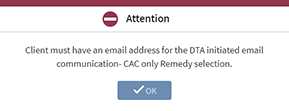
The edit will not allow entry of the accommodation.
Removal of an Email Address – Case Managers and CACs
If a client requests removal of their email address on the Email page in BEACON and has a previously approved email communication accommodation, you will receive the following popup message View/HideView/Hide
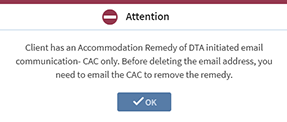
Case Mangers
You must have a conversation with the client explaining how removal of their email address will impact the email communication accommodation and only continue if the client requests to do so. This will require you to cancel from the page and email the catchment area CAC to remove the accommodation and client’s email address.
- Case managers must make the request to the CAC by sending a secure email to the catchment area CAC with the client’s APID, name, telephone number and
- request to remove the client’s email address so that the accommodation and email can be removed
Important: For a list of current Client Assistance Coordinators (CAC) see List of Client Assistance Coordinators.
Client Assistance Coordinators (CACs)
CACs will remove the email accommodation by following procedures found at: ADA Accommodation Process: Case Manager Approving Accommodation
Note: If a client requests by email to end their Email accommodation, then no further action is required by the CAC. Email accommodation will be ended by the CAC following procedures for ending accommodations.
Email Communication - Heightened Level of Security (HLS) and Blocked Online Services
Clients with a Heightened Level of Security (HLS) and/or for whom Access Online Services is blocked must not be emailed even if the client has emailed the CAC.
If you are attempting to enter email communication as an accommodation and the client’s case has HLS and/or Access Online Services is blocked, you will receive the following popup message View/HideView/Hide
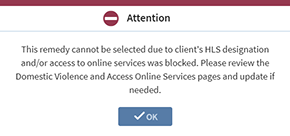
This will require you to re-visit the Domestic Violence page and/or Access Online Services in the BEACON workflows with the client and explain the restrictions of HLS and/or blocked online services for email communication as an accommodation.
Remember: The HLS indicator can be activated or removed with the client’s telephonic self-declaration. Whereas clients may verbally request to change access to online services.
If a client has a previously approved email communication accommodation, and you attempt to add HLS and/or block online services, you will receive the following popup message View/HideView/Hide
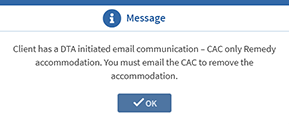
This will require you to email the catchment area CAC so that the accommodation can be removed.
For a list of current Client Assistance Coordinators (CAC) see List of Client Assistance Coordinators.
Remember: If a client’s email address has changed, the email communication remedy needs to be ended and the accommodation request must be re-approved by the CAC. A new ADA Notice will be generated to the client with the updated accommodation information.
Last Update: May 6, 2022
|
|
|
||
| Digital Accessibility Statement | Privacy Policy | Site Policies | Public Records Requests |
|
© 2026 Commonwealth of Massachusetts. Mass.gov is a registered service mark of the Commonwealth of Massachusetts. |
|||

