An official website of the Commonwealth of Massachusetts Here's how you knowHere's how you know

DTA Finder
Overview
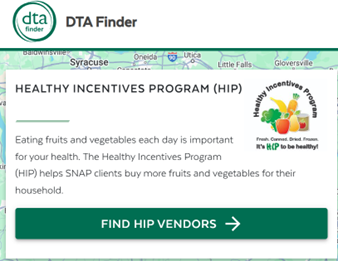
DTA Finder is a site created to help clients locate their nearest HIP vendors. To ensure that the information is up to date, the site is updated directly by the HIP vendors. Users can access DTA Finder by visiting DTAFinder.com.
DTA Finder is available in five languages: English, Brazilian Portuguese, Simplified Chinese, Spanish, and Vietnamese. An information button at the top of the page provides visitors with general information about HIP and a link to the HIP home page.
Search Features
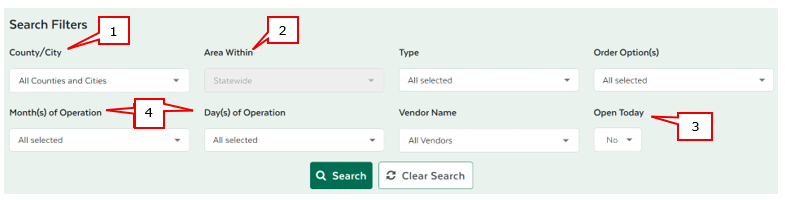
DTA Finder consists of an interactive map with various search filters. Users can search for HIP vendors based on:
- county/city;
- distance;
- type of vendor (e.g., CSA Program, Farm Stand);
- order options (e.g., curbside pickup, delivery);
- month(s) of operation;
- day(s) of operation;
- vendor name; and/or
- whether the vendor is scheduled to be open today.
The search results include a list of up-to-date HIP vendors with their respective locations marked on the interactive map. Users have the option to export the search results to Microsoft Excel. Users can click each listed result to view information such as the vendor products, contact information, or photos. Moreover, for mobile users, each result includes a hyperlink to Google Maps for navigation to the HIP location.
Note: To locate agricultural locations that process SNAP but not HIP benefits, users should visit the MA Grown map at https://massnrc.org/farmlocator/map.aspx.
Location Types
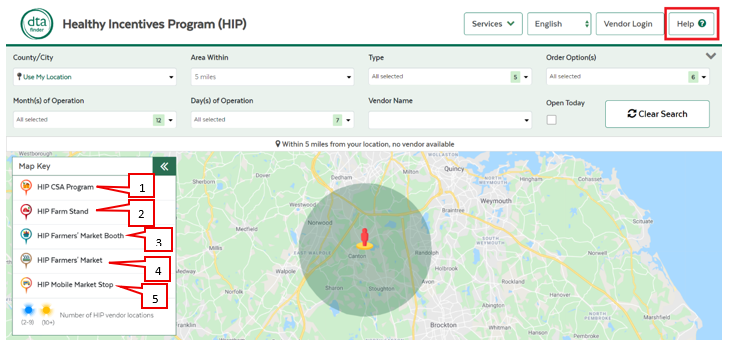
Each participating retailer is identified by a location type. See below for definition of location types.

A place where users can pick up farm-fresh HIP produce through a weekly membership program. Users must sign up with the farm in advance.
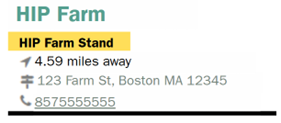
A stand or store where a farm sells HIP produce. Usually located at or near the farm.
A table at a farmers’ market where users can buy HIP produce directly from a farm. Some booths at the market may not process HIP – users must check to make sure HIP is accepted.
A pop-up location where users can buy fresh HIP produce delivered by a farm retailer.
A place where users can buy HIP produce from multiple farm tables by checking out at a central location.- You can find the location type for a farm by looking underneath the name of the farm in the results section view/hideview/hide
Tutorials
For information on how to use DTA Finder on a home computer or mobile device, there are video tutorials available on DTA’s YouTube channel.
Reporting Issues
The DTA Finder website includes a “Help” button to assist clients and vendors who may be experiencing technical issues with the website. The Help button allows vendors and clients to report issues. The drop-down menu includes the following items:
- How to use the map;
- How to use HIP;
- Report bug;
- Report inaccurate information;
- Question about DTA case;
- Help for HIP vendors; or
- Other.
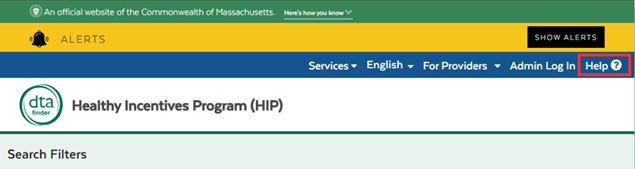
When accessing DTAFinder.com from a desktop, the “Help” button is visible in the top right corner of the screen. view/hideview/hide
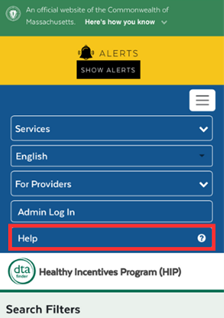
When accessing DTAFinder.com from a mobile device, the user must select the rectangular menu box in the top right corner. Then, select “Help” from the drop-down menu. view/hideview/hide
Responding to Calls About DTA Finder
If any external partners call you with questions about DTA Finder, email their question(s) and contact information to the HIP Mailbox at DTA.HIP@mass.gov.
Helping a Client Find Participating HIP Vendors
When talking to a client about HIP, you are to direct them to access http://www.DTAFinder.com to find vendors near them. You can guide them through the search using the information below:
- The most common way to do so is by selecting their town or city in the County/City dropdown option.
- You can ask the client how far they are willing to travel to visit a HIP vendor, and then select that option from the Area Within dropdown menu.
- In most cases, the client is looking for something open on a specific day. If they are looking for something open today, you can select “Yes” on the Open Today dropdown.
- Otherwise, be sure to select the Months of Operation and/or Days of Operation that apply.
Finally, keep in mind about location types. In most cases, it is advisable to exclude the HIP CSA Program option from your search, as those locations require prior sign-up.
Note: Farm hours may vary. It’s a good idea to suggest that the client calls the farm to verify their hours before visiting for the first time. Their phone number can be found on their search results. view/hideview/hide
Confirming That a Vendor Accepts HIP
Not all farms accept HIP. Clients may call the assistance line because they didn’t receive HIP on a purchase at a farm. To confirm whether a vendor accepts HIP you can:
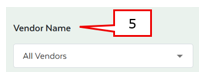
- check if a specific farm participates in HIP by searching for a vendor’s name using the Vendor Name search filter. You can type directly into the box or select a vendor name from the dropdown. view/hideview/hide
You can also search by location by typing and/or selecting the client’s town from the County/City dropdown option. Please note that often times location names can be similar and only vary slightly.
HIP availability is based on the Days, Months, and Times that the vendor lists on the site.
Important: Be sure to check the location type because while a HIP Farmers’ Market location accepts HIP on behalf of all the vendors at the market, a HIP Farmers’ Market Booth only refers to an individual vendor who accepts HIP at the market. If the client makes a purchase at the market with an individual vendor who does not accept HIP, they will not be eligible for a HIP reimbursement.
Last Update: August 28, 2025
|
|
|
||
| Digital Accessibility Statement | Privacy Policy | Site Policies | Public Records Requests |
|
© 2026 Commonwealth of Massachusetts. Mass.gov is a registered service mark of the Commonwealth of Massachusetts. |
|||

